EasyManua.ls Logo

Sony EV-S800 - 1210, About-The VPS Switch Ssccscssssssscsereesersrsevenszxnes

Sony EV-S800
44 pages
Print Icon
To Next Page IconTo Next Page
To Previous Page IconTo Previous Page
Loading...
1-10.
ABOUT
THE
VPS
SWITCH
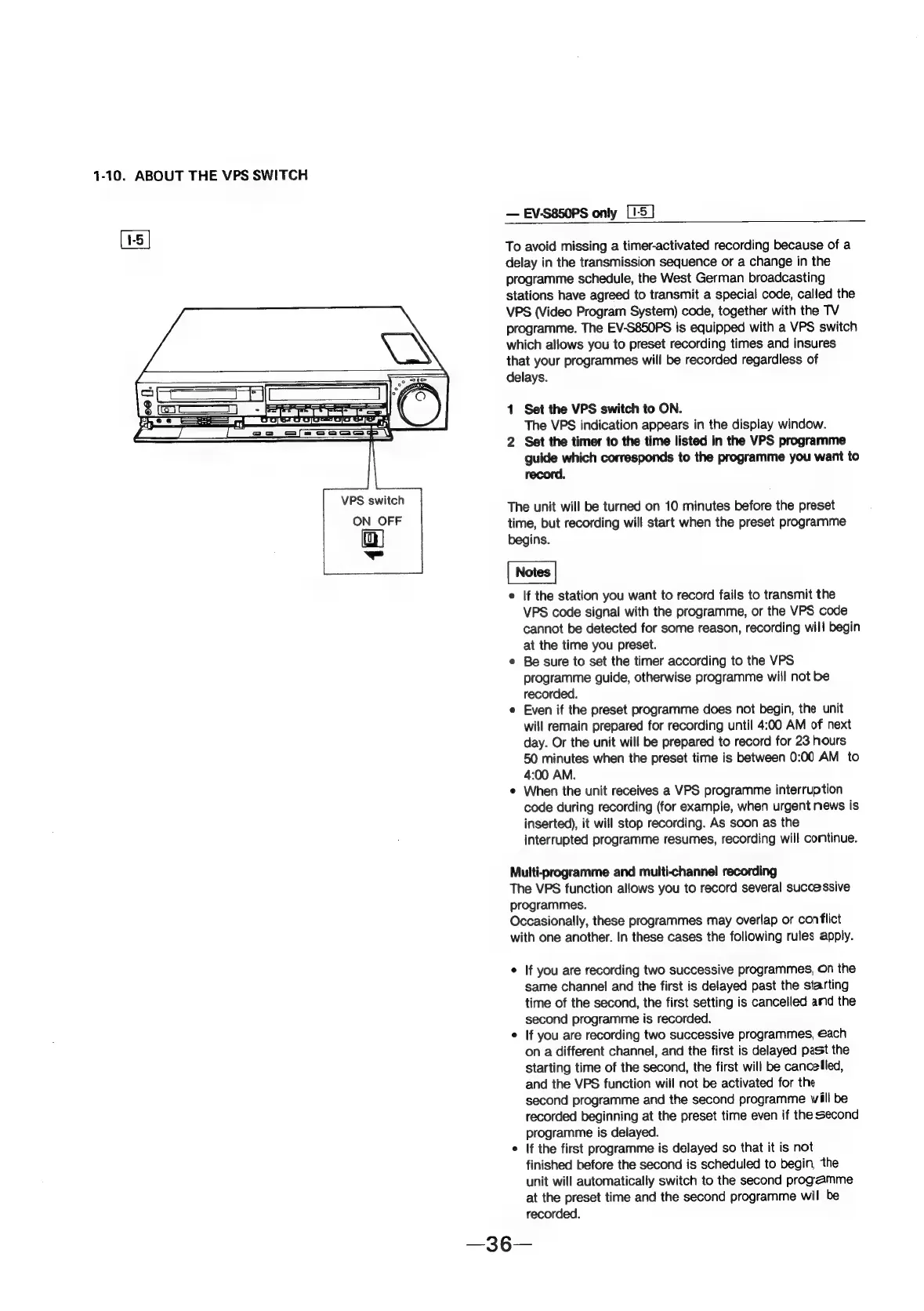
[15]
VPS
switch
ON
OFF
ut
=
EV-S850PS
only
[1-5
]
To
avoid
missing
a
timer-activated
recording
because
of
a
delay
in
the
transmission
sequence
or
a
change
in
the
programme
schedule,
the
West
German
broadcasting
stations
have
agreed
to
transmit
a
special
code,
called
the
VPS
(Video
Program
System)
code,
together
with
the
TV
programme.
The
EV-S850PS
is
equipped
with
a
VPS
switch
which
allows
you
to
preset
recording
times
and
insures
that
your
programmes
will
be
recorded
regardless
of
delays.
1
Set
the
VPS
switch
to
ON.
The
VPS
indication
appears
in
the
display
window.
2
Set
the
timer
to
the
time
listed
in
the
VPS
programme
guide
which
corresponds
to
the
programme
you
want
to
record.
The
unit
will
be
turned
on
10
minutes
before
the
preset
time,
but
recording
will
start
when
the
preset
programme
begins.
e
If
the
station
you
want
to
record
fails
to
transmit
the
VPS
code
signal
with
the
programme,
or
the
VPS
code
cannot
be
detected
for
some
reason,
recording
will
begin
at
the
time
you
preset.
¢
Be
sure
to
set
the
timer
according
to
the
VPS
programme
guide,
otherwise
programme
will
not
be
recorded.
e
Even
if
the
preset
programme
does
not
begin,
the
unit
will
remain
prepared
for
recording
until
4:00
AM
of
next
day.
Or
the
unit
will
be
prepared
to
record
for
23
hours
50
minutes
when
the
preset
time
is
between
0:00
AM
to
4:00
AM.
e
When
the
unit
receives
a
VPS
programme
interruption
code
during
recording
(for
example,
when
urgent
news
is
inserted),
it
will
stop
recording.
As
soon
as
the
interrupted
programme
resumes,
recording
will
continue.
Multi-programme
and
multi-channel
recording
The
VPS
function
allows
you
to
record
several
successive
programmes.
Occasionally,
these
programmes
may
overlap
or
conflict
with
one
another.
In
these
cases
the
following
rules
apply.
°
If
you
are
recording
two
successive
programmes,
On
the
same
channel
and
the
first
is
delayed
past
the
starting
time
of
the
second,
the
first
setting
is
cancelled
amd
the
second
programme
is
recorded.
e
If
you
are
recording
two
successive
programmes,
each
on
a
different
channel,
and
the
first
is
delayed
past
the
starting
time
of
the
second,
the
first
will
be
cancelled,
and
the
VPS
function
will
not
be
activated
for
the
second
programme
and
the
second
programme
will
be
recorded
beginning
at
the
preset
time
even
if
the
second
programme
is
delayed.
e
If
the
first
programme
is
delayed
so
that
it
is
not
finished
before
the
second
is
scheduled
to
begin,
the
unit
will
automatically
switch
to
the
second
progamme
at
the
preset
time
and
the
second
programme
wil
be
recorded.