EasyManua.ls Logo

Sony EV-S800 - Adjusting the Tv; 1:33. Adjustments! Sxsecncusnscapasccseacnranrnss

Sony EV-S800
44 pages
Print Icon
To Next Page IconTo Next Page
To Previous Page IconTo Previous Page
Loading...
1-3.
ADJUSTMENTS
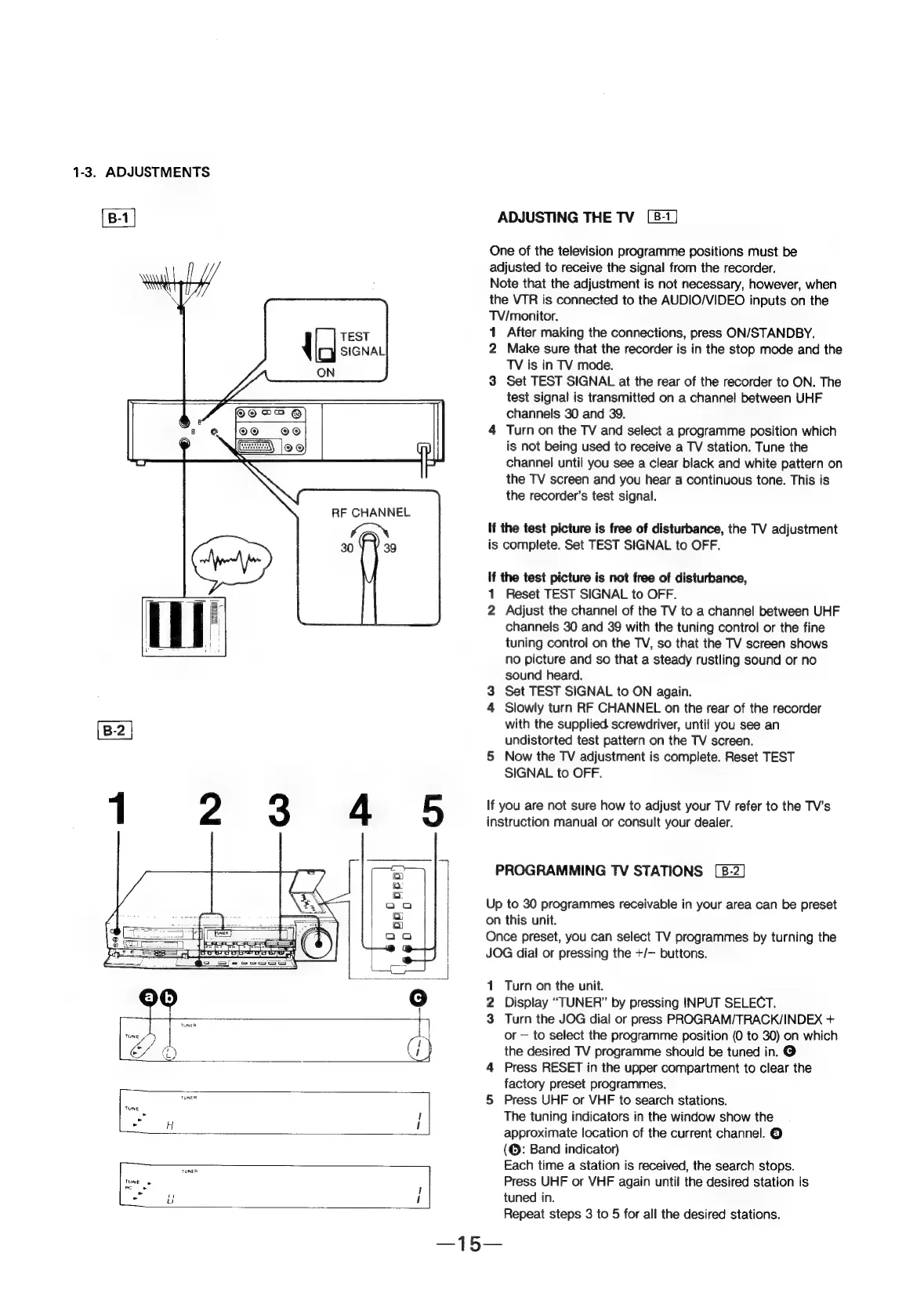
ADJUSTING
THE
TV
One
of
the
television
programme
positions
must
be
adjusted
to
receive
the
signal
from
the
recorder.
Note
that
the
adjustment
is
not
necessary,
however,
when
the
VTR
is
connected
to
the
AUDIO/VIDEO
inputs
on
the
TV/monitor.
1
After
making
the
connections,
press
ON/STANDBY.
2
Make
sure
that
the
recorder
is
in
the
stop
mode
and
the
TV
is
in
TV
mode.
3
Set
TEST
SIGNAL
at
the
rear
of
the
recorder
to
ON.
The
test
signal
is
transmitted
on
a
channel
between
UHF
channels
30
and
39.
4
Turn
on
the
TV
and
select
a
programme
position
which
is
not
being
used
to
receive
a
TV
station.
Tune
the
channel
until
you
see
a
clear
black
and
white
pattern
on
the
TV
screen
and
you
hear
a
continuous
tone.
This
is
the
recorder’s
test
signal.
TEST
SIGNAL
ON
If
the
test
picture
is
free
of
disturbance,
the
TV
adjustment
is
complete.
Set
TEST
SIGNAL
to
OFF.
If
the
test
picture
is
not
free
of
disturbance,
1
Reset
TEST
SIGNAL
to
OFF.
2
Adjust
the
channel
of
the
TV
to
a
channel
between
UHF
channels
30
and
39
with
the
tuning
control
or
the
fine
tuning
control
on
the
TV,
so
that
the
TV
screen
shows
no
picture
and
so
that
a
steady
rustling
sound
or
no
sound
heard.
3
Set
TEST
SIGNAL
to
ON
again.
4
Slowly
turn
RF
CHANNEL
on
the
rear
of
the
recorder
with
the
supplied.
screwdriver,
until
you
see
an
undistorted
test
pattern
on
the
TV
screen.
5
Now
the
TV
adjustment
is
complete.
Reset
TEST
SIGNAL
to
OFF.
If
you
are
not
sure
how
to
adjust
your
TV
refer
to
the
TV's
instruction
manual
or
consult
your
dealer.
PROGRAMMING
TV
STATIONS
Up
to
30
programmes
receivable
in
your
area
can
be
preset
on
this
unit.
Once
preset,
you
can
select
TV
programmes
by
turning
the
JOG
dial
or
pressing
the
+/—
buttons.
1
Turn
on
the
unit.
2
Display
“TUNER”
by
pressing
INPUT
SELECT.
3
Turn
the
JOG
dial
or
press
PROGRAM/TRACK/INDEX
+
or
to
select
the
programme
position
(0
to
30)
on
which
the
desired
TV
programme
should
be
tuned
in.
@
4
Press
RESET
in
the
upper
compartment
to
clear
the
factory
preset
programmes.
ciate
5
Press
UHF
or
VHF
to
search
stations.
:
The
tuning
indicators
in
the
window
show
the
approximate
location
of
the
current
channel.
©
(@:
Band
indicator)
Each
time
a
station
is
received,
the
search
stops.
Press
UHF
or
VHF
again
until
the
desired
station
is
tuned
in.
Repeat
steps
3
to
5
for
all
the
desired
stations.
~——