EasyManua.ls Logo

Sony EV-S800 - Page 14

Sony EV-S800
44 pages
Print Icon
To Next Page IconTo Next Page
To Previous Page IconTo Previous Page
Loading...
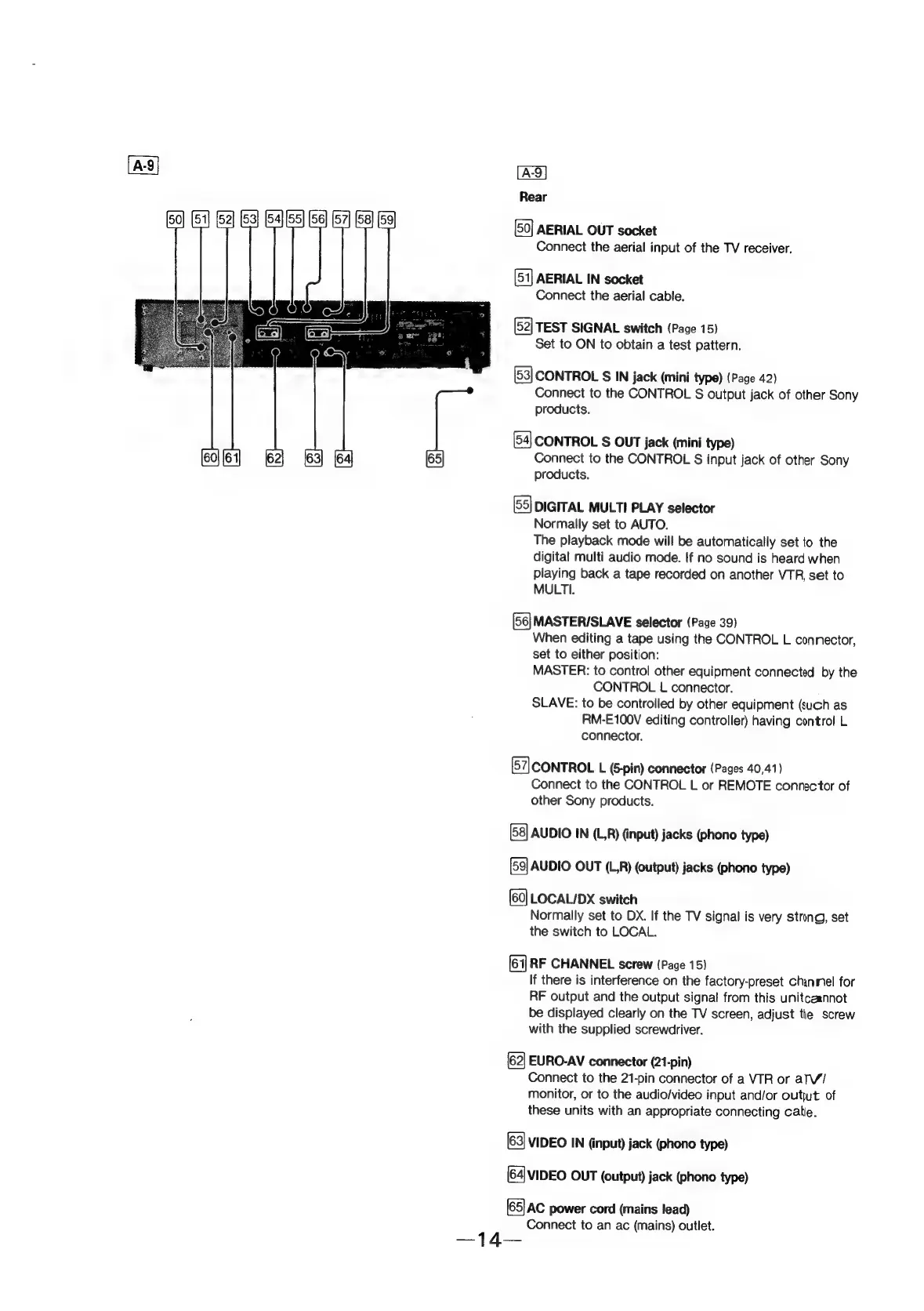
Rear
[50]
AERIAL
OUT
socket
Connect
the
aerial
input
of
the
TV
receiver.
AERIAL
IN
socket
Connect
the
aerial
cable.
TEST
SIGNAL
switch
(Page
15)
Set
to
ON
to
obtain
a
test
pattern.
CONTROL
S
IN
jack
(mini
type)
(Page
42)
Connect
to
the
CONTROL
S
output
jack
of
other
Sony
products.
CONTROL
$
OUT
jack
(mini
type)
Connect
to
the
CONTROL
S
input
jack
of
other
Sony
products.
DIGITAL
MULTI
PLAY
selector
Normally
set
to
AUTO.
The
playback
mode
will
be
automatically
set
to
the
digital
multi
audio
mode.
If
no
sound
is
heard
when
playing
back
a
tape
recorded
on
another
VTR
set
to
MULTI.
MASTERISLAVE
selector
(Page
39)
When
editing
a
tape
using
the
CONTROL
L
connector,
set
to
either
position:
MASTER:
to
control
other
equipment
connected
by
the
CONTROL
L
connector.
SLAVE:
to
be
controlled
by
other
equipment
(such
as
RM-E100V
editing
controller)
having
control
L
connector.
[57]
CONTROL
L
(&pin)
connector
(Pages
40,41)
Connect
to
the
CONTROL
L
or
REMOTE
connector
of
other
Sony
products.
AUDIO
IN
(LR)
(input)
jacks
(phono
type)
AUDIO
OUT
(L,R)
(output)
jacks
(phono
type)
[60]
LOCAL/DX
switch
Normally
set
to
DX.
If
the
TV
signal
is
very
strong,
set
the
switch
to
LOCAL.
RF
CHANNEL
screw
(Page
15)
If
there
is
interference
on
the
factory-preset
channel
for
RF
output
and
the
output
signal
from
this
unitcaannot
be
displayed
clearly
on
the
TV
screen,
adjust
the
screw
with
the
supplied
screwdriver.
EURO-AV
connector
(21-pin)
Connect
to
the
21-pin
connector
of
a
VTR
or
alV/
monitor,
or
to
the
audio/video
input
and/or
outjut
of
these
units
with
an
appropriate
connecting
cate.
VIDEO
IN
(input)
jack
(phono
type)
(64|
VIDEO
OUT
(output)
jack
(phono
type)
(65)
Ac
power
cord
(mains
lead)
Connect
to
an ac
(mains)
outiet.