EasyManua.ls Logo

Sony EV-S800 - Page 13

Sony EV-S800
44 pages
Print Icon
To Next Page IconTo Next Page
To Previous Page IconTo Previous Page
Loading...
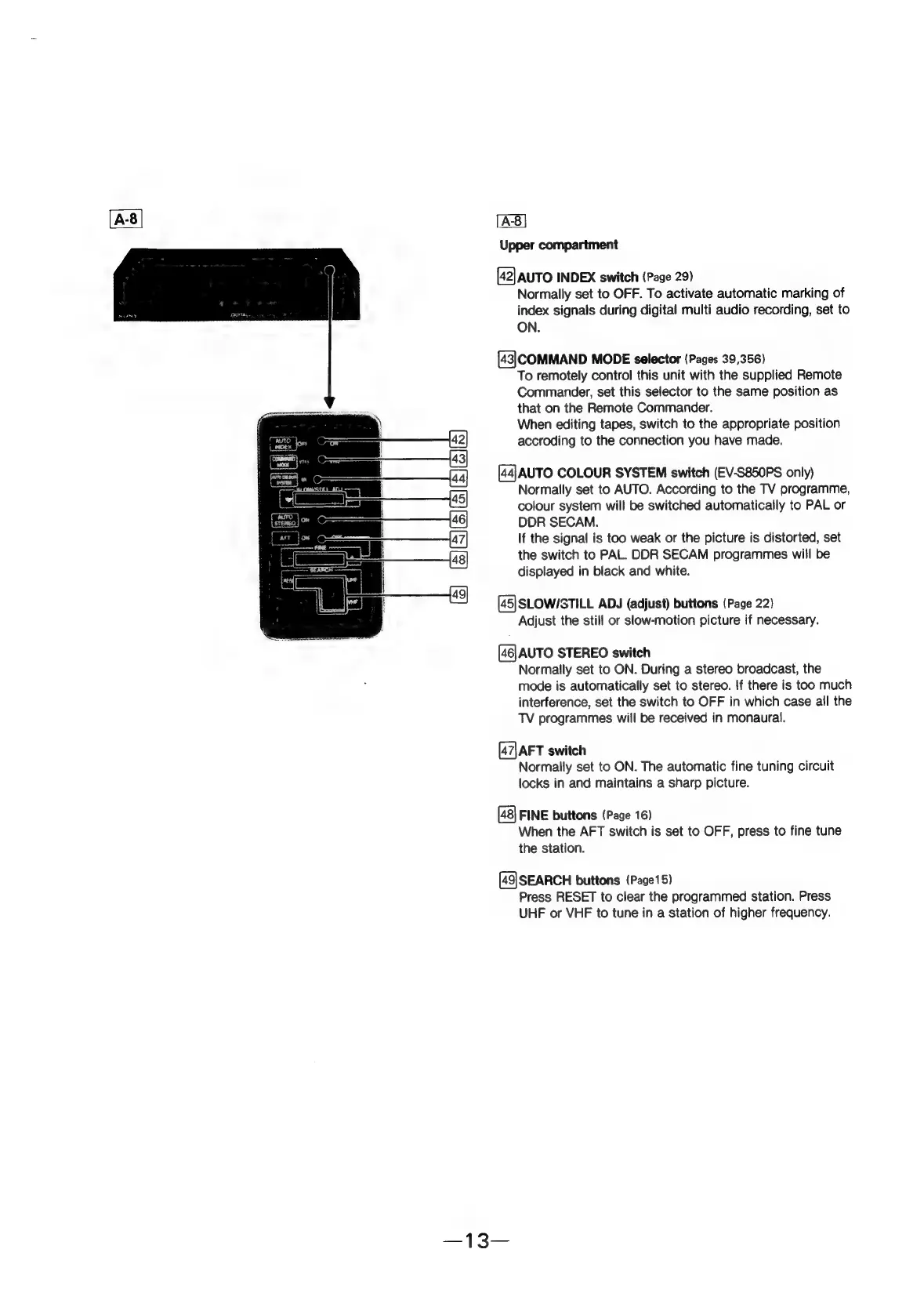
[A:8]
Upper
compartment
[42]
AUTO
INDEX
switch
(Page 29)
Normally
set
to
OFF.
To
activate
automatic
marking
of
index
signals
during
digital
multi
audio
recording,
set
to
ON.
[43|COMMAND
MODE
selector
(Pages
39,356)
To
remotely
control
this
unit
with
the
supplied
Remote
Commander,
set
this
selector
to
the
same
position
as
that
on
the
Remote
Commander.
When
editing
tapes,
switch
to
the
appropriate
position
accroding
to
the
connection
you
have
made.
[44]AUTO
COLOUR
SYSTEM
switch
(EV-S850PS
only)
Normally
set
to
AUTO.
According
to
the
TV
programme,
colour
system
will
be
switched
automatically
to
PAL
or
DDR
SECAM.
If
the
signal
is
too
weak
or
the
picture
is
distorted,
set
the
switch
to
PAL.
DDR
SECAM
programmes
will
be
displayed
in
black
and
white.
(45]SLOW/STILL
ADJ
(adjust)
buttons
(Page
22)
Adjust
the
still
or
slow-motion
picture
if
necessary.
[46]
AUTO
STEREO
switch
Normally
set
to
ON.
During
a
stereo
broadcast,
the
mode
is
automatically
set
to
stereo.
If
there
is
too
much
interference,
set
the
switch
to
OFF
in
which
case
all
the
TV
programmes
will
be
received
in
monaural.
(47|AFT
switch
Normally
set
to
ON.
The
automatic
fine
tuning
circuit
locks
in
and
maintains
a
sharp
picture.
FINE
buttons
(Page
16)
When
the
AFT
switch
is
set
to
OFF,
press
to
fine
tune
the
station.
[49|SEARCH
buttons
(Page15)
Press
RESET
to
clear
the
programmed
station.
Press
UHF
or
VHF
to
tune
in
a
station
of
higher
frequency.