EasyManua.ls Logo

Sony EV-S800 - Page 8

Sony EV-S800
44 pages
Print Icon
To Next Page IconTo Next Page
To Previous Page IconTo Previous Page
Loading...
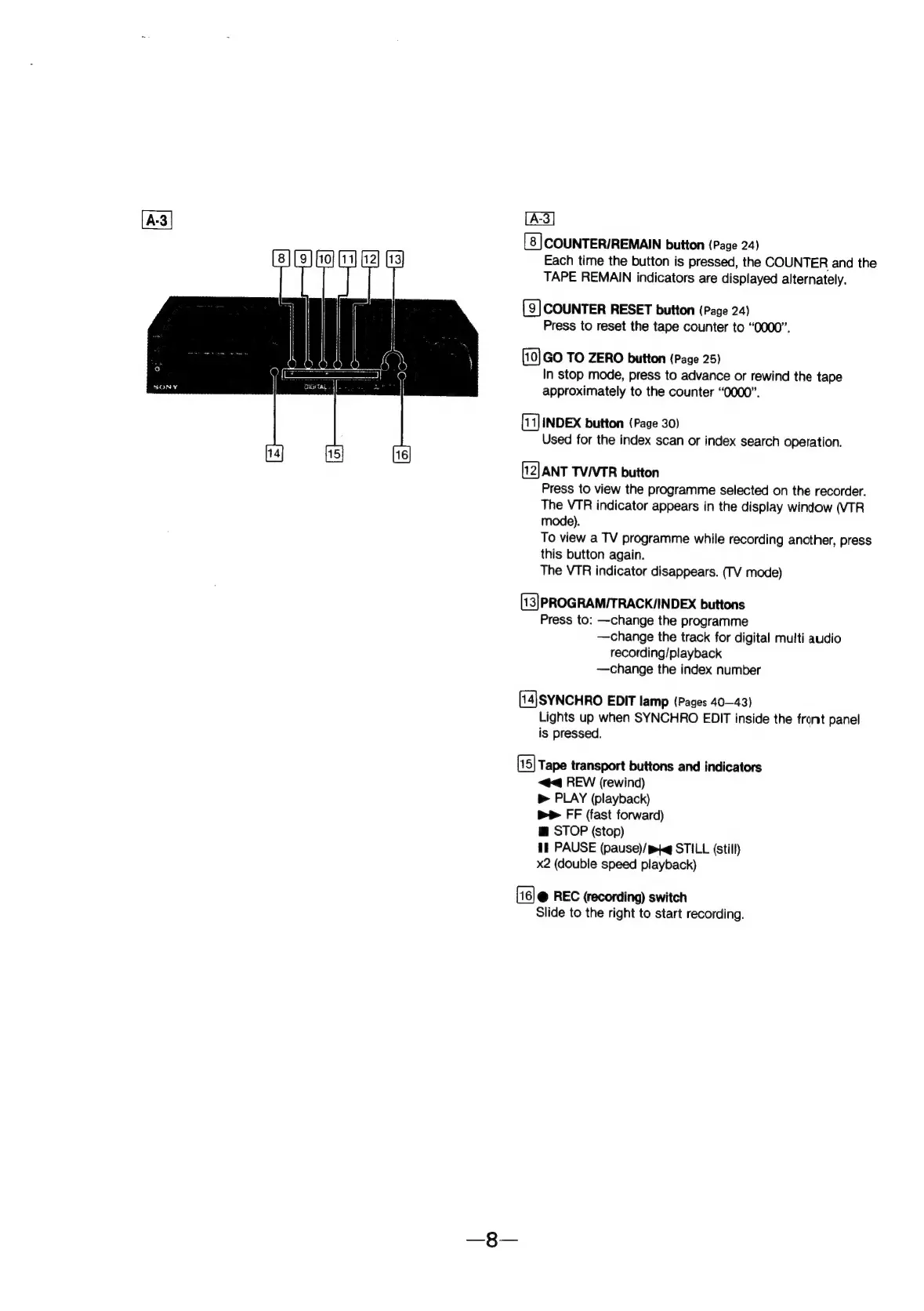
[8]
COUNTER/REMAIN
button
(Page
24)
Each
time
the
button
is
pressed,
the
COUNTER
and
the
TAPE
REMAIN
indicators
are
displayed
alternately.
[9]
COUNTER
RESET
button
(Page
24)
Press
to
reset
the
tape
counter
to
“0000”.
GO
TO
ZERO
button
(Page
25)
In
stop
mode,
press
to
advance
or
rewind
the
tape
approximately
to
the
counter
“0000”.
INDEX
button
(Page
30)
Used
for
the
index
scan
or
index
search
operation.
[12]
ANT
TV/VTR
button
Press
to
view
the
programme
selected
on
the
recorder.
The
VTR
indicator
appears
in
the
display
window
(VTR
mode).
To
view
a
TV
programme
while
recording
another,
press
this
button
again.
The
VTR
indicator
disappears.
(TV
mode)
(13]PROGRAMIT
RACK/INDEX
buttons
Press
to:
—change
the
programme
—change
the
track
for
digital
multi
audio
recording/playback
—change
the
index
number
[14]SYNCHRO
EDIT
lamp
(Pages
40-43)
Lights
up
when
SYNCHRO
EDIT
inside
the
front
panel
is
pressed.
Tape
transport
buttons
and
indicators
<4
REW
(rewind)
b>
PLAY
(playback)
bP
FF
(fast
forward)
@
STOP
(stop)
Il
PAUSE
(pause)/
pq
STILL
(still)
x2
(double
speed
playback)
@
REC
(recording)
switch
Slide
to
the
right
to
start
recording.