EasyManua.ls Logo

Sony EV-S800 - Page 23

Sony EV-S800
44 pages
Print Icon
To Next Page IconTo Next Page
To Previous Page IconTo Previous Page
Loading...
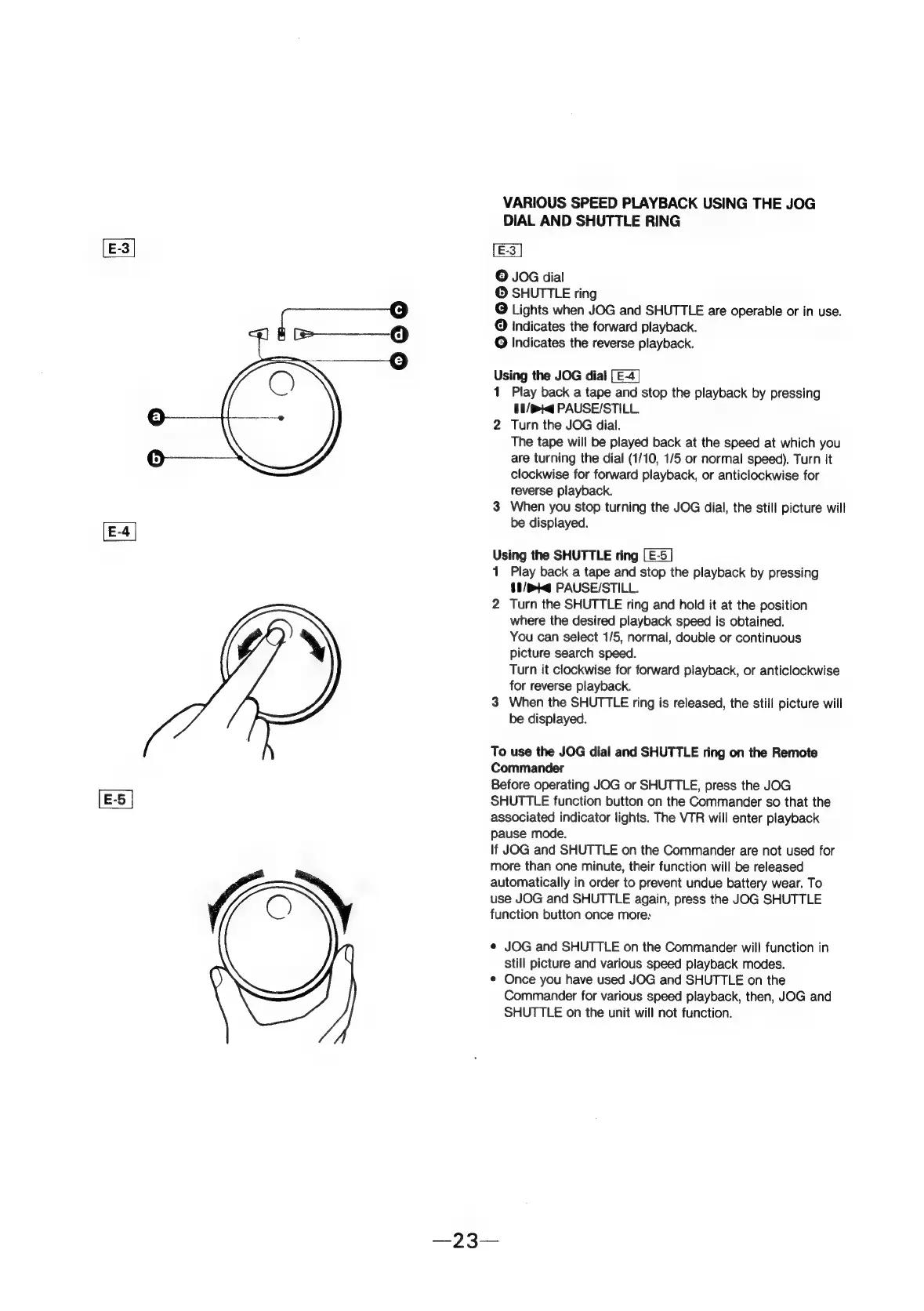
VARIOUS
SPEED
PLAYBACK
USING
THE
JOG
DIAL
AND
SHUTTLE
RING
©
JOG
dial
©
SHUTTLE
ring
@
Lights
when
JOG
and
SHUTTLE
are
operable
or
in
use.
@
indicates
the
forward
playback.
@
Indicates
the
reverse
playback.
ven
the
JOG
dial
[E-4]
Play
back
a
tape
and
stop
the
playback
by
pressing
11/bK@
PAUSE/STILL.
2
Turn
the
JOG
dial.
The
tape
will
be
played
back
at
the
speed
at
which
you
are
turning
the
dial
(1/10,
1/5
or
normal
speed).
Turn
it
clockwise
for
forward
playback,
or
anticlockwise
for
reverse
playback.
3
When
you
stop
turning
the
JOG
dial,
the
still
picture
will
be
displayed.
Using
the
SHUTTLE
ring
1
Play
back
a
tape
and
stop
the
playback
by
pressing
§1/mi@
PAUSE/STILL.
2
Turn
the
SHUTTLE
ring
and
hold
it
at
the
position
where
the
desired
playback
speed
is
obtained.
You
can
select
1/5,
normal,
double
or
continuous
picture
search
speed.
Turn
it
clockwise
for
forward
playback,
or
anticlockwise
for
reverse
playback.
3
When
the
SHUTTLE
ring
is
released,
the
still
picture
will
be
displayed.
To
use
the
JOG
dial
and
SHUTTLE
ring
on
the
Remote
Commander
Before
operating
JOG
or
SHUTTLE,
press
the
JOG
SHUTTLE
function
button
on
the
Commander
so
that
the
associated
indicator
lights.
The
VTR
will
enter
playback
pause
mode.
If
JOG
and
SHUTTLE
on
the
Commander
are
not
used
for
more
than
one
minute,
their
function
will
be
released
automatically
in
order
to
prevent
undue
battery
wear.
To
use
JOG
and
SHUTTLE
again,
press
the
JOG
SHUTTLE
function
button
once
more:
e
JOG
and
SHUTTLE
on
the
Commander
wil!
function
in
still
picture
and
various
speed
playback
modes.
e
Once
you
have
used
JOG
and
SHUTTLE
on
the
Commander
for
various
speed
playback,
then,
JOG
and
SHUTTLE
on
the
unit
will
not
function.