20
HCD-C770/C990
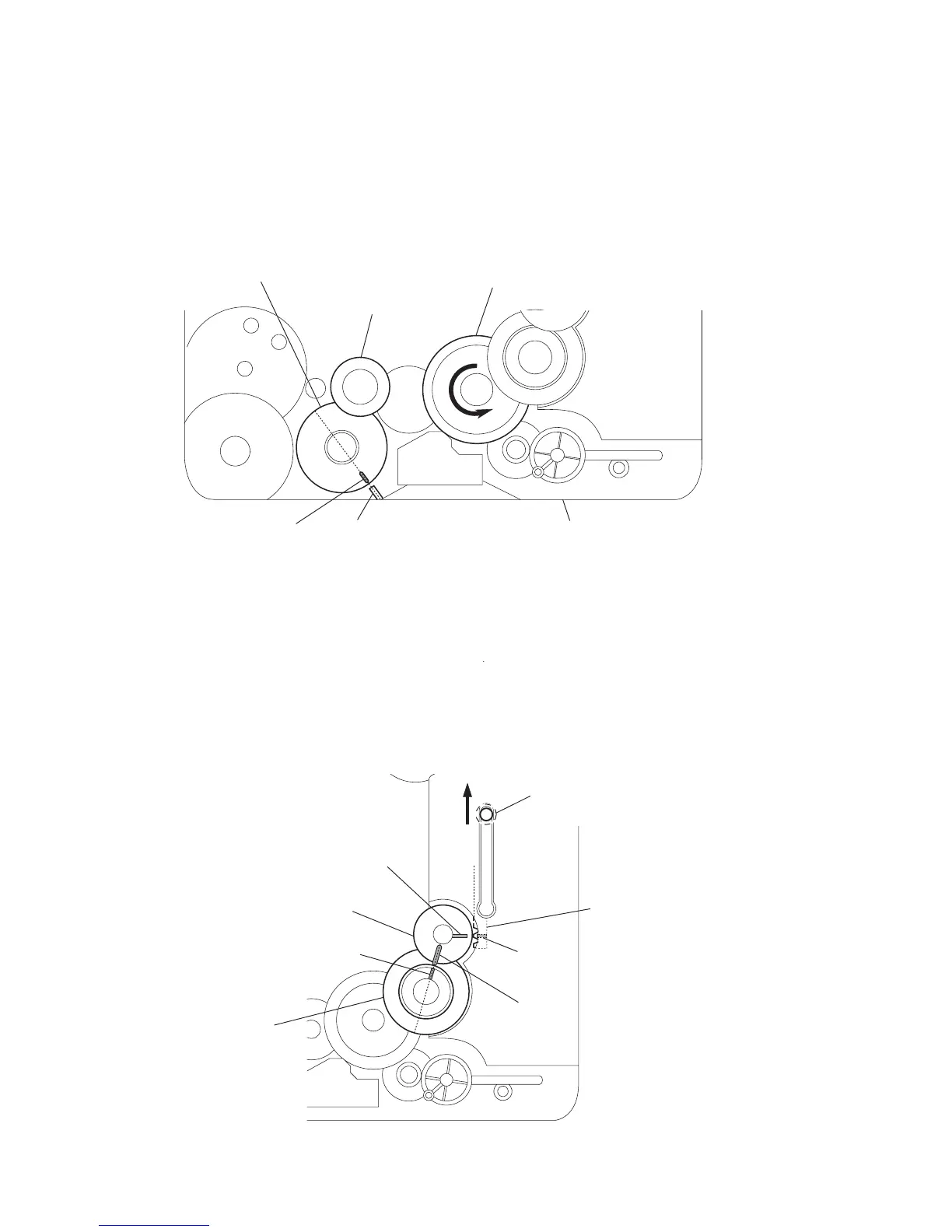
mark
B
slider (mode cam) assy
shaft
mark
A
mark
D
gear (mode cam)
cam (gear)
mark
C
1
Slide the shaft in the direction of arrow.
2
Align mark
A
on the gear (mode cam) with mark
B
on the slider (mode cam) assy,
then install the gear (mode cam).
3
Check that mark
C
on the gear (mode cam) is in alignment with mark
D
on the cam (gear).
– bottom view • front –
4-3. HOW TO INSTALL THE GEAR (MODE 2)
4-4. HOW TO INSTALL THE GEAR (MODE CAM)
– bottom view • front –
gear
(mode 2)
rotary encoder
(S701)
cam (BU U/D)
mark projection chassis
1
Align the mark on the rotary encoder (S701) with the projection of the assy.
2
Check that the cam (BU U/D) can not be rotated in the direction of arrow.
3
Install the gear (mode 2).
Ver 1.5



 To Next Page