– 12 –
[Aging Mode]
This mode can be used for operation check of CD section and tape
deck section.
• If an error occurred:
The aging operation stops and display status.
• If no error occurs:
The aging operation continues repeatedly.
1. Operating Method of Aging Mode
1) Set disc in DISC1 tray.
2) Load the tapes recording use into the decks A and B respec-
tively.
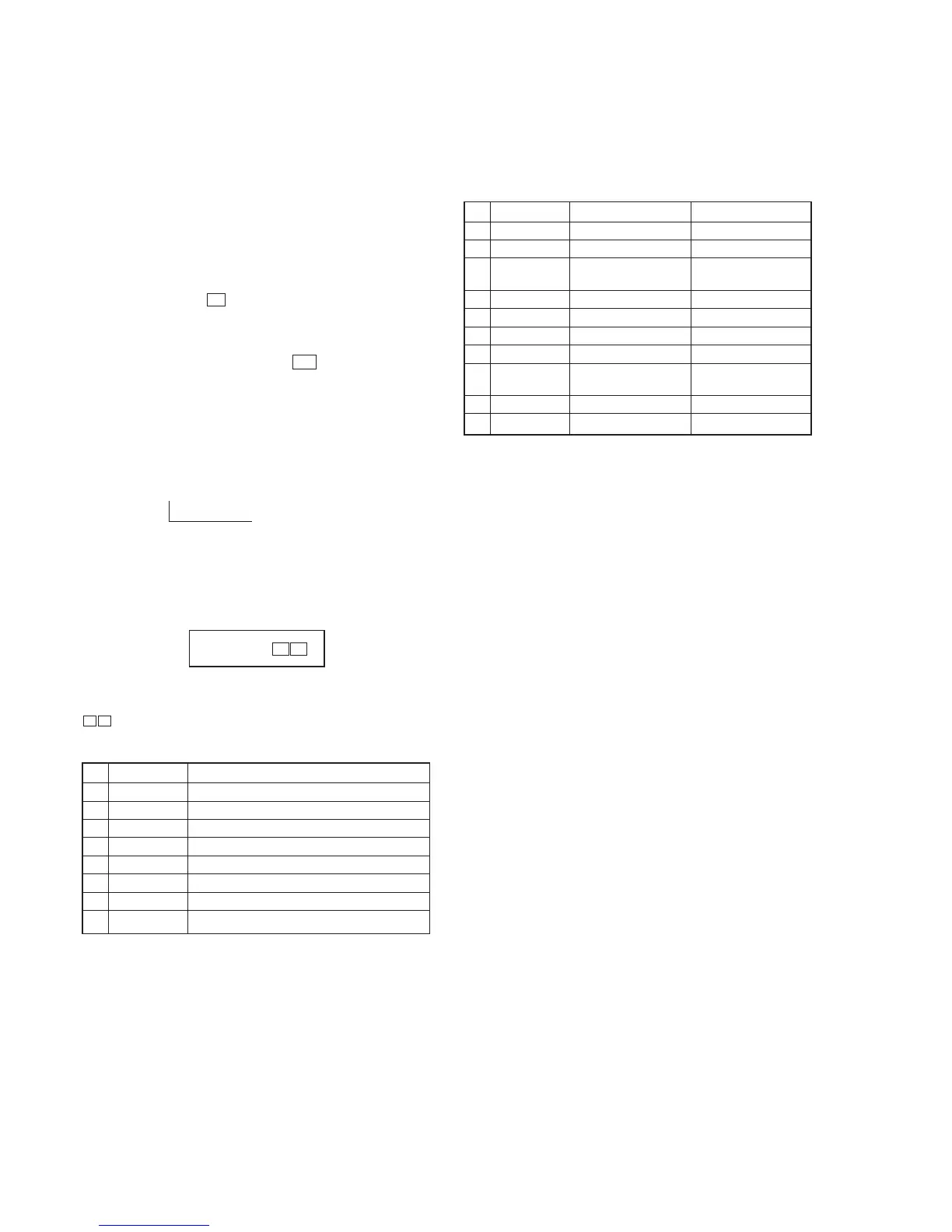
3) Press three buttons p , [ENTER/NEXT],
and [DISCSKIP/EX-CHANGE] simultaneously.
4) The aging mode is activated, if a CD roulette mark on the fluo-
rescent indicator tube is blinking.
5) To exit from the aging mode, press I/u button to turn the set
OFF.
2. Operation Sequence
• During the aging mode in the following sequence to below.
• Starting the CD section aging for function set “CD”, starting
the TAPE section (deck A) aging for function set “TAPE A” or
“TAPE B”. (Set another function is no work.)
CD (disc1) (12 minutes) → Deck A
↑↓(About 13 minutes
Deck B 20 seconds
maximum)
3. Aging mode in CD section
1) Display state
• No error occurs
display
Note:
[*][*]
: a letter “CD” and the remainder time (minute) alternately. (re-
mainder time start from 12 minute)
@@: track number in access.
• Error occurred
2) Operation during aging Mode
In the aging mode, the program is executed in the following se-
quence.
(1) The disc tray turns to select a disc1.
(2) A disc is chucked.
(3) TOC of disc is read.
(4) The pickup accesses to the track 1, and playing 2 seconds.
(5) The pickup accesses to the last track, and playing 2 seconds.
(6) Steps 1 through 5 are repeated about 12 minutes.
(7) Change to deck section aging.
NO. Display Main factor
1 NO DISC ERR Not set disc in DISC1
2 FOCUS1 ERR Focus does not work
3 FOCUS2 ERR Focus does not work after the disc rotate as usual
4 GFS ERR GFS error
5 FBIAS ERR Error in to the focus bias adjustment
6 SENSOR ERR Disc sensor sens DISC1 is no disc
7 TABLE ERR CD tray lotate does not work
8 TRAY ERR Tray (include BD) move does not work
4. Aging mode in Tape Deck section
1) Display state
• No error occurs
Display action now
• Error occurred
Display action last time
2) Operation during Aging Mode
In the aging mode, the program is executed in the following se-
quence.
(1) Rewind is executed up to the top of tape.
(2) A tape on FWD side is played for 3 minutes.
(3) FF is executed up to either made for 20 minutes or the end of
tape.
(4) A tape is reversed, and the tape on REV side is played for 3
minutes.
(5) Rewind is executed up to the top of tape.
(6) Steps 1 through 5 are executed for the other deck.
(7) Change to CD section aging.
NO. Display action Action contents Final timing
1 TAPE A AG-1 Rewind the TAPE A The top of tape
2 TAPE A AG-2 FWD play the TAPE A 3 minutes playing
3 TAPE A AG-3 F.F. the TAPE A First either 20 minutes
or the end of tape
4 TAPE A AG-4 REV play the TAPE A 3 minutes playing
5 TAPE A AG-5 Rewind the TAPE A The top of tape
6 TAPE B AG-1 Rewind the TAPE B The top of tape
7 TAPE B AG-2 FWD play the TAPE B 3 minutes playing
8 TAPE B AG-3 F.F. the TAPE B First either 20 minutes
or the end of tape
9 TAPE B AG-4 REV play the TAPE B 3 minutes playing
10 TAPE B AG-5 Rewind the TAPE B The top of tape
[*][*]
1 –
@ @



 To Next Page