– 6 –
SECTION 2
GENERAL
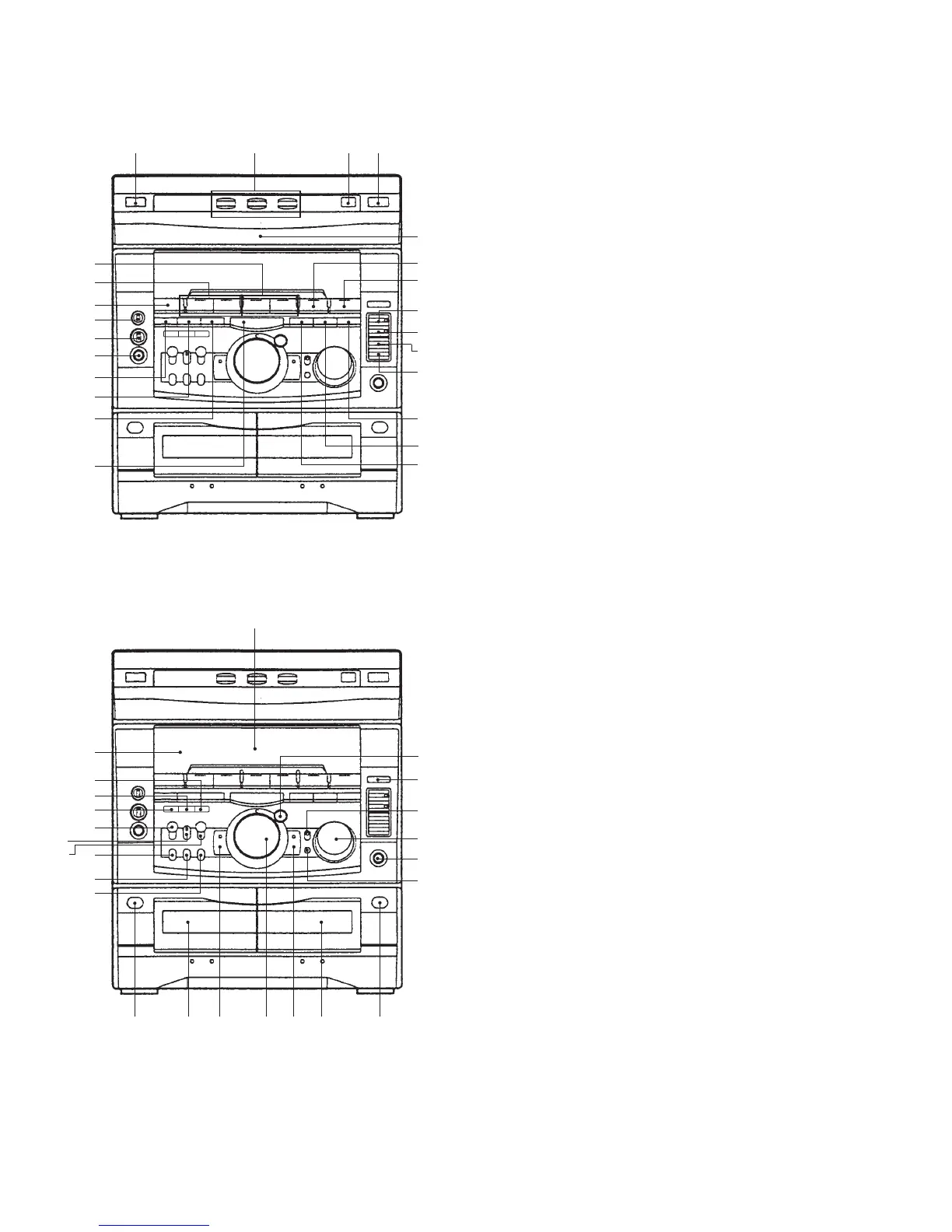
LOCATION OF CONTROLS
1 2 3 4
!¶
!§
!∞
!ª
@º
@¡
@™
@£
@¢
5
6
7
8
9
!º
!¡
!™
!£
!¢
@∞
#™
#£
#∞
#§
#ª
$º
$¡
@¶
@•
@ª
#º
#¡
$™ $£ $¢ $∞ $§ $¶ $•
1 I /u (Power) button
2 DISC 1 to 3 buttons and indicators
3 DISC SKIP/EX-CHANGE button
4 6 (CD) button
5 CD disc tray
6 CD ^ button and indicator
7 TUNER, BAND button
8 r REC button and indicator
9 P PAUSE button and indicator
!º HI-DUB button
!¡ CD SYNC button
!™ EFFECT button and indicator
(GRX7/GRX7J/RX77: Canadian models)
FILE SELECT button (AEP, UK, German, East
European, and CIS models)
!£ SURROUND button
!¢ KARAOKE PON/MPX button
!∞ DECK B 9 and ( buttons and indicators
!§ DECK A 9 and ( buttons and indicators
!¶ FUNCTION button
!• ECHO LEVEL knob (Saudi Arabia model)
!ª MIC LEVEL knob
@º MIX MIC jac
@¡ DISPLAY/DEMO button
@™ CLOCK/TIMER SET button
@£ TIMER SELECT button
@¢ p button
@∞ Fluorescent indicator tube
@§ ENTER/NEXT button and indicator
@¶ PTY button (AEP, UK, and German models)
@• GROOVE button and indicator
@ª VOLUME konb
#º PHONES jack
#¡ DBFB button
#™ Remote sensor
#£ P FILE MEMORY button (GRX7/GRX7J/RX77:
Canadian models)
#¢ GEQ CONTROL button (GRX7/GRX7J/RX77:
Canadian models)
#∞ FILE SELECT button (GRX7/GRX7J/RX77:
Canadian models)
#§ LOOP button
#¶ NON-STOP button and indicator
#• FLASH button
#ª EDIT, DIRECTION button
$º PLAY MODE, DOLBY NR button
$¡ REPEAT button
$™ § button (deck A)
$£ Tape deck A
$¢ –, 0 button and indicator
$∞ JOG dial
$§ +, ) button and indicator
$¶ Tape deck B
$• § button (deck B)
!•
@§
#¢
#•
#¶



 To Next Page