71
Using Network Functions
1 Press the MENU button.
2 Select (NETWORK SET) t
[Wi-Fi SET] t [EDIT DEVICE
NAME].
“Wi-Fi Direct” and other devices
appear.
To rename a device, use the following
procedure to enter a name from the
keyboard.
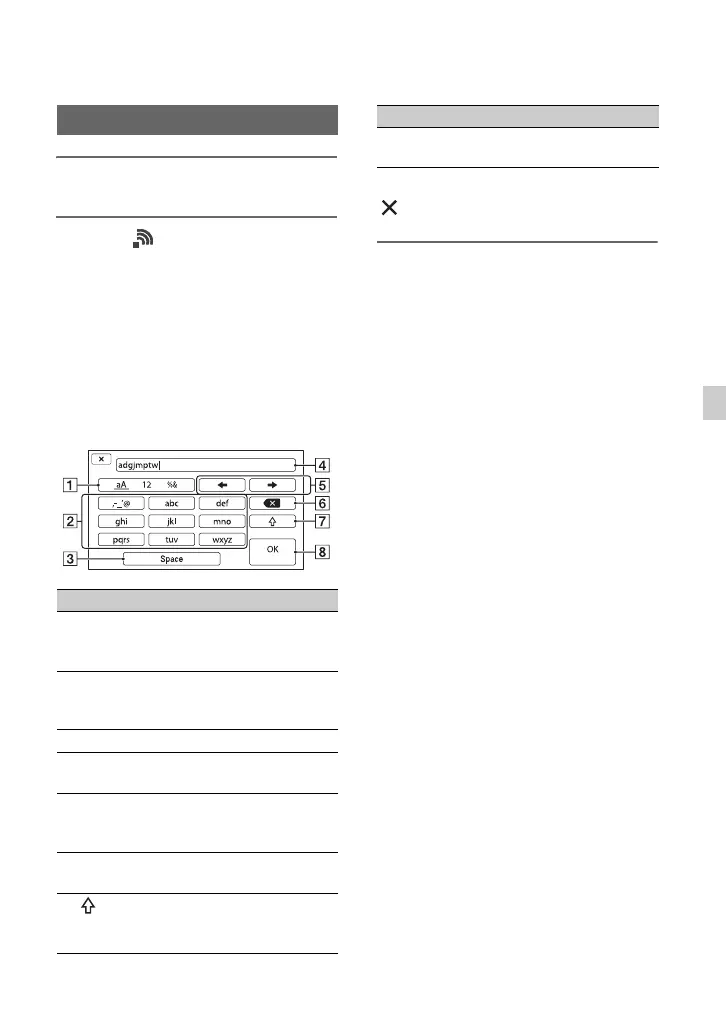
How to use the keyboard
To cancel character input midway, press
.
Changing the device name
Screen items Functions
1 Switch
character type
Characters switch between
alphabetical letters,
numerals and symbols.
2 Keyboard Characters are displayed
in the order they are
selected.
3 Space Enters a space.
4 Input box Entered characters are
displayed.
5 Move cursor Moves the cursor in the
input box to the left or
right
6 Delete Deletes the character
preceding the cursor
7 Switches between
uppercase and lowercase
alphabetical letters
8 OK Confirms an input
operation
Screen items Functions


 To Next Page
 Loading...