
 Need help?
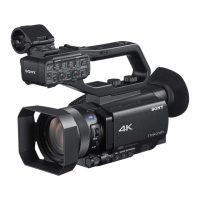
Do you have a question about the Sony NXCAM HXR-NX80 and is the answer not in the manual?
 General
| Lens | ZEISS Vario-Sonnar T* |
|---|---|
| Optical Zoom | 12x |
| ND Filter | Clear, 1/4, 1/16, 1/64 |
| Image Stabilization | Optical SteadyShot with Active Mode |
| Maximum Resolution | 3840 x 2160 (4K) |
| Microphone | Built-in stereo microphone |
| Memory Card Slots | Dual SD card slots |
| Effective Pixels | 14.2MP |
| Digital Zoom | 48x |
| Focal Length | 9.3 - 111.6 mm |
| Aperture | f/2.8 - f/4.5 |
| Minimum Focusing Distance | 1 cm (Wide) |
| Recording Format | XAVC S, AVCHD |
| Frame Rate | Up to 120fps (HD) |
| Audio Recording | Linear PCM 2ch, Dolby Digital 2ch |
| LCD Screen | 3.5-inch (1.56 million dots) touchscreen LCD |
| Viewfinder | 0.39-inch type OLED, approx. 2.36 million dots |
| Battery | NP-FV70A |
| Dimensions | 89.5 x |
| Connectivity | HDMI, USB, Wi-Fi, NFC |
Identifies and labels external components of the camcorder.
Details the functions and operation of the wireless remote.
Explains the meaning of various icons displayed on the camcorder screen.
Lists items included with the camcorder and how to verify them.
Provides instructions for charging the camcorder's battery.
Guides users on how to mount accessories via the accessory shoe.
Explains how to power on the camcorder and configure initial date/time settings.
Details how to adjust the screen and viewfinder for optimal viewing.
Covers memory card compatibility and preparation for recording.
Explains how to start, stop, and manage basic movie recording.
Describes relay and simultaneous recording using multiple memory cards.
Covers manual and automatic methods for adjusting zoom and focus.
Details how to adjust image brightness, iris, ISO, shutter speed, and color tone.
Explains microphone selection and audio level settings for recording.
Introduces various automatic and scene-specific shooting modes.
Explains how to customize ASSIGN buttons for quick access to functions.
Guides users on how to play back recorded movies and navigate through clips.
Covers changing screen display and checking camcorder status and data.
Provides instructions for connecting the camcorder to TVs or monitors.
Explains how to connect and control the camcorder using a smartphone.
Details steps for connecting to a wireless network and registering access points.
Guides on setting up a wired network connection for the camcorder.
Covers live streaming setup and distribution via various protocols.
Explains how to synchronize timecode across multiple cameras using a smartphone.
Details the process for resetting all network-related configurations.
Covers protecting files from deletion and splitting movie clips.
Explains how to delete unwanted clips and format memory cards.
Introduces how to navigate and use the camcorder's menu system.
Lists the main categories of menu items available on the camcorder.
Provides in-depth explanations of various menu settings and their functions.
Outlines a general procedure for diagnosing and resolving camcorder issues.
Addresses common problems related to specific camcorder components and functions.
Covers issues related to memory cards and the recording process.
Details problems with image display, playback, and connections to other devices.
Explains the meaning of warning indicators and error messages shown on the screen.
Provides tables estimating recording and playback times based on battery and settings.
Lists limitations on functions and compatibility with various recording formats.
Offers guidance on using the camcorder abroad and general maintenance practices.
Lists the detailed technical specifications of the camcorder.



 To Next Page