6
Operating Instructions
TV, VCR, and Cable box
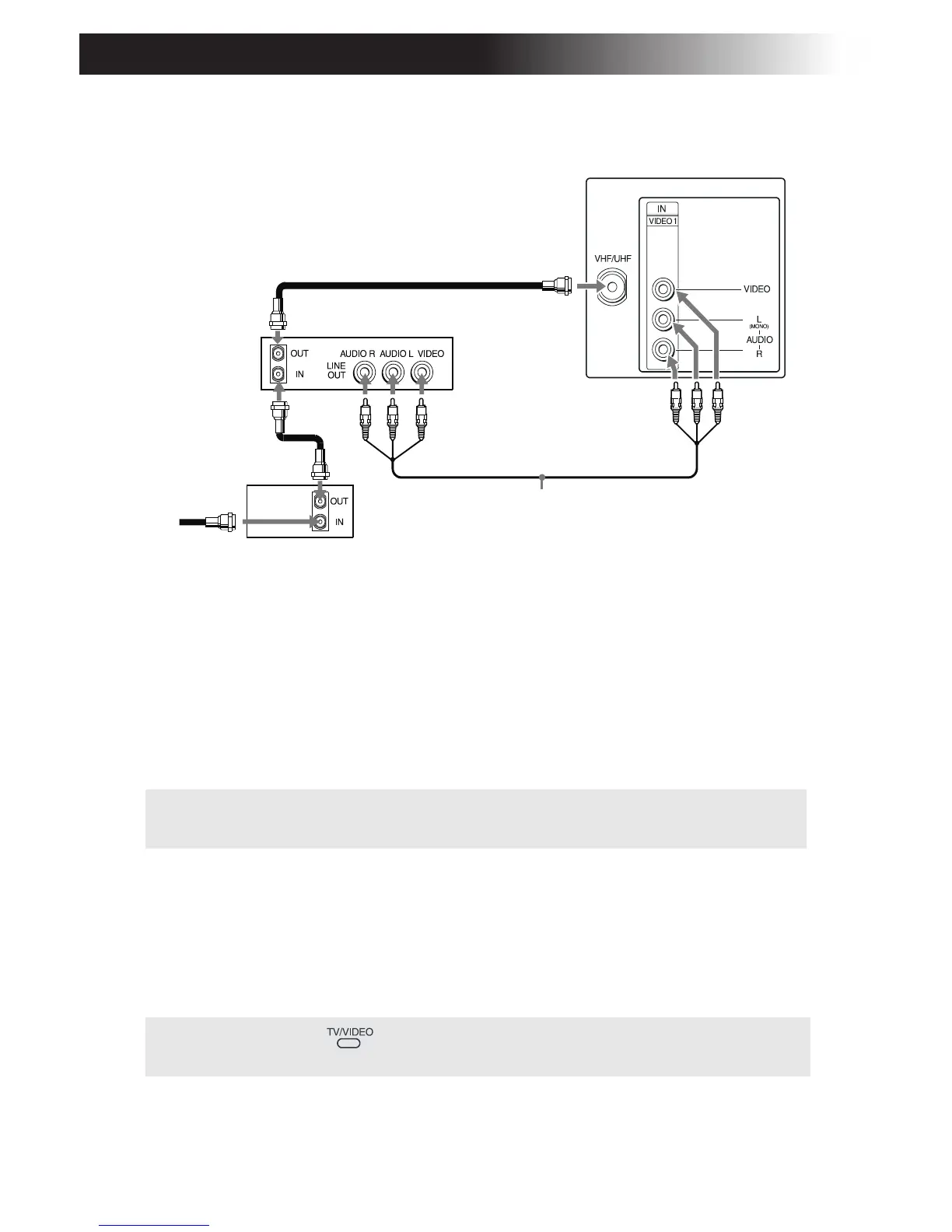
1 Connect the coaxial cable from your cable service to the IN jack on
your cable box.
2 Connect a coaxial cable (not supplied) from the OUT jack on your
cable box to the IN jack on your VCR.
3 Connect a coaxial cable (not supplied) from the OUT jack on your
VCR to the VHF/UHF jack on the TV.
(Optional connection)
4 If your VCR is equipped with video outputs, you can get better
picture quality by connecting A/V cables (not supplied) from
AUDIO and VIDEO OUT on your VCR to AUDIO/VIDEO IN on
your TV.
✍ If you will be controlling all channel selection through your cable box, you
should consider using the Channel Fix feature, (see page 19).
✍ You can use the button to switch between the VHF/UHF and VIDEO
inputs.
3
4
(Optional connection)
Cable
1
VCR
2
Rear of TV
From
cable
Coaxial
Cable
box








 To Next Page