8
Operating Instructions
TV, Satellite Receiver, and VCR
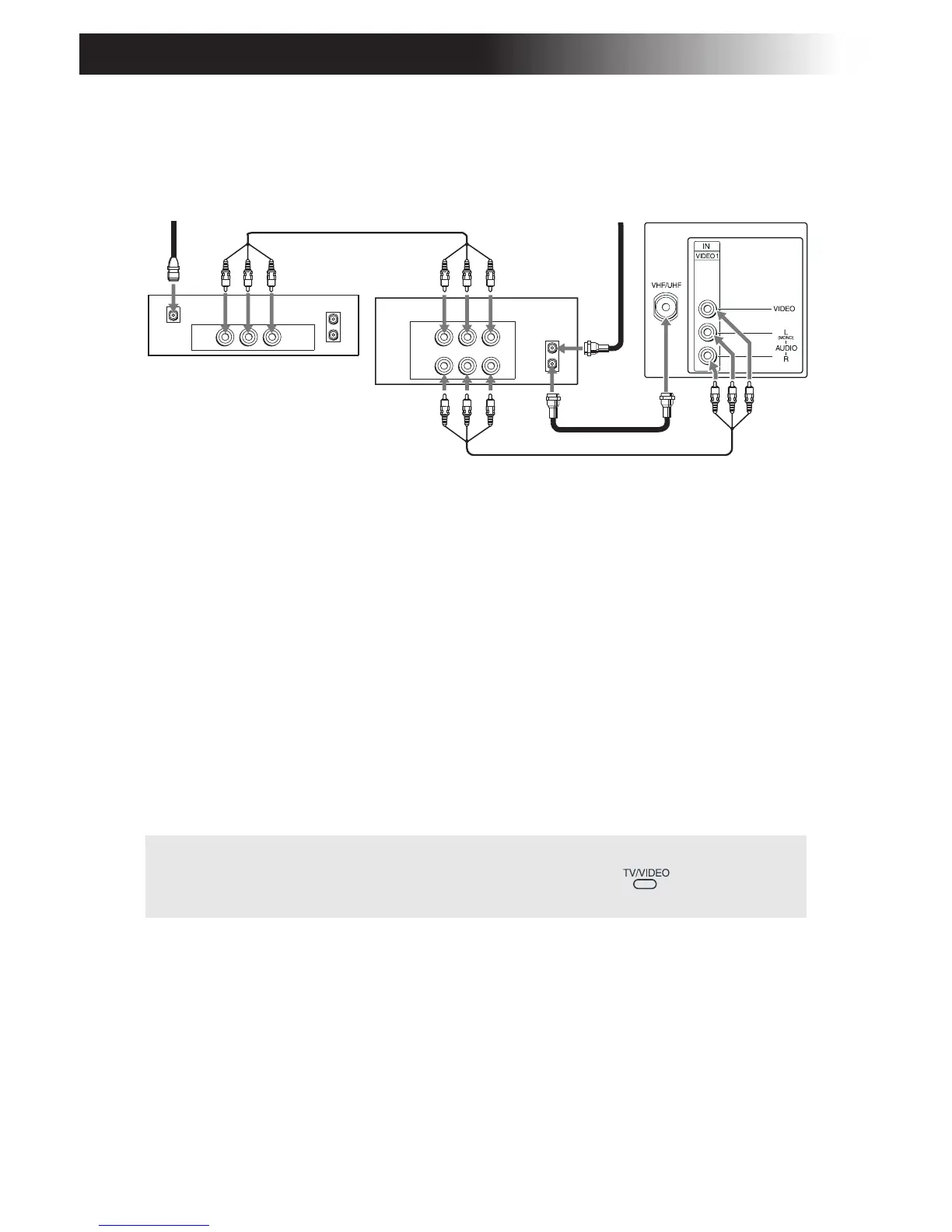
1 Connect the cable from your satellite antenna to SATELLITE IN on
your satellite receiver.
2 Connect the coaxial cable from your cable service or antenna to the
IN jack on your VCR.
3 Using a coaxial cable, connect the OUT jack on your VCR to the
VHF/UHF jack on your TV.
4 Using A/V cables, connect AUDIO and VIDEO OUT on your
satellite receiver to AUDIO and VIDEO IN on your VCR.
5 Using A/V cables, connect AUDIO and VIDEO OUT on your VCR to
AUDIO and VIDEO IN on your TV.
✍ To view from the satellite receiver or VCR, select the video input to which
your satellite receiver or VCR is connected by pressing on the remote
control.
AUDIO R AUDIO L VIDEO
AUDIO R AUDIO L VIDEO
SATELLITE IN
VHF/UHF
OUT
IN
LINE OUT
LINE IN
VHF/UHF
OUT
IN
LINE OUT
Satellite receiver
4
5
2
3
1
Rear of TV
VCR
Satellite
antenna
From
antenna
cable/
cable








 To Next Page