EasyManua.ls Logo

Sony MDS-E55 - Playing Mds; Using the Display

Sony MDS-E55
36 pages
Print Icon
To Next Page IconTo Next Page
To Previous Page IconTo Previous Page
Loading...
-
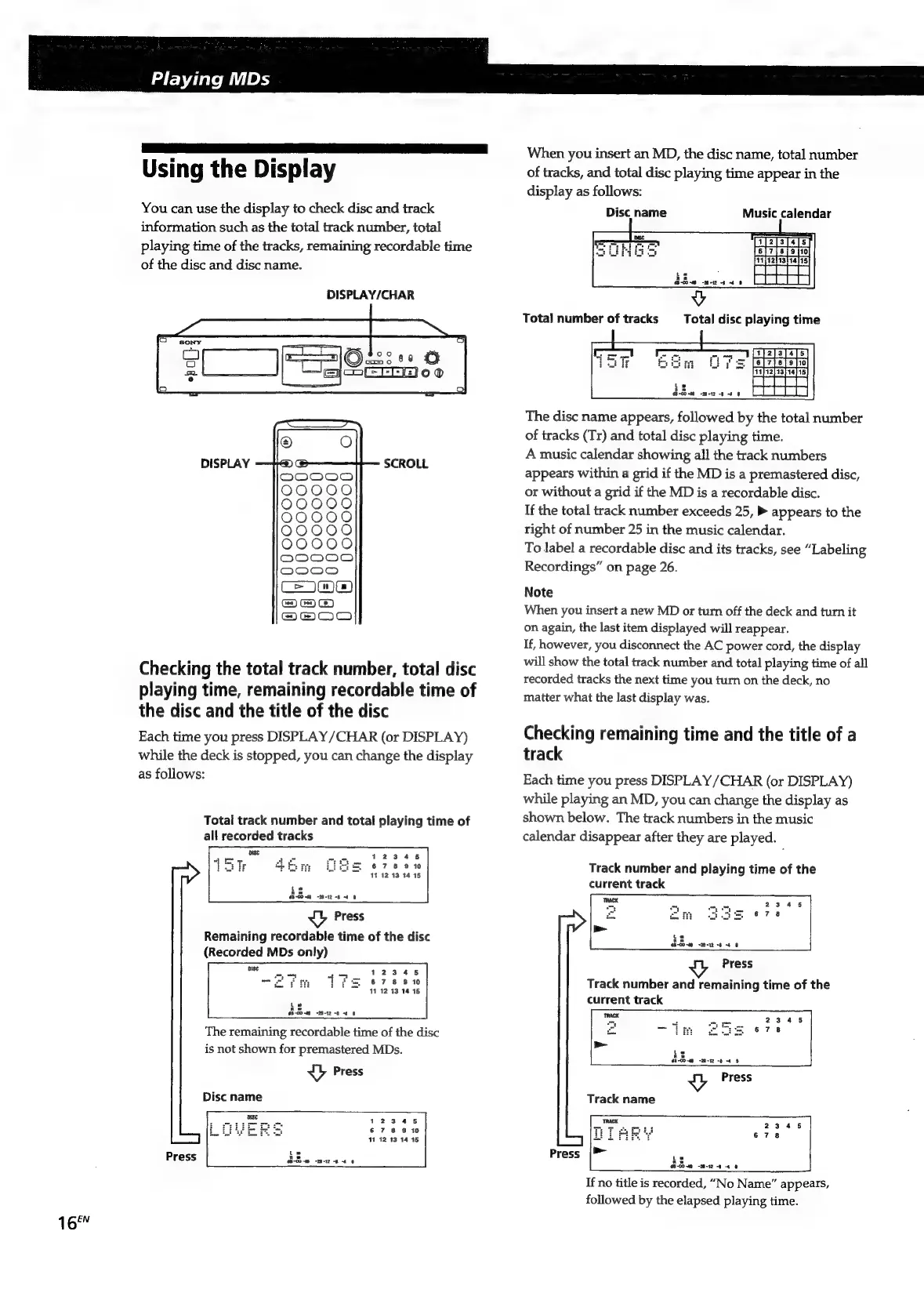
Playing
MDs
Using
the
Display
You
can
use
the
display
to
check
disc
and
track
information
such
as
the
total
track
number,
total
playing
time
of
the
tracks,
remaining
recordable
time
of
the
disc
and
disc
name.
DISPLAY/CHAR
DISPLAY
SCROLL
Checking
the
total
track
number,
total
disc
playing
time,
remaining
recordable
time
of
the
disc
and
the
title
of
the
disc
Each
time
you
press
DISPLAY/CHAR
(or
DISPLAY)
while
the
deck
is
stopped,
you
can
change
the
display
as
follows:
Total
track
number
and
total
playing
time
of
all
recorded
tracks
Press
Remaining
recordable
time
of
the
disc
(Recorded
MDs
only)
The
remaining
recordable
time
of
the
disc
is
not
shown
for
premastered
MDs.
ea
Press
Disc
name
Press
When
you
insert
an
MD,
the
disc
name,
total
number
of
tracks,
and
total
disc
playing
time
appear
in
the
display
as
follows:
Disc
name
Music
calendar
Total
number
of
tracks
Total
disc
playing
time
The
disc
name
appears,
followed
by
the
total
number
of
tracks
(Tr)
and
total
disc
playing
time.
A
music
calendar
showing
all
the
track
numbers
appears
within
a
grid
if
the
MD
is
a
premastered
disc,
or
without
a
grid
if
the
MD
is
a
recordable
disc.
If
the
total
track
number
exceeds
25,
»
appears
to
the
right
of
number
25
in
the
music
calendar.
To
label
a
recordable
disc
and
its
tracks,
see
“Labeling
Recordings”
on
page
26.
Note
When
you
insert
a
new
MD
or
turn
off
the
deck
and
turn
it
on
again,
the
last
item
displayed
will
reappear.
If,
however,
you
disconnect
the
AC
power
cord,
the
display
will
show
the
total
track
number
and
total
playing
time
of
all
recorded
tracks
the
next
time
you
turn
on
the
deck,
no
matter
what
the
last
display
was.
Checking
remaining
time
and
the
title
of
a
track
Each
time
you
press
DISPLAY
/CHAR
(or
DISPLAY)
while
playing
an
MD,
you
can
change
the
display
as
shown
below.
The
track
numbers
in
the
music
calendar
disappear
after
they
are
played.
Track
number
and
playing
time
of
the
current
track
Press
Track
number
and
remaining
time
of
the
current
track
Les
Ke
s8-CO-4G
=z
-b
dO
ea
Press
Track
name
La
Le
OB-CO~m
-20-12
-8
4
0
If
no
title
is
recorded,
“No
Name”
appears,
followed
by
the
elapsed
playing
time.

Related product manuals