EasyManua.ls Logo

Sony MDS-E55 - Moving Recorded Tracks (Move Function); Labeling Recordings (Title Function)

Sony MDS-E55
36 pages
Print Icon
To Next Page IconTo Next Page
To Previous Page IconTo Previous Page
Loading...
Editing
Recorded
MDs
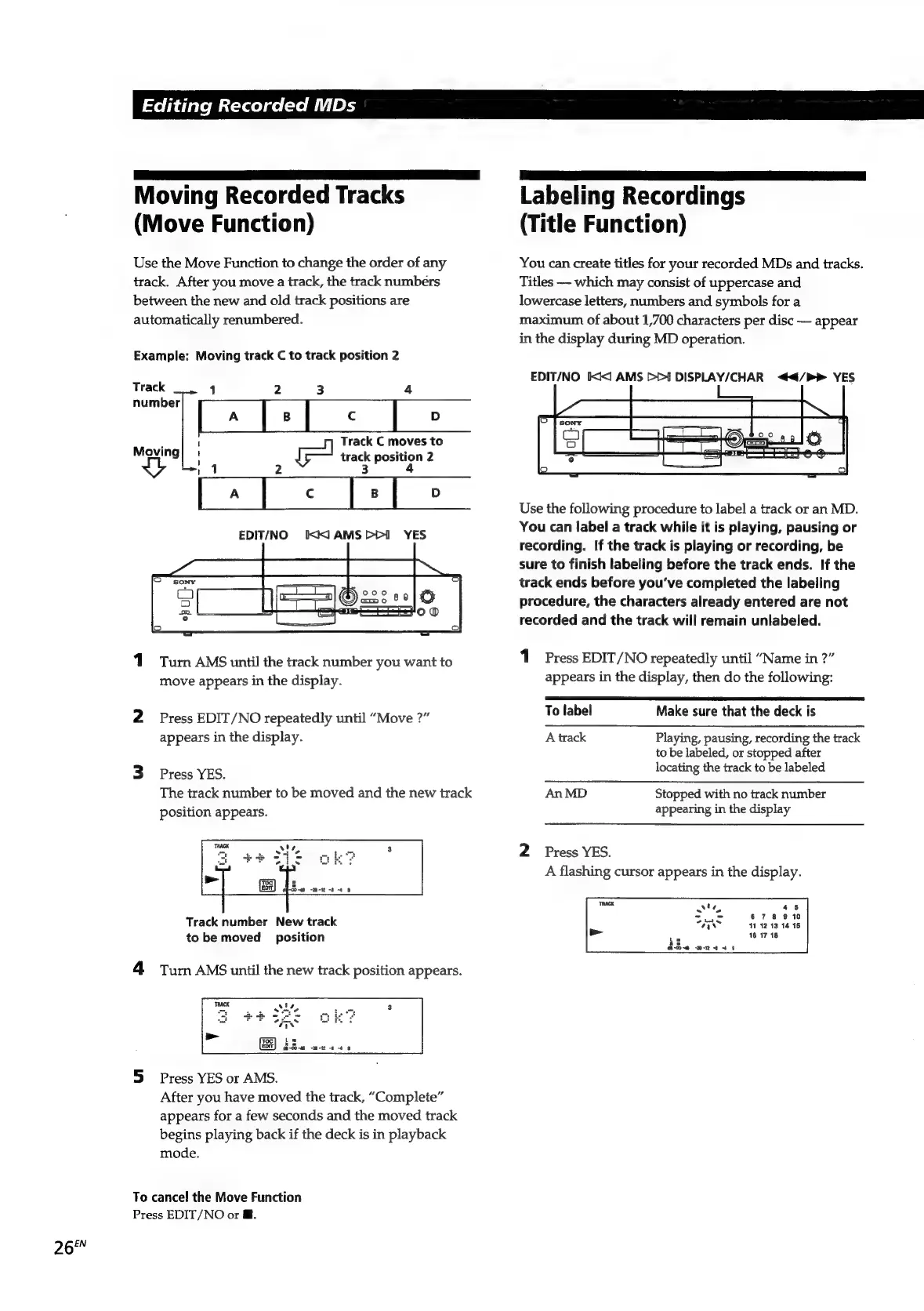
Moving
Recorded
Tracks
Labeling
Recordings
(Move
Function)
(Title
Function)
Use
the
Move
Function
to
change
the
order
of
any
You
can
create
titles
for
your
recorded
MDs
and
tracks.
track.
After
you
move
a
track,
the
track
numbers
Titles
which
may
consist
of
uppercase
and
between
the
new
and
old
track
positions
are
lowercase
letters,
numbers
and
symbols
for
a
automatically
renumbered.
maximum
of
about
1,700
characters
per
disc
appear
in
the
display
during
MD
operation.
Example:
Moving
track
C
to
track
position
2
ae
EDIT/NO
IX
AMS
>>]
DISPLAY/CHAR
</P>
YES
rac
1
2
3
4
number
Track
C
moves
to
it
track
position
2
3
4
“Tel
=
zs
Ee!
Use
the
following
procedure
to
label
a
track
or
an
MD.
You
can
label
a
track
while
it
is
playing,
pausing
or
recording.
If
the
track
is
playing
or
recording,
be
sure
to
finish
labeling
before
the
track
ends.
If
the
track
ends
before
you've
completed
the
labeling
procedure,
the
characters
already
entered
are
not
recorded
and
the
track
will
remain
unlabeled.
Moving
EDIT/NO
IX.
AMS
YES
1
Turn
AMS
until
the
track
number
you
want
to
1
Press
EDIT/NO
repeatedly
until
“Name
in
?”
move
appears
in
the
display.
appears
in
the
display,
then
do
the
following:
2
Press
EDIT/NO
repeatedly
until
“Move
?”
To
label
Make
sure
that
the
deck
is
appears
in
the
display.
A
track
Playing,
pausing,
recording
the
track
to
be
labeled,
or
stopped
after
3
Press
YES
locating
the
track
to
be
labeled
The
track
number
to
be
moved
and
the
new
track
An
MD
Stopped
with
no
track
number
position
appears.
appearing
in
the
display
2
Press
YES.
A
flashing
cursor
appears
in
the
display.
Hoe
was
45
678
9
10
Track
number
New
track
4
41:12:13
14 15
to
be
moved
position
16
17
18
4
Turn
AMS
until
the
new
track
position
appears.
5
Press
YES
or
AMS.
After
you
have
moved
the
track,
“Complete”
appears
for
a
few
seconds
and
the
moved
track
begins
playing
back
if
the
deck
is
in
playback
mode.
To
cancel
the
Move
Function
Press
EDIT/NO
or
@.
265%

Related product manuals