EasyManua.ls Logo

Sony MDS-E55 - Locating a Specific Track

Sony MDS-E55
36 pages
Print Icon
To Next Page IconTo Next Page
To Previous Page IconTo Previous Page
Loading...
¢
You
can
check
the
track
name
at
any
time
while
playing
an
MD
[¥]
Press
SCROLL
on
the
remote.
Since
the
display
shows
up
to
12
characters
at
a
time,
press
SCROLL
again
to
see
the
rest
of
the
track
title
if
the
title
has
13
characters
or
more.
Press
SCROLL
again
to
pause
scrolling,
and
again
to
continue
scrolling.
EEE
————
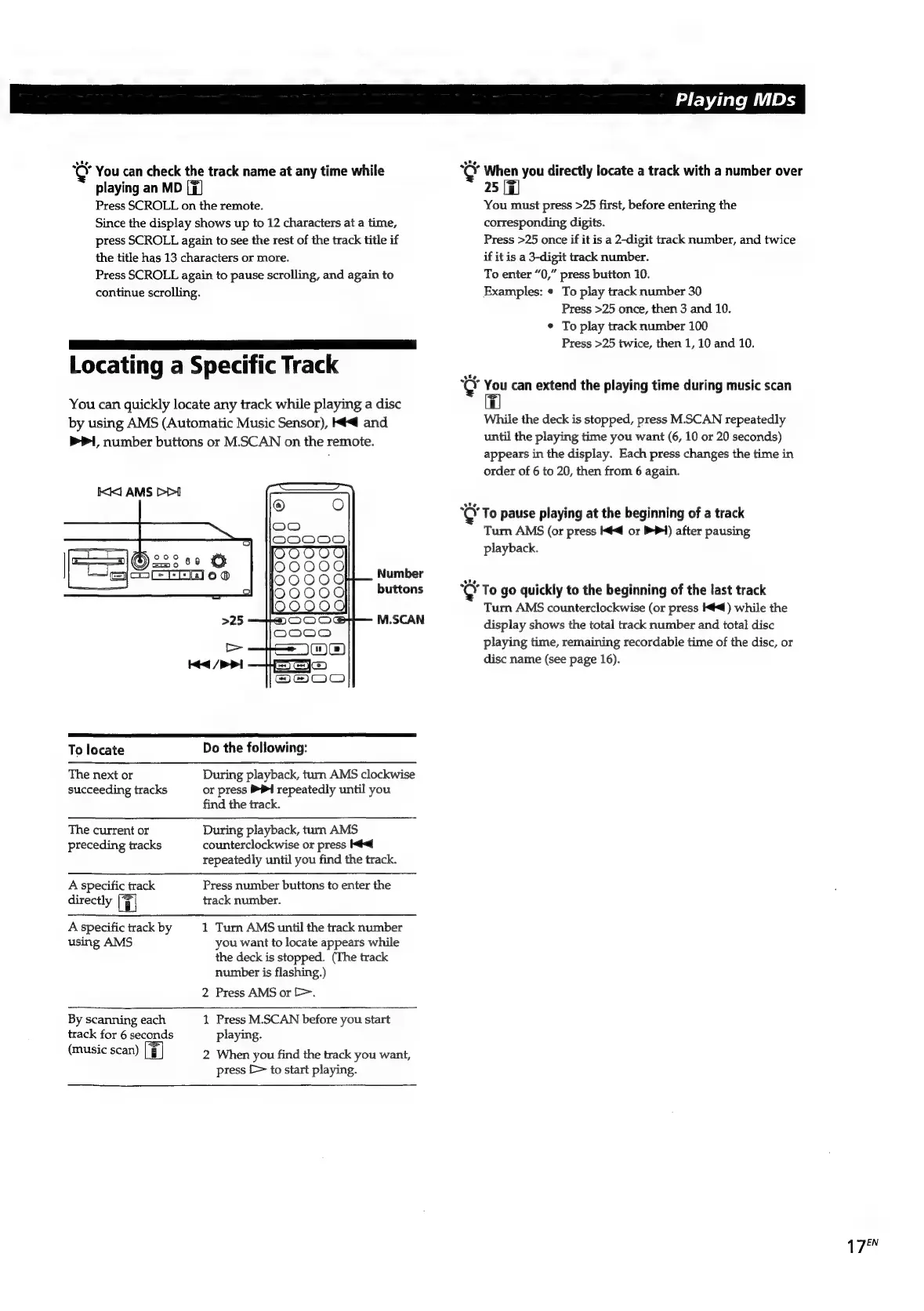
Locating
a
Specific
Track
You
can
quickly
locate
any
track
while
playing
a
disc
by
using
AMS
(Automatic
Music
Sensor),
Ke
and
PI,
number
buttons
or
M.SCAN
on
the
remote.
Number
buttons
M.SCAN
To
locate
The
next
or
succeeding
tracks
The
current
or
preceding
tracks
A
specific
track
directly
A
specific
track
by
using
AMS
By
scanning
each
track
for
6
seconds
(music
scan)
Do
the
following:
During
playback,
turn
AMS
clockwise
or
press
PPI
repeatedly
until
you
find
the
track.
During
playback,
turn
AMS
counterclockwise
or
press
Kd
repeatedly
until
you
find
the
track.
Press
number
buttons
to
enter
the
track
number.
1
Turn
AMS
until
the
track
number
you
want
to
locate
appears
while
the
deck
is
stopped.
(The
track
number
is
flashing.)
2
Press
AMS
or
[>.
1
Press
M.SCAN
before
you
start
playing.
2
When
you
find
the
track
you
want,
press
[>
to
start
playing.
|
Playing
MDs
Key
When
you
directly
locate
a
track
with
a
number
over
25
[7
You
must
press
>25
first,
before
entering
the
corresponding
digits.
Press
>25
once
if
it
is
a
2-digit
track
number,
and
twice
if
it
is
a
3-digit
track
number.
To
enter
“0,”
press
button
10.
Examples:
¢
To
play
track
number
30
Press
>25
once,
then
3
and
10.
¢
To
play
track
number
100
Press
>25
twice,
then
1,
10
and
10.
Key
You
can
extend
the
playing
time
during
music
scan
While
the
deck
is
stopped,
press
M.SCAN
repeatedly
until
the
playing
time
you
want
(6,
10
or
20
seconds)
appears
in
the
display.
Each
press
changes
the
time
in
order
of
6
to
20,
then
from
6
again.
se
To
pause
playing
at
the
beginning
of
a
track
Turn
AMS
(or
press
Ké<@
or
PPI)
after
pausing
playback.
re
To
go
quickly
to
the
beginning
of
the
last
track
Turn
AMS
counterclockwise
(or
press
Ké<@)
while
the
display
shows
the
total
track
number
and
total
disc
playing
time,
remaining
recordable
time
of
the
disc,
or
disc
name
(see
page
16).
1
FEN

Related product manuals