EasyManua.ls Logo

Sony MDS-E55 - Creating Your Own Program (Program Play)

Sony MDS-E55
36 pages
Print Icon
To Next Page IconTo Next Page
To Previous Page IconTo Previous Page
Loading...
2
of
Playing
MDs
aS
eS
an
ae
ae
Creating
Your
Own
Program
(Program
Play)
You
can
specify
the
playback
order
of
the
tracks
on
an
MD
and
create
your
own
programs
containing
up
to
25
tracks.
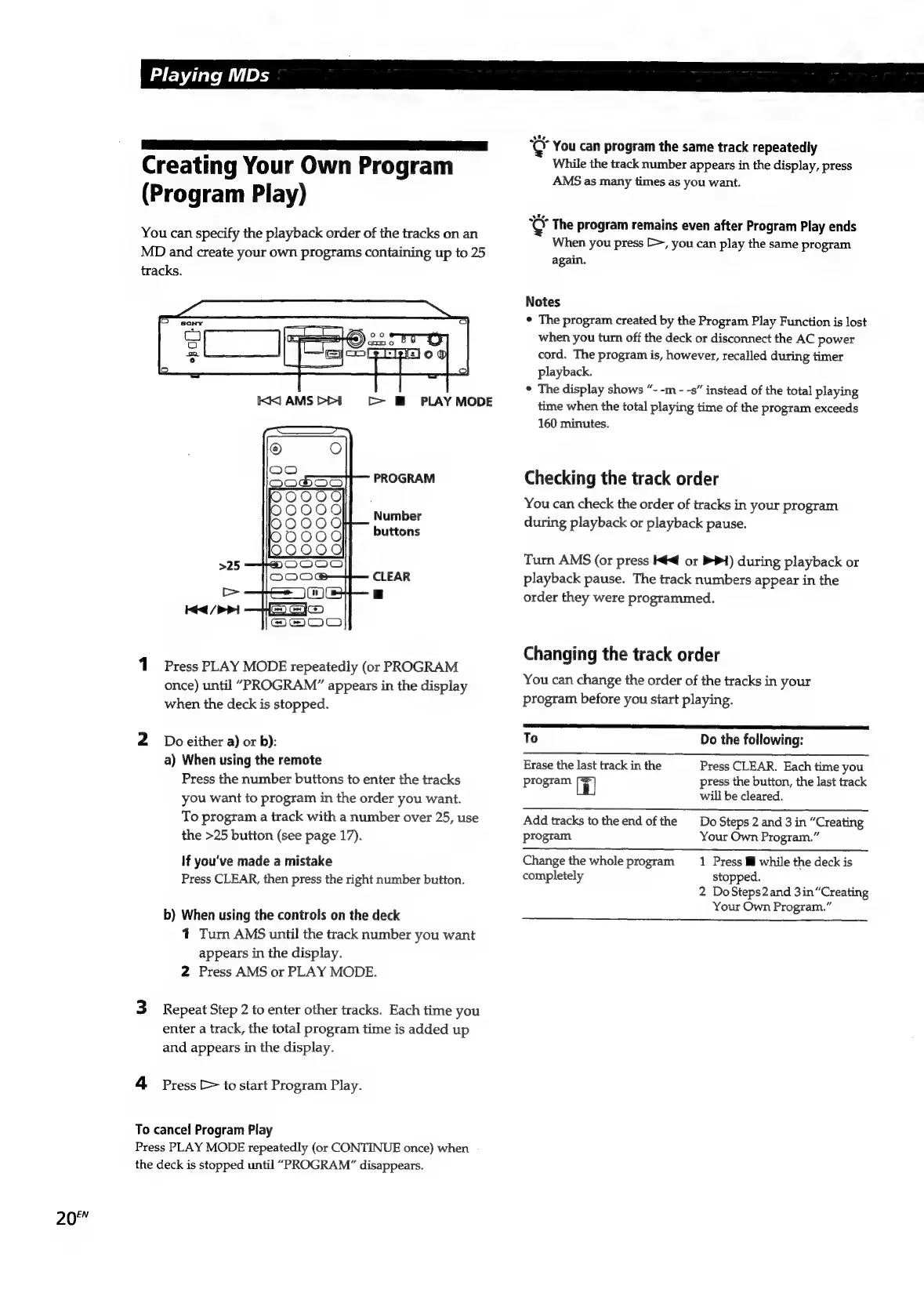
PROGRAM
Number
buttons
CLEAR
1
Press
PLAY
MODE
repeatedly
(or
PROGRAM
once)
until
“PROGRAM”
appears
in
the
display
when
the
deck
is
stopped.
2
Doeither
a)
or
b):
a)
When
using
the
remote
Press
the
number
buttons
to
enter
the
tracks
you
want
to
program
in
the
order
you
want.
To
program
a
track
with
a
number
over
25,
use
the
>25
button
(see
page
17).
If
you've
made
a
mistake
Press
CLEAR,
then
press
the
right
number
button.
b)
When
using
the
controls
on
the
deck
1
Turn
AMS
until
the
track
number
you
want
appears
in
the
display.
2
Press
AMS
or
PLAY
MODE.
3
Repeat
Step
2
to
enter
other
tracks.
Each
time
you
enter
a
track,
the
total
program
time
is
added
up
and
appears
in
the
display.
4
Press
>
to
start
Program
Play.
To
cancel
Program
Play
Press
PLAY
MODE
repeatedly
(or
CONTINUE
once)
when
the
deck
is
stopped
until
“PROGRAM”
disappears.
¢
You
can
program
the
same
track
repeatedly
While
the
track
number
appears
in
the
display,
press
AMS
as
many
times
as
you
want.
¢
The
program
remains
even
after
Program
Play
ends
When
you
press
>,
you
can
play
the
same
program
again.
Notes
°
The
program
created
by
the
Program
Play
Function
is
lost
when
you
turn
off
the
deck
or
disconnect
the
AC
power
cord.
The
program
is,
however,
recalled
during
timer
playback.
*
The
display
shows
“-
-m
-
-s”
instead
of
the
total
playing
time
when
the
total
playing
time
of
the
program
exceeds
160
minutes.
Checking
the
track
order
You
can
check
the
order
of
tracks
in
your
program
during
playback
or
playback
pause.
Turn
AMS
(or
press
K€
or
PPI)
during
playback
or
playback
pause.
The
track
numbers
appear
in
the
order
they
were
programmed.
Changing
the
track
order
You
can
change
the
order
of
the
tracks
in
your
program
before
you
start
playing.
To
Do
the
following:
Erase
the
last
track
in
the
Press
CLEAR.
Each
time
you
program
i
press
the
button,
the
last
track
will
be
cleared.
Add
tracks
to
the
end
of
the
Do
Steps
2
and
3
in
“Creating
program
Your
Own
Program.”
Change
the
whole
program
1
Press
Mi
while
the
deck
is
completely
stopped.
2
DoSteps2
and
3in“Creating
Your
Own
Program.”

Related product manuals