EasyManua.ls Logo

Sony MDS-E55 - Getting Started; Unpacking +.C.csscsensescasetsiteegsoss Covesntscasnsestiecerstosevcaspestieosoupesqosgeaasotesadauesenseaiadensdtstenavncdasateseeas; Comme Ction Siissciscscs Aces Scte Sieve Secs Madan Stnsesitten Dbsngee be Goesckcee Iatenstegreegesoanseodanedpsedoeasoseseuton

Sony MDS-E55
36 pages
Print Icon
To Next Page IconTo Next Page
To Previous Page IconTo Previous Page
Loading...
4eN
Getting
Started
Unpacking
Check
that
you
received
the
following
items:
¢
Remote
commander
(remote)
RM-D7M
(1)
¢
Sony
SUM-3
(NS)
batteries
(2)
Inserting
batteries
into
the
remote
You
can
control
the
deck
using
the
supplied
remote.
Insert
two
R6
(size-AA)
batteries
by
matching
the
+
and
~
on
the
batteries.
When
using
the
remote,
point
it
at
the
remote
sensor
ff
on
the
deck.
er
When
to
replace
batteries
With
normal
use,
the
batteries
should
last
for
about
six
months.
When
the
remote
no
longer
operates
the
deck,
replace
all
the
batteries
with
new
ones.
Notes
¢
Do
not
leave
the
remote
near
an
extremely
hot
or
humid
place.
e
Do
not
drop
any
foreign
object
into
the
remote
casing,
particularly
when
replacing
the
batteries.
¢
Do
not
expose
the
remote
sensor
to
direct
sunlight
or
lighting
apparatuses.
Doing
so
may
cause
a
malfunction.
¢
If
you
don’t
use
the
remote
for
an
extended
period
of
time,
remove
the
batteries
to
avoid
possible
damage
from
battery
leakage
and
corrosion.
ee
a
ee
ae
Pe
ee
|
Connection
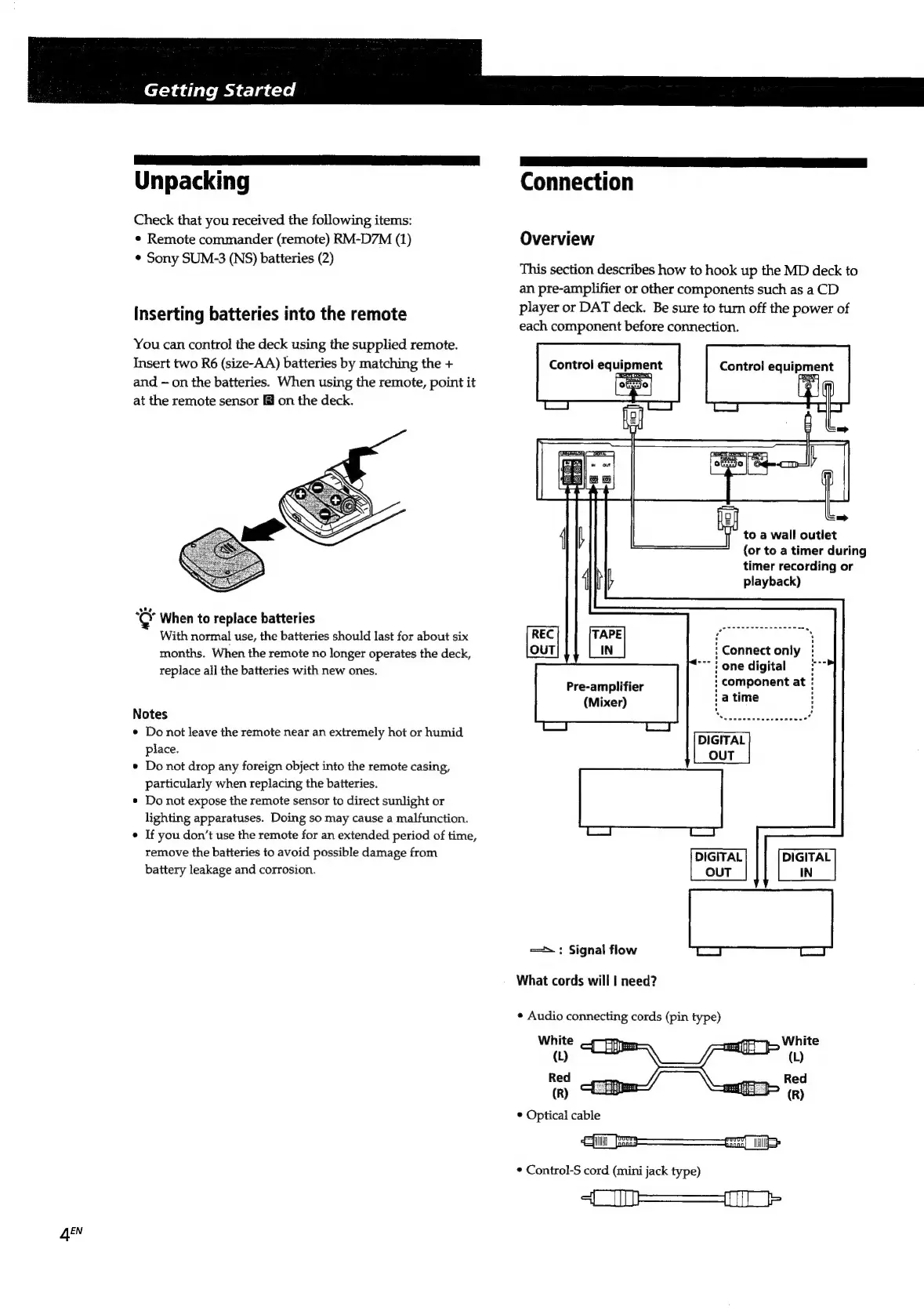
Overview
This
section
describes
how
to
hook
up
the
MD
deck
to
an
pre-amplifier
or
other
components
such
as
a
CD
player
or
DAT
deck.
Be
sure
to
turn
off
the
power
of
each
component
before
connection.
Control
equipment
CHE
ORT
Control
equipment
pore)
4
to
a
wall
outlet
(or
to
a
timer
during
timer
recording
or
{
Mb
playback)
REC
TAPE
-
iy
ia,
pepiala
.
OUT
IN
:
Connect
only
““"
}
one
digital
q
:
component
at
(Mixer)
a
time
.
DIGITAL
OUT
Pre-amplifier
DIGITAL
DIGITAL
OUT
IN
==:
Signal
flow
What
cords
will
|
need?
*
Audio
connecting
cords
(pin
type)
White
—;
(b
Red
(R)
*
Control-S
cord
(mini
jack
type)
=n

Related product manuals