EasyManua.ls Logo

Sony MDS-E55 - Page 23

Sony MDS-E55
36 pages
Print Icon
To Next Page IconTo Next Page
To Previous Page IconTo Previous Page
Loading...
_
Editing
Recorded
MDs
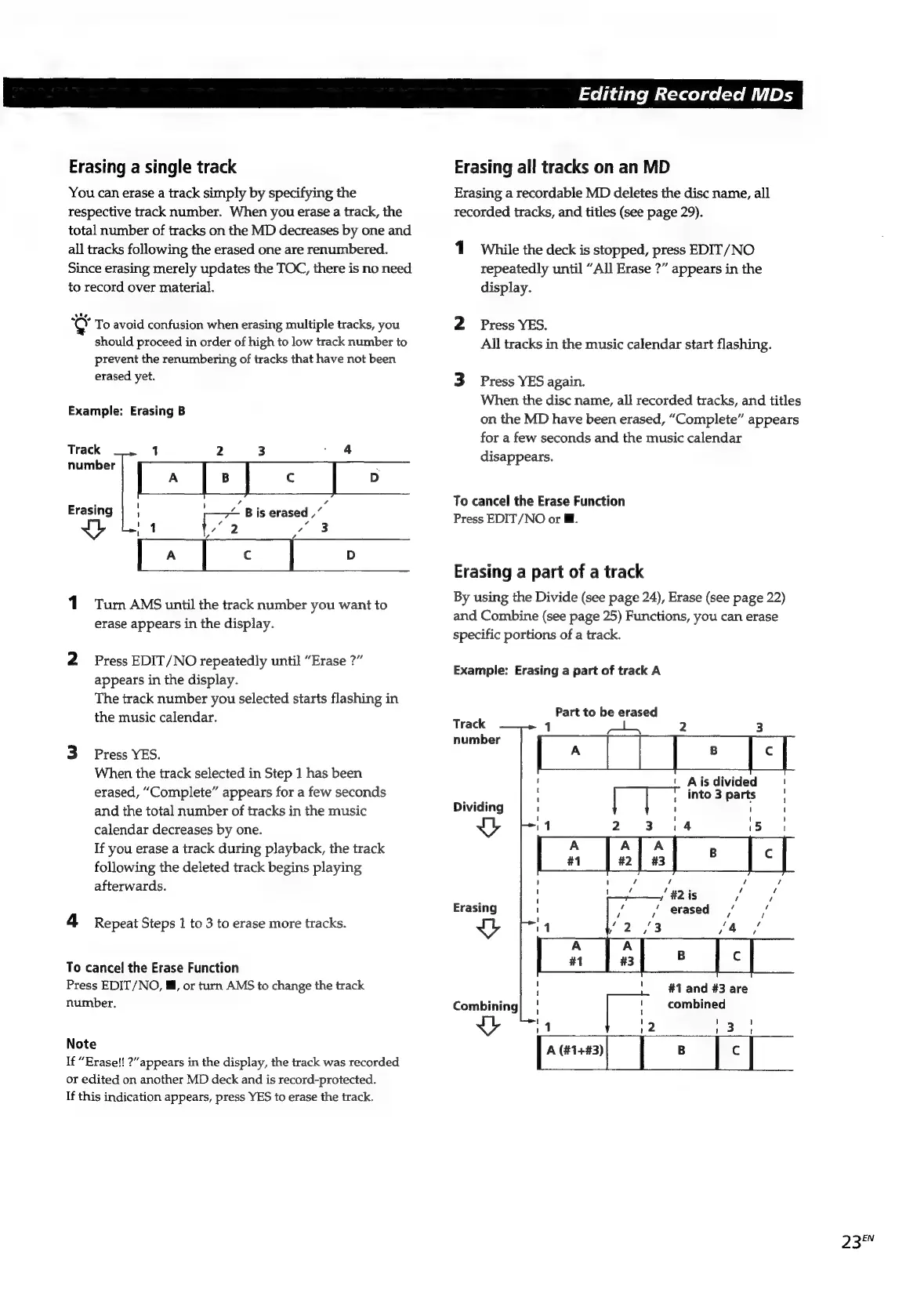
Erasing
a
single
track
You
can
erase
a
track
simply
by
specifying
the
respective
track
number.
When
you
erase
a
track,
the
total
number
of
tracks
on
the
MD
decreases
by
one
and
all
tracks
following
the
erased
one
are
renumbered.
Since
erasing
merely
updates
the
TOC,
there
is
no
need
to
record
over
material.
°C¥
To
avoid
confusion
when
erasing
multiple
tracks,
you
should
proceed
in
order
of
high
to
low
track
number
to
prevent
the
renumbering
of
tracks
that
have
not
been
erased
yet.
Example:
Erasing
B
Track
1
2
3
/
4
number
:
pate]
«
|
i)
,
.
i)
.
f
Erasing
;
~
Bis
erased
,”
1
4
I
Turn
AMS
until
the
track
number
you
want
to
erase
appears
in
the
display.
2
Press
EDIT/NO
repeatedly
until
“Erase
?”
appears
in
the
display.
The
track
number
you
selected
starts
flashing
in
the
music
calendar.
3
Press
YES.
When
the
track
selected
in
Step
1
has
been
erased,
“Complete”
appears
for
a
few
seconds
and
the
total
number
of
tracks
in
the
music
calendar
decreases
by
one.
If
you
erase
a
track
during
playback,
the
track
following
the
deleted
track
begins
playing
afterwards.
4
Repeat
Steps
1
to
3
to
erase
more
tracks.
To
cancel
the
Erase
Function
Press
EDIT/NO,
@,
or
turn
AMS
to
change
the
track
number.
Note
If
“Erase!!
?”
appears
in
the
display,
the
track
was
recorded
or
edited
on
another
MD
deck
and
is
record-protected.
If
this
indication
appears,
press
YES
to
erase
the
track.
Erasing
all
tracks
on
an
MD
Erasing
a
recordable
MD
deletes
the
disc
name,
all
recorded
tracks,
and
titles
(see
page
29).
1
While
the
deck
is
stopped,
press
EDIT/NO
repeatedly
until
“All
Erase
?”
appears
in
the
display.
2
Press
YES.
All
tracks
in
the
music
calendar
start
flashing.
3
Press
YES
again.
When
the
disc
name,
all
recorded
tracks,
and
titles
on
the
MD
have been
erased,
“Complete”
appears
for
a
few
seconds
and
the
music
calendar
disappears.
To
cancel
the
Erase
Function
Press
EDIT/NO
or
@.
Erasing
a
part
of
a
track
By
using
the
Divide
(see
page
24),
Erase
(see
page
22)
and
Combine
(see
page
25)
Functions,
you
can
erase
specific
portions
of
a
track.
Example:
Erasing
a
part
of
track
A
Part
to
be
erased
Track
1
2
3
ea
' \
Aisdivided
'
,
into3
parts
|
Dividing
1
1
1
'
Uy
1
2-
Site
is
A
A
A
#1
#2
|
#3
:
~
~
s
~
"#2
is
je
ys
'
'
1
é
'
i
-
erased
,
1
1
v
(4
i
:
#1
and
#3
are
1
i
combined
11
|
12
Erasing
Vv
Combining
Vv
23°"

Related product manuals