EasyManua.ls Logo

Sony NEX-3 - Deleting Images from Camera

Sony NEX-3
265 pages
Print Icon
To Next Page IconTo Next Page
To Previous Page IconTo Previous Page
Loading...
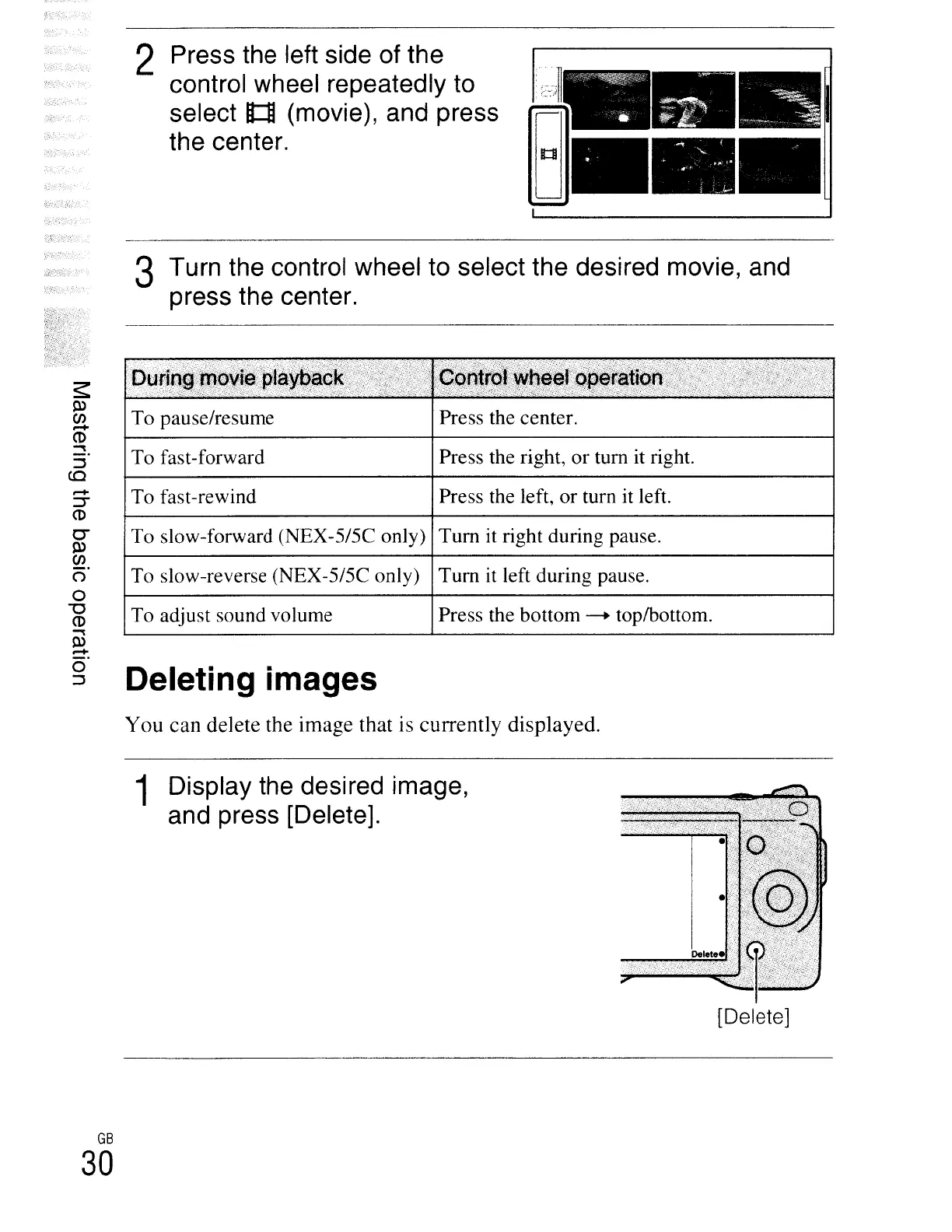
2
Press
the
left
side
of
the
control
wheel
repeatedly
to
select
ft:U
(movie),
and
press
the
center.
;_J.
-'
<·-:·,,;11
R
•••
To slow-reverse (NEX-5/5C only)
Tum
it
left during pause.
To slow-forward (NEX-5/5C only)
Tum
it right during pause.
Press the center.
Press the right, or tum it right.
Press the left, or tum it left.
Press the bottom
-+
top/bottom.
3
Turn
the
control
wheel
to
select
the
desired
movie,
and
press
the
center.
To pause/resume
To fast-forward
To fast-rewind
To adjust sound volume
Deleting images
You
can delete the image that is currently displayed.
1
Display
the
desired
image,
and
press
[Delete].
[Delete]
GB
30

Table of Contents

Other manuals for Sony NEX-3

Related product manuals