EasyManua.ls Logo

Sony NEX-3 - LCD Monitor Icon Guide

Sony NEX-3
265 pages
Print Icon
To Next Page IconTo Next Page
To Previous Page IconTo Previous Page
Loading...
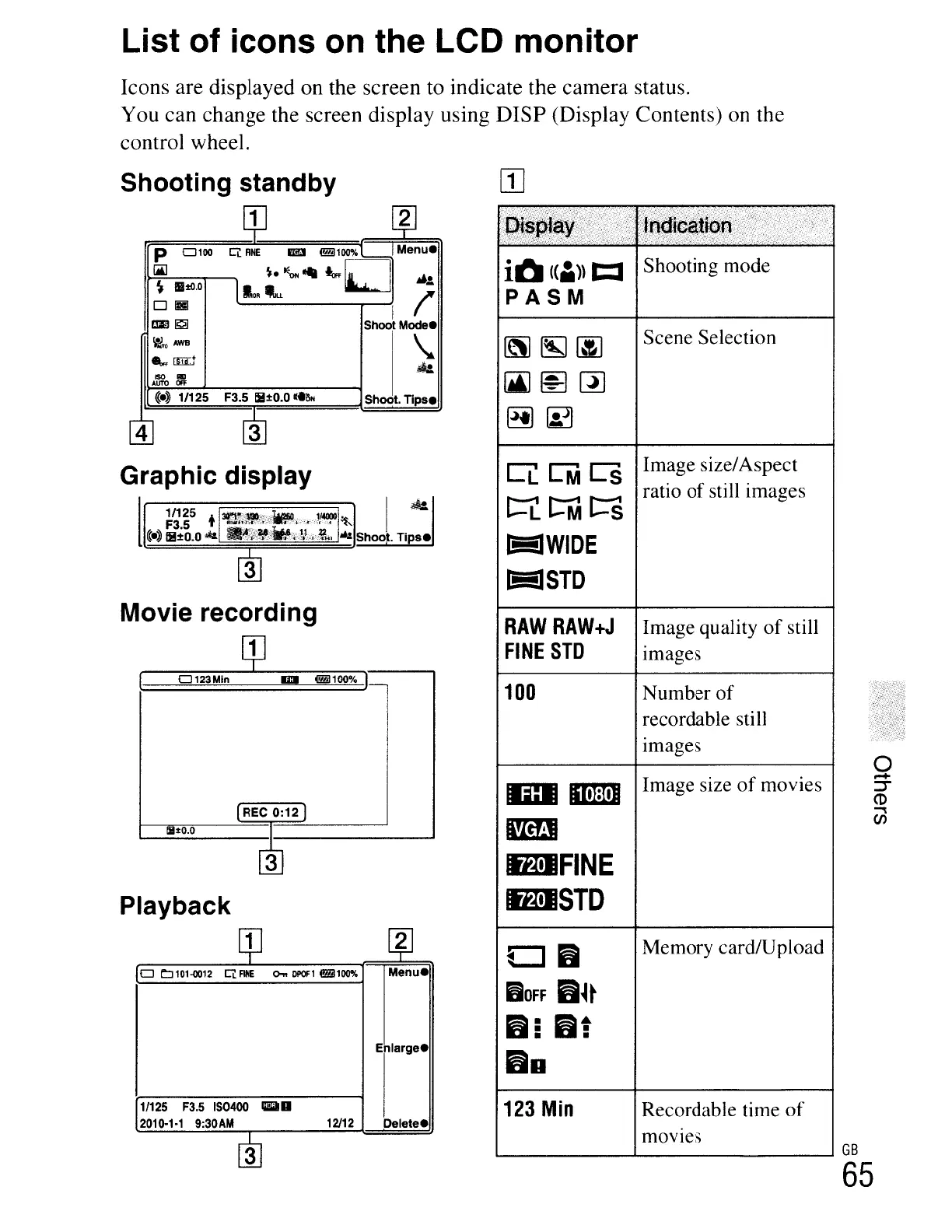
List of icons on the LCD monitor
Icons are displayed on the screen to indicate the camera status.
You can change the screen display using DISP (Display Contents) on the
control wheel.
4 3
Graphic display
l
1/125 t
30!W"'11iO""",,"'-
..
114000·
I
~
F3.5 .
~r~f:;'''::~::j,';'''_;':',;~.:~'-''''-:::''~'''_.~'
«.»
li!:tO.O*
.'*i';;',~,ja¥,J},.~"
Shoot.
Tips.
~
«.»
1/125 F3.5
li!:tO.O
«tilt<
Image size/Aspect
ratio
of
still images
Scene Selection
CLCMCS
t=Lt:MC::S
I!iiIWIDE
I!iiISrD
K\J~(jJ
[ji)~~
~~
it!
(ci\))
t:I
Shooting mode
PASM
Shoot.
Tips.
Ci:
FINE
lEJ
@il1oo%
Menu.
~.~--
"'D
~.:.
10."LL
I I'
Shoot
Mode.
~
..
P
0100
~
ISO
""
AUTO
OfF
~
IIIltO.o
D(ggJ
1m
1!:21
~AWB
...
[ffij
Shooting standby
1
o
L:J
101-0012
Ci:
FlHE
0..
DPOf1
@il100%
Menu.
Enlarge.
RAW
RAW+J
Image quality
of
still
FINE
STD
Images
100
Number
of
recordable still
Images
0
Image size
of
movies
.-+
ID
IImIm
::r
CD
"""
I!m!
(J)
ImJIFINE
ImJISTO
CJ6
Memory cardlUpload
DOFF
6~~
656:
60
123
Min
Recordable time
of
mOVIes
GB
65
21
qJ
0123Min
IDlI
@il100% I
REC
0:12
Iil±O.O
3
1/125
F3.5
IS0400
_II
2010·1·1
9:30AM
12/12
Delete.
Movie recording
Playback

Table of Contents

Other manuals for Sony NEX-3

Related product manuals