Using the guide function of the camera
The camera provides various "Help Guides" which explain the functions, and
"Shooting Tips" which introduce tips for better shooting. Use these guides to
make better use
of
the camera.
17
1<Advanced>
Portrait
9
Backe
• Freezing SUbject
motion
~
I
II
I
mill
1111I
:".
-
..
"....... ,
.....
IlL I
III
~
II
I
Hili
!
III
!
,
......
-.-,"".,-.'
! J1II
III
I
IIIIIUlm
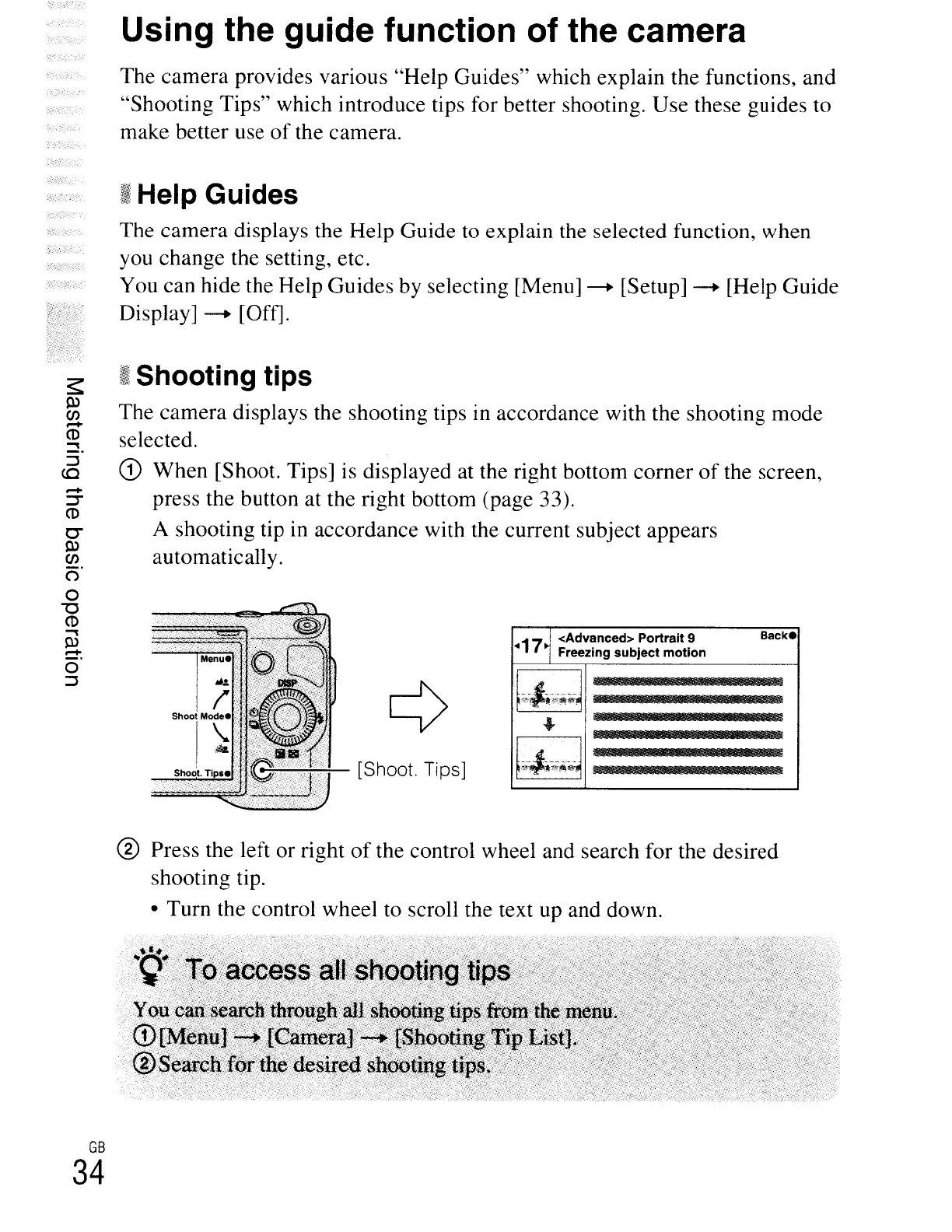
[Shoot. Tips]
f
'"T~
Sho~l.
Tip.
~t
Shooting tips
The camera displays the shooting tips in accordance with the shooting mode
selected.
CD
When [Shoot. Tips] is displayed at the right bottom corner
of
the screen,
press the button at the right bottom (page 33).
A shooting tip in accordance with the current subject appears
automatically.
I Help Guides
The camera displays the Help Guide
to
explain the selected function, when
you change the setting, etc.
You can hide the Help Guides by selecting [Menu]
---+ [Setup] ---+ [Help Guide
Display]
---+ [Off].
-
~
CD
0"
~
CJ)
()
o
"'0
CD
~
~
-
o
::J
® Press the left or right
of
the control wheel and search for the desired
shooting tip.
• Turn the control wheel to scroll the text up and down.
GB
34





 To Next Page