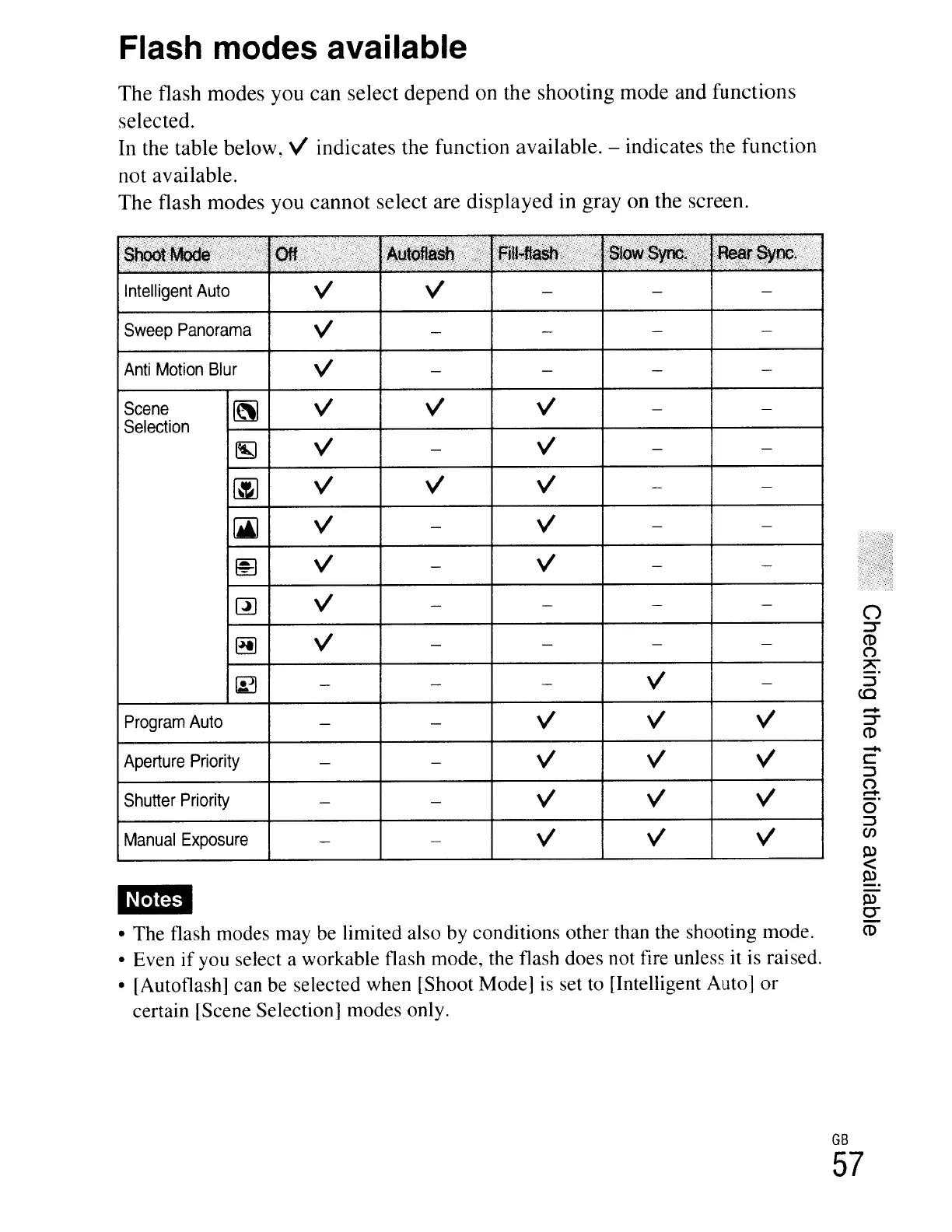
Flash modes available
The
flash
modes
you can select
depend
on the shooting
mode
and functions
selected.
In
the table below,
v'
indicates the function available. - indicates the function
not available.
The
flash
modes
you
cannot
select are
displayed
in gray
on
the screen.
• The flash modes may be limited also
by
conditions other than the shooting mode.
• Even
if
you select a workable flash mode, the flash does not fire unless it
is
raised.
• [Autoflash] can be selected when [Shoot Mode]
is
set to [Intelligent Auto] or
certain [Scene Selection] modes only.
Intelligent
Auto
v'
Sweep
Panorama
v'
Anti
Motion
Blur
v'
Scene
[\]
v'
Selection
~
v'
~
v'
[ji)
v'
~
v'
rn
v'
~
v'
~
Program
Auto
Aperture
Priority
Shutter
Priority
Manual
Exposure
mm
v' v'
v' v'
o
::::r
(1)
C1
7\
::J
(Q
.....
::::r
(1)
-
c:
::J
C1
!:!:.
o
::J
en
~
<
~
~
0-
ro
GB
57





 To Next Page