leamera
Allows
you
to
set
shooting
functions,
such
as
continuous
shooting,
self-timer,
and
flash.
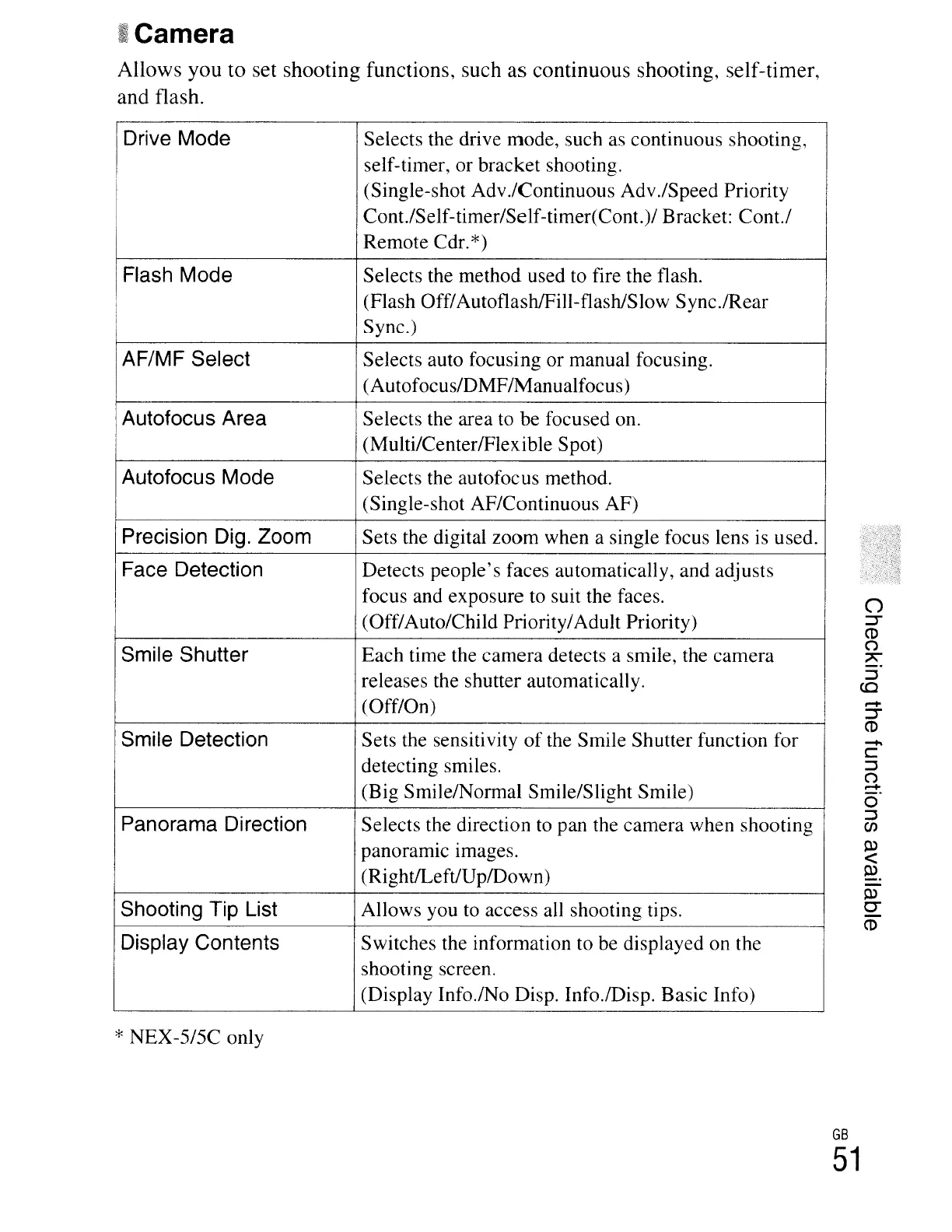
IDrive Mode
Selects the drive mode, such as continuous shooting,
self-timer, or bracket shooting.
(Single-shot Adv.lContinuous Adv.lSpeed Priority
Cont./Self-timer/Self-timer(ConL)/ Bracket: Cont.!
Remote Cdr.*)
Flash Mode
Selects the method used to fire the flash.
(Flash Off/Autoflash/FiII-flash/Slow Sync./Rear
Sync.)
AF/MF Select Selects auto focusing or manual focusing.
(Autofocus/DMF/Manualfocus)
Autofocus Area
Selects the area to be focused 011.
(Multi/CenterlFlexible Spot)
Autofocus Mode Selects the autofocus method.
(Single-shot AF/Continuous AF)
Precision Dig. Zoom
Sets the digital zoom when a single focus lens is used.
~-
Face Detection
Detects people's faces automatically, and adjusts
focus and exposure to suit the faces.
(Off/Auto/Child Priority/Adult Priority)
Smile Shutter Each time the camera detects a smile, the camera
releases the shutter automatically.
(Off/On)
Smile Detection
Sets the sensitivity
of
the Smile Shutter function for
detecting smiles.
(Big Smile/Normal Smile/Slight Smile)
Panorama Direction
Selects the direction
to
pan the camera when shooting
panoramIc Images.
(Right/Left/UplDown)
Shooting Tip List Allows you
to
access all shooting tips.
Display Contents Switches the information to be displayed on the
shooting screen.
(Display Info.lNo Disp. Info.lDisp. Basic Info)
* NEX-5/5C only
-
C
:::J
(")
.-+
o'
:::J
en
l:l)
<
l:l).
l:l)
0-
CD
GB
51



 To Next Page