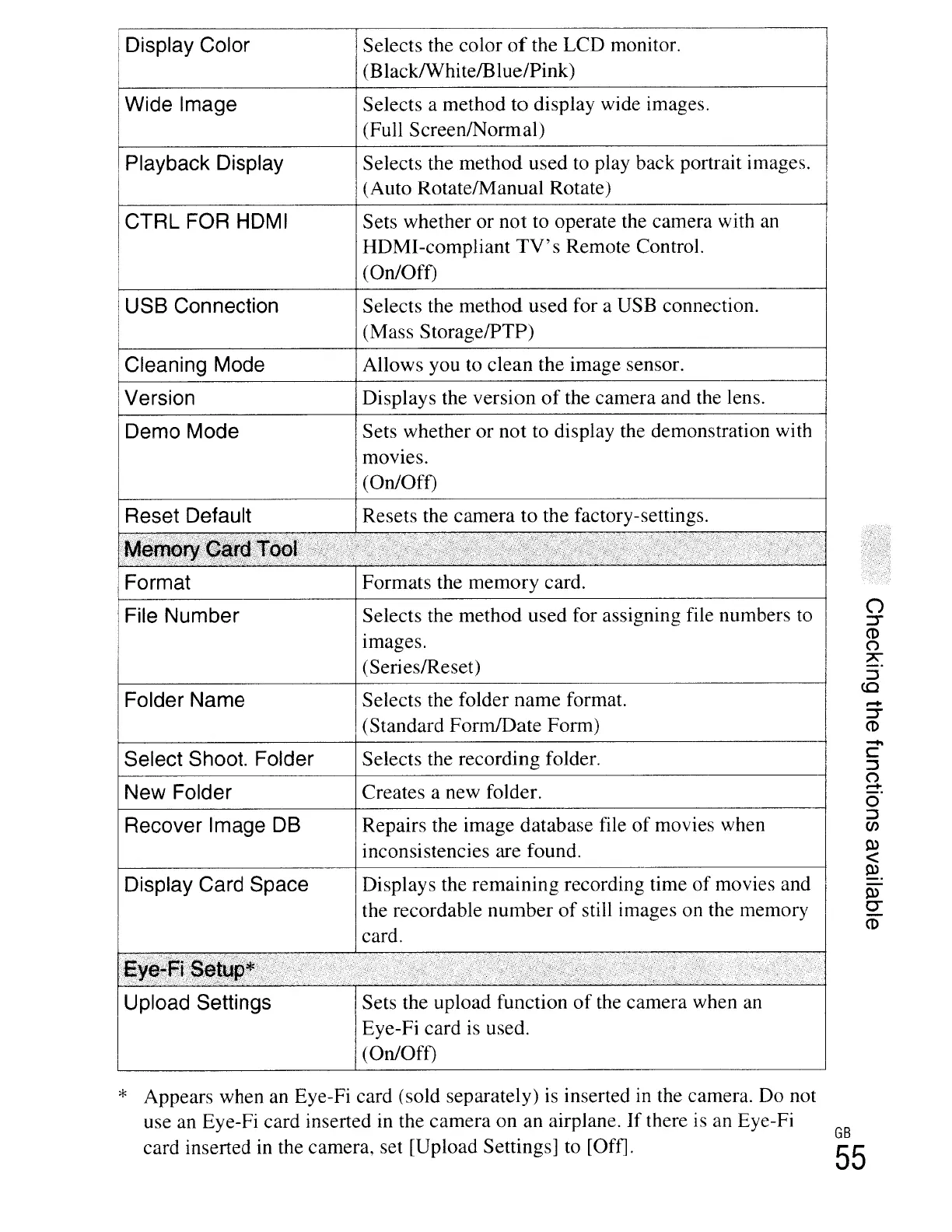
IDisplay Color
IWide Image
Playback Display
CTRL FOR HOMI
USB Connection
Cleaning Mode
Version
Demo Mode
Reset Default
Format
File Number
Folder Name
Select Shoot. Folder
New Folder
Recover Image
DB
Display Card Space
Selects the color
of
the LCD monitor.
(Black/WhitefBlue/Pink)
Selects a method
to
display wide images.
(Full ScreenlNormal)
Selects the method used to play back portrait images.
(Auto RotatelManual Rotate)
Sets whether or not to operate the camera with
an
HDMI-compliant
TV's
Remote Control.
(On/Off)
Selects the method used for a USB connection.
(Mass StoragelPTP)
Allows you to clean the image sensor.
Displays the version
of
the camera and the lens.
Sets whether or not to display the demonstration with
mOVIes.
(On/Off)
Resets the camera to the factory-settings.
Formats the memory card.
Selects the method used for assigning file numbers to
Images.
(Series/Reset)
Selects the folder name format.
(Standard FormlDate Form)
Selects the recording folder.
Creates a new folder.
Repairs the image database file
of
movies when
inconsistencies are found.
Displays the remaining recording time
of
movies and
the recordable number
of
still images on the memory
card.
.-+
~
CD
Upload Settings
Sets the upload function
of
the camera when
an
Eye-Fi card
is
used.
(On/Off)
* Appears when
an
Eye-Fi card (sold separately)
is
inserted in the camera. Do not
use an Eye-Fi card inserted in the camera on an airplane.
If
there is an Eye-Fi
card inserted
in
the camera, set [Upload Settings] to [Off].
GB
55





 To Next Page