– 22 –
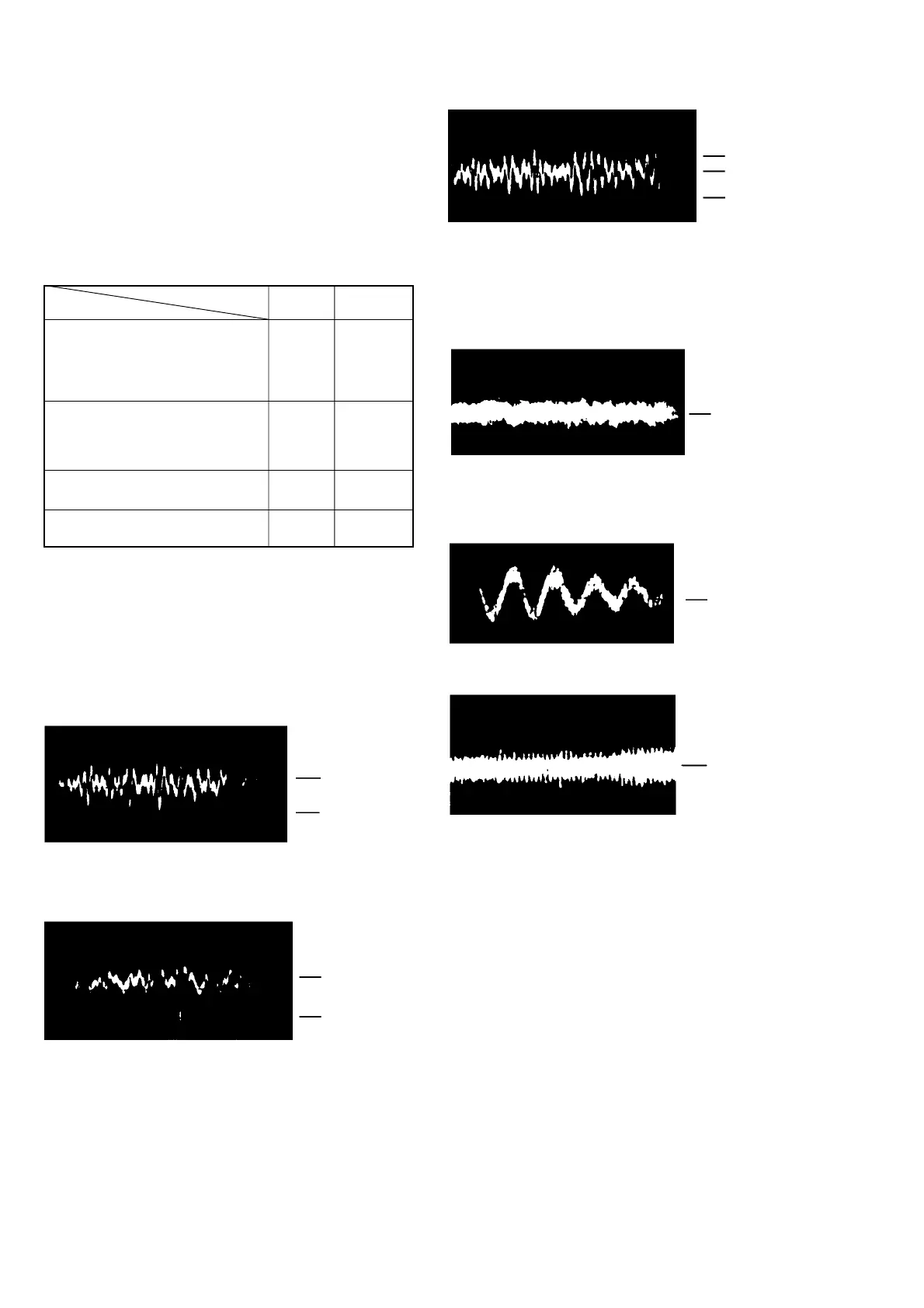
high focus gain
0 V
100 mV
VOLT/DIV: 100 mV
TIME/DIV: 2 ms
VOLT/DIV: 100 mV
TIME/DIV: 1 ms
100 mV
75 mV
0 V
VOLT/DIV: 0.2 V
TIME/DIV: 2 ms
0 V
VOLT/DIV: 0.2 V
TIME/DIV: 2 ms
0 V
0 V
VOLT/DIV: 0.2 V
TIME/DIV: 2 ms
Gain
Focus Tracking
Symptoms
Focus/Tracking Gain Check
Adjustment Location: CD board (Component side)
A frequency response analyzer is necessary in order to perform this
check exactly.
However, this gain has a margin, so even if it is slightly off, there is
no problem.
Focus/Tracking gain determines the pick-up follow-up (vertical and
horizontal) relative to mechanical noise and mechanical shock when
the 2-axis device operate.
• The time until music starts becomes
longer for STOP , CD u or
automatic selection (m, M buttons
pressed). (Normally takes about 2
seconds.)
• Music does not start and disc continues
to rotate for STOP , CD u or
automatic selection (m, M buttons
pressed).
• Sound is interrupted during PLAY. Or
time counter display stops progressing.
• More noise during 2-axis device
operation.
low low or high
––– low
––– low
high high
Check Procedure:
1. Keep the set horizontal.
2. Inset disk (YEDS-18) and press u button.
3. Connect an oscilloscope to TP (FE) and TP (VC) on the CD
board.
4. Check that the waveform is as shown in the figure below. (Focus
waveform)
• Good Example
low focus gain
• Incorrect Examples (DC level changes more than on adjusted
waveform)
5. Connect an oscilloscope between TP (TE) and TP (VC).
6. Insert disc (YEDS-18) and press the CD u button.
7. Check that the waveform is as shown in the figure below.
(tracking waveform)
• Incorrect Examples (Fundamental wave appears)
0 V
200 mV
VOLT/DIV: 100 mV
TIME/DIV: 2 ms
low tracking gain
high tracking gain
(high fundamental wave than for low gain)


 To Next Page