63
GB
Editing Files
Using a Track Mark
Adding a track mark
You can add a track mark at a point at
which you would like to divide a file later
or locate during playback. You can add a
maximum of 98 track marks to each file.
During recording, playing back, or
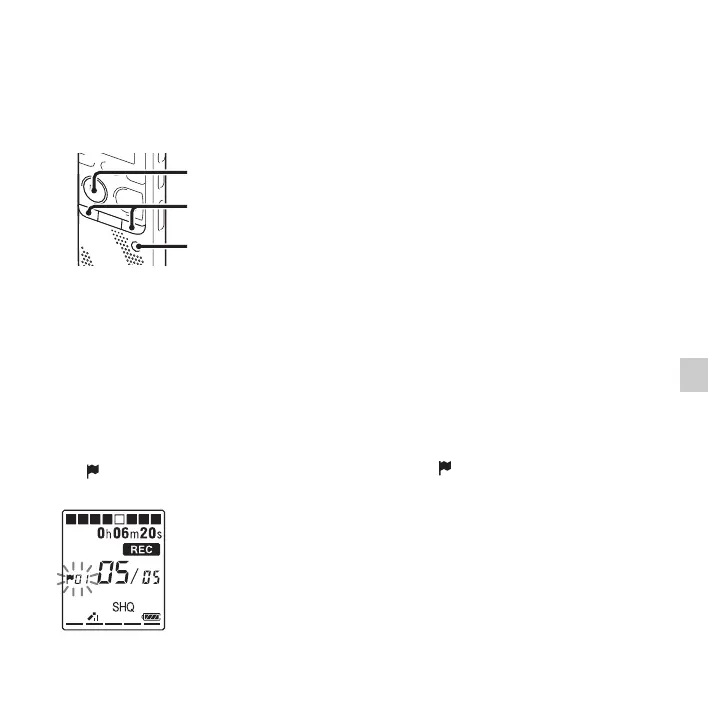
recording pausing, press T-MARK at the
position you want to add a track mark.
The (track mark) indicator flashes, and a
track mark is added.
P Notes
• You can add a track mark only to files
recorded using the IC recorder. However,
when you edit files using the supplied Sound
Organizer software, adding a track mark to
the files may not be possible.
• You cannot add a track mark at a point
within 0.5 seconds from another track mark.
• You cannot add a track mark at the very
beginning or at the very end of the file.
• If there are already 98 track marks in a file,
you cannot add any more track marks.
• When a track mark is added during
playback, the playback stops.
To locate a track mark and
starting playback at the track
mark
Press –. or >+ in the stop mode.
When the (track mark) indicator flashes
once, press
N PLAY/STOP•ENTER.
N PLAY/
STOP•ENTER
T-MARK
–., >+



 To Next Page