1-3
12
Setting up the remote commander
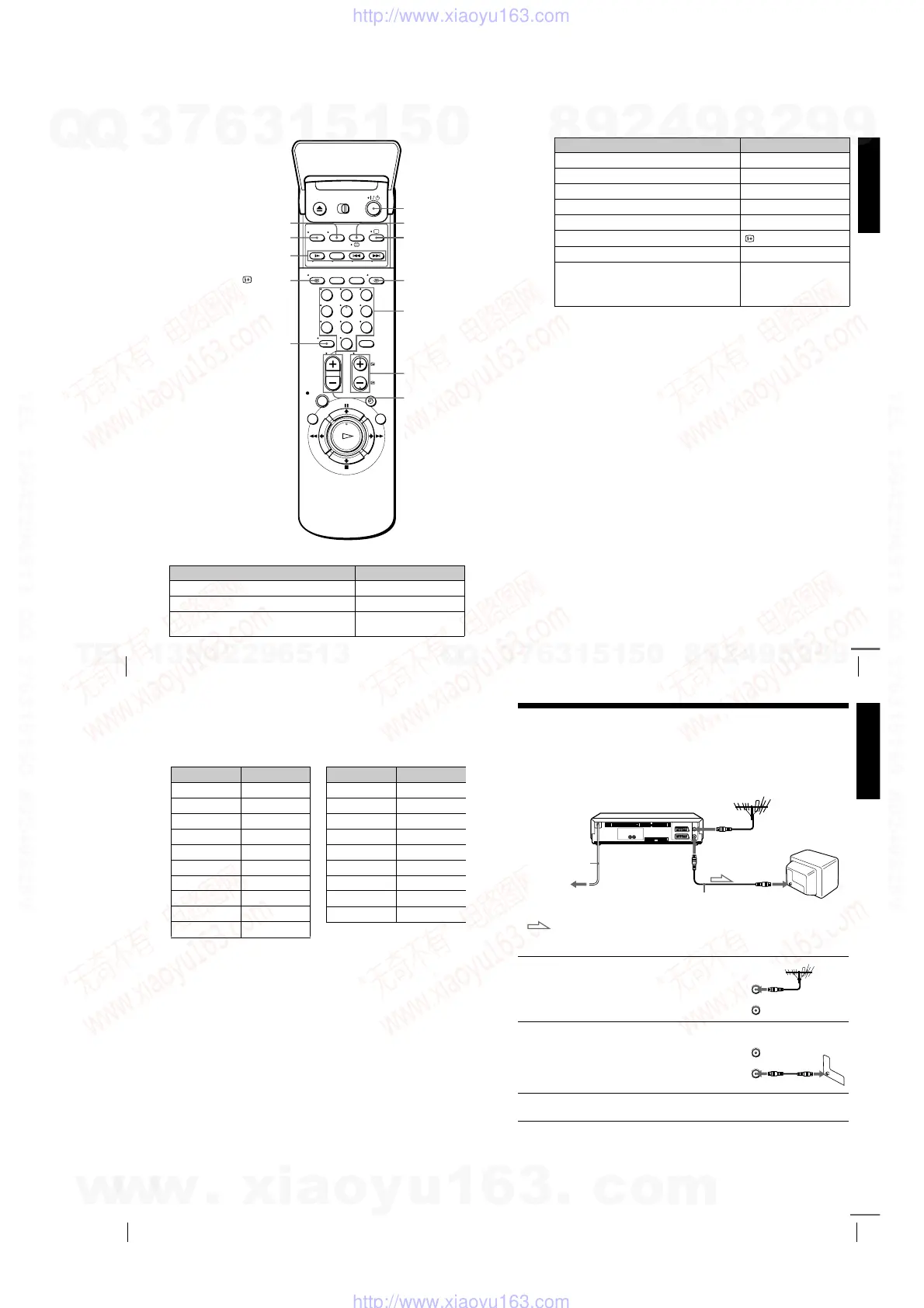
TV control buttons
To Press
Set the TV to standby mode
?
/
1
Select an input source: aerial in or line in
t
TV/VIDEO
Select the TV’s programme position Programme number buttons,
-
, PROG +/–
PROG +/–/
c
/
C
2
22
2
+/–
123
456
789
0
Programme
number
buttons
WIDE
DISPLAY
?
??
?
/
1
11
1
t
tt
t
TV/VIDEO
-
AUDIO MONITOR
FASTEXT buttons
/
a
Getting Started
13
Setting up the remote commander
Notes
• With normal use, the batteries should last about three to six months.
• If you do not use the remote commander for an extended period of time, remove
the batteries to avoid possible damage from battery leakage.
• Do not use a new battery together with an old one.
• Do not use different types of batteries together.
• Some buttons may not work with certain Sony TVs.
* SLV-SE810N/K only
Controlling other TVs with the remote commander
(SLV-SE810N/K only)
The remote commander is preprogrammed to control non-Sony TVs. If your
TV is listed in the following table, set the appropriate manufacturer’s code
number.
* These buttons may not work with all TVs.
Adjust the volume of the TV
2
+/–
Switch to TV (Teletext off)*
a
(TV)
Switch to Teletext*
/
(Teletext)
Select the sound AUDIO MONITOR
Use FASTEXT* FASTEXT buttons
Call up the on-screen display
DISPLAY
Change the Teletext page*
c
/
C
Switch to/from wide mode of a Sony wide TV (For
other manufactures’ wide TVs, see “Controlling
other TVs with the remote commander (SLV-
SE810N/K only)” below.)
WIDE
1
Set
[TV]
/
[VIDEO]
at the top of the remote commander to
[TV]
.
2
Hold down
?
/
1
, and enter your TV’s code number using the programme
number buttons. Then release
?
/
1
.
Now you can use the following TV control buttons to control your TV:
?
/
1
,
t
TV/VIDEO, programme number buttons,
-
(ten’s digit),
PROG +/–,
2
+/–,
a
(TV),
/
(Teletext), FASTEXT buttons, WIDE*,
MENU*,
M
/
m
/
<
/
,
*, and OK*.
To Press
continued
14
Setting up the remote commander
Code numbers of controllable TVs
If more than one code number is listed, try entering them one at a time until
you find the one that works with your TV.
To switch to wide mode, see the footnotes below this table for the applicable
code numbers.
*
1
Press WIDE to switch the wide picture mode on or off.
*
2
Press WIDE, then press
2
+/– to select the wide picture mode you want.
*
3
Press WIDE. The menu appears on the TV screen. Then, press
M
/
m
/
<
/
,
to
select the wide picture you want and press OK.
Tip
• When you set your TV’s code number correctly while the TV is turned on, the TV
turns off automatically.
Notes
• If you enter a new code number, the code number previously entered will be
erased.
• If the TV uses a different remote control system from the one programmed to work
with the VCR, you cannot control your TV with the remote commander.
• When you replace the batteries of the remote commander, the code number may
change. Set the appropriate code number every time you replace the batteries.
Manufacturer Code number
Sony
01*
1
, 02
Akai 68
Ferguson 52
Grundig
10*
1
, 11*
1
Hitachi 24
JVC 33
Loewe 45
Mivar 09, 70
NEC 66
Nokia
15, 16, 69*
3
Panasonic
17*
1
, 49
Philips
06*
1
, 07*
1
, 08*
1
Saba 12, 13
Samsung 22, 23
Sanyo 25
Sharp 29
Telefunken 36
Thomson
43*
2
Tosh iba 3 8
Manufacturer Code number
Getting Started
15
Connecting the VCR
Step 3 : Connecting the VCR
If your TV has a Scart (EURO-AV) connector, see page 16.
If your TV does not have a Scart (EURO-AV) connector
Note
• When you connect the VCR and your TV only with an aerial cable, you have to
tune your TV to the VCR (see page 19).
1
Disconnect the aerial cable from
your TV and connect it to
AERIAL IN on the rear panel of
the VCR.
2
Connect AERIAL OUT of the
VCR and the aerial input of your
TV using the supplied aerial cable.
3
Connect the mains lead to the mains.
Mains lead
AERIAL IN
to mains
Aerial cable (supplied)
AERIAL OUT
: Signal flow
AERIAL IN
AERIAL
ANTENNE
IN
ENTREE
OUT
SORTIE
IN
ENTREE
OUT
SORTIE
AERIAL
ANTENNE
continued
w
w
w
.
x
i
a
o
y
u
1
6
3
.
c
o
m
Q
Q
3
7
6
3
1
5
1
5
0
9
9
2
8
9
4
2
9
8
T
E
L
1
3
9
4
2
2
9
6
5
1
3
9
9
2
8
9
4
2
9
8
0
5
1
5
1
3
6
7
3
Q
Q
TEL 13942296513 QQ 376315150 892498299
TEL 13942296513 QQ 376315150 892498299
http://www.xiaoyu163.com
http://www.xiaoyu163.com



 To Next Page