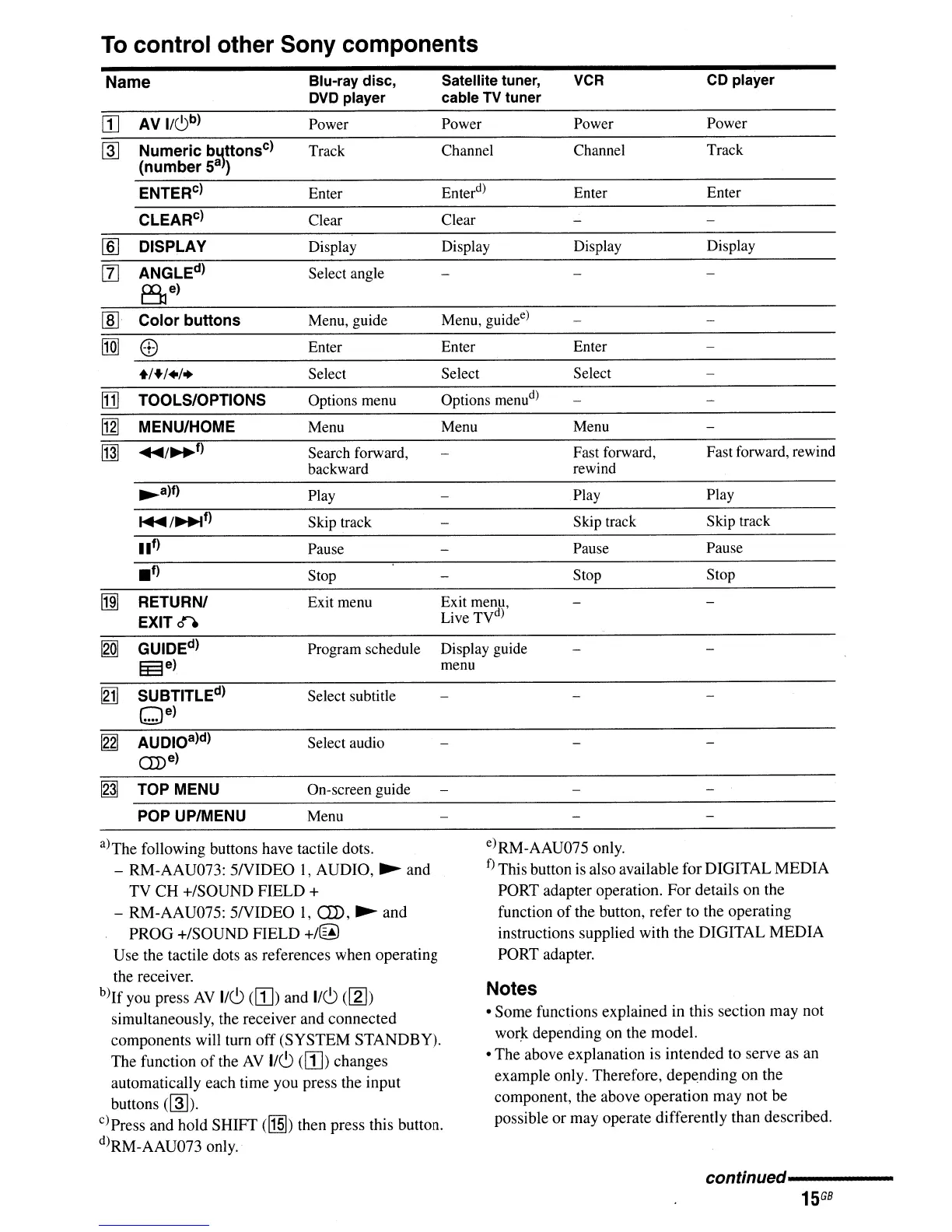
To
control other Sony components
Select Select
Enter Enter
Menu, guide
e
)
Options menu
d
)
Play
Fast forward. rewind
Pause
Skip track
Stop
Satellite tuner,
VCR
CD
player
cable
TV
tuner
Power Power Power
Channel
Channel Track
Enter
d
)
Enter Enter
Clear
Display Display Display
Stop
Skip track
Fast forward,
rewind
Play
Menu Menu
Pause
Display guide
menu
Exit menu,
Live TV
d
)
Name
Blu-ray
disc,
DVD
player
[I]
AV
I/C)b)
Power
~
Numeric
b~ttonsC)
Track
(number
Sa)
ENTER
c
)
Enter
CLEAR
c
)
Clear
lID
DISPLAY
Display
[II
ANGLEd)
Select angle
Be)
~l
Color
buttons
Menu, guide
[1Q]
8
Enter
+/+/+/+
Select
[1]
TOOLS/OPTIONS
Options menu
[2J
MENU/HOME Menu
~
....
/~f)
Search forward,
backward
~a)f)
Play
~/~t)
Skip track
lit)
Pause
.f)
Stop
~
RETURN/ Exit menu
EXIT
0'"
[gQ]
GUIDEd)
Program schedule
~e)
~
SUBTITLEd)
Select subtitle
Qe)
~
AUDIOa)d)
Select audio
aD
e)
~
TOP
MENU On-screen guide
POP
UP/MENU Menu
a)The following buttons have tactile dots.
- RM-AAU073:
5NIDEO
1,
AUDIO,
~
and
TV
CH
+/SOUND
FIELD
+
- RM-AAU075:
5NIDEO
1,
aD,
~
and
PROG
+/SOUND
FIELD
+/@
Use the tactile dots as references when operating
the receiver.
b)1f
you press
AV
1/6
(W)
and 1/6
([g])
simultaneously, the receiver and connected
components will tum
off
(SYSTEM
STANDBY).
The function
of
the
AV
1/6
(W)
changes
automatically each time you press the input
buttons
(~).
c)Press and hold SHIFT
(~)
then press this button.
d)RM-AAU073 only.
e)RM-AAU075 only.
f) This button is also available for DIGITAL
MEDIA
PORT adapter operation.
For
details on the
function
of
the button, refer to the operating
instructions supplied with
the
DIGITAL
MEDIA
PORT adapter.
Notes
•
Some
functions explained in this section may not
wor~
depending on the model.
•
The
above explanation is intended to serve as an
example only. Therefore,
depending
on the
component, the above
operation
may not be
possible
or
may operate differently than described.
continued----------
15
GB



 To Next Page