5:
Connecting
the
antennas
(aerials)
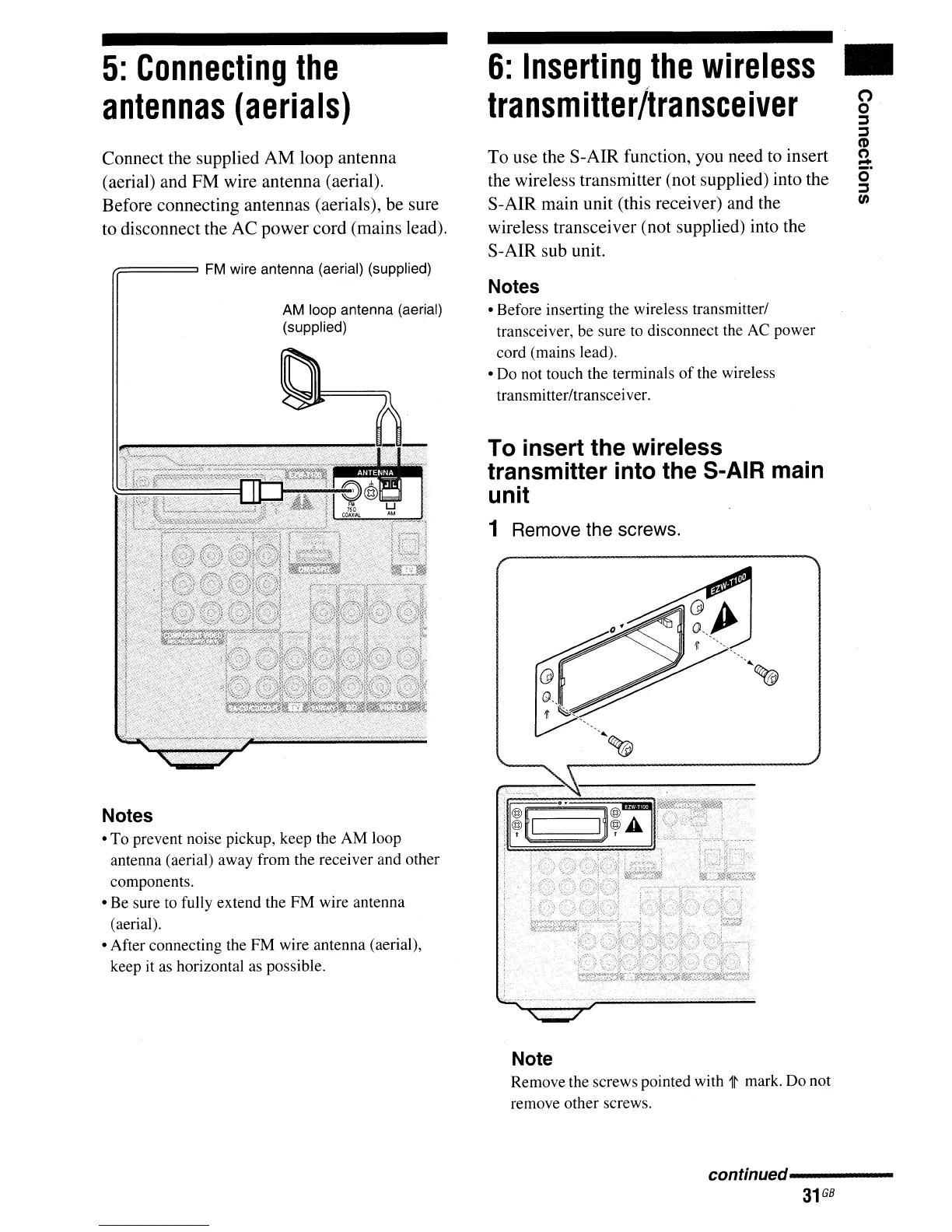
Connect the supplied
AM
loop antenna
(aerial) and FM wire antenna (aerial).
Before connecting antennas (aerials), be sure
to disconnect the AC power cord (mains lead).
r;:====
FM
wire antenna (aerial) (supplied)
AM loop antenna (aerial)
(supplied)
Notes
• To prevent noise pickup, keep the AM loop
antenna (aerial) away from the receiver and other
components.
• Be sure to fully extend the FM wire antenna
(aerial).
• After connecting the FM wire antenna (aerial),
keep it as horizontal
as
possible.
6:
Inserting
the
wireless
tra
nsm
itte
r
Itra
nsee
ive
r
To use the S-AIR function, you need
to
insert
the wireless transmitter (not supplied) into the
S-AIR main unit (this receiver) and the
wireless transceiver (not supplied) into the
S-AIR sub unit.
Notes
• Before inserting the wireless transmitter/
transceiver, be sure
to
disconnect the AC power
cord (mains lead).
• Do not touch the terminals
of
the wireless
transmitter/transceiver.
To insert the wireless
transmitter into the S-AIR main
unit
1 Remove the screws.
Note
Remove the screws pointed with
1~
mark. Do not
remove other screws.
•o
o
::J
::J
(I)
(')
=:
o
::J
t/)
continued-----



 To Next Page