4b:
Connecting
the
video
components
Ctlmponents
to.
be
connected
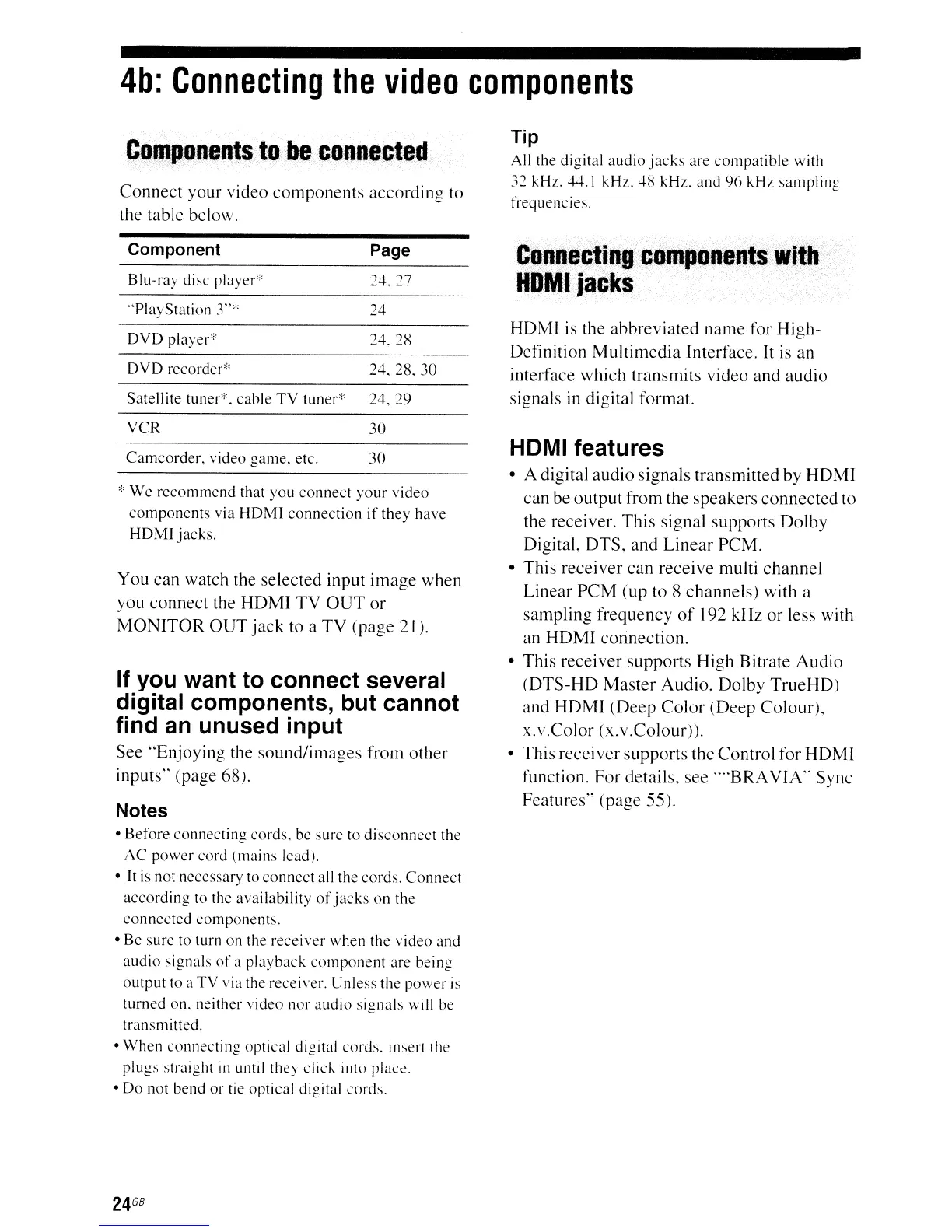
Connect
your video
components
according to
the table below.
Tip
All the digital
audio
jacks
are
compatible
with
32 kHz. 44.1
kHz.
48
kHz.
and
96
kHz
sampling
frequencies.
Component Page
Blu-ray disc
player"'24.
27
Connecting'
components.
With
~.
HOMljacks
"PlayStation
r*
24
DVD
player* 24.
2R
DVD
recorder"
24.28.30
Satellite
tuner*.
cable
TV
tuner*
24.29
HDMI is the
abbreviated
name
for
High-
Definition
Multimedia
Interface. It
is
an
interface which transmits video and
audio
signals in digital format.
Camcorder,
video
game.
etc.
30
e'
We
recommend
that
you
connect
your
video
components
via
HOMl
connection
if
they
have
HOMl
jacks.
You
can
watch the selected input image
when
you connect the
HDMI
TV
OUT
or
MONITOR
OUT
jack
to a
TV
(page 21).
If you want to connect several
digital components, but cannot
find
an
unused input
See
"Enjoying
the
sound/images
from
other
inputs" (page 68).
Notes
•
Before
connecting
cords.
be
sure
to
disconnect
the
AC
power
cord
(mains
lead).
•
It
is not necessary to
connect
all the cords.
Connect
according
to the availability
of
jacks
on
the
connected
components.
• Be sure to turn on the
receiver
when
the
video
and
audio
signals
of
a
playback
component
are being
output
to a
TV
via the receiver. Unless the
power
is
turned on. neither video nor
audio
signals
will be
transmitted.
•
When
connecting
optical digital
cords.
insert the
plugs
straight
ill
until
the)
did.
into place.
•
Do
not
bend
or
tie optical digital
cords.
HDMI features
• A digital audio signals transmitted by
HDMI
can be output from the speakers
connected
to
the receiver.
This
signal supports
Dolby
Digital,
DTS,
and
Linear
PCM.
• This
receiver
can
receive
multi
channel
Linear
PCM
(up to 8 channels) with a
sampling frequency
of
192 kHz
or
less with
an
HDMI
connection.
• This
receiver
supports
High Bitrate
Audio
(DTS-HD
Master
Audio, Dolby
TrueHD)
and
HDMI
(Deep
Color
(Deep
Colour),
x.v.Color
(x.v.Colour».
• This
receiver
supports the Control for HDMI
function.
For
details, see ....
BRA
VIA"
Sync
Features" (page 55).
30
VCR
24
GB



 To Next Page