AMP
~~/.--lf+--:-l~f
~
o*""'+-
MENU
CD
c.::J c.::J. •c.::J
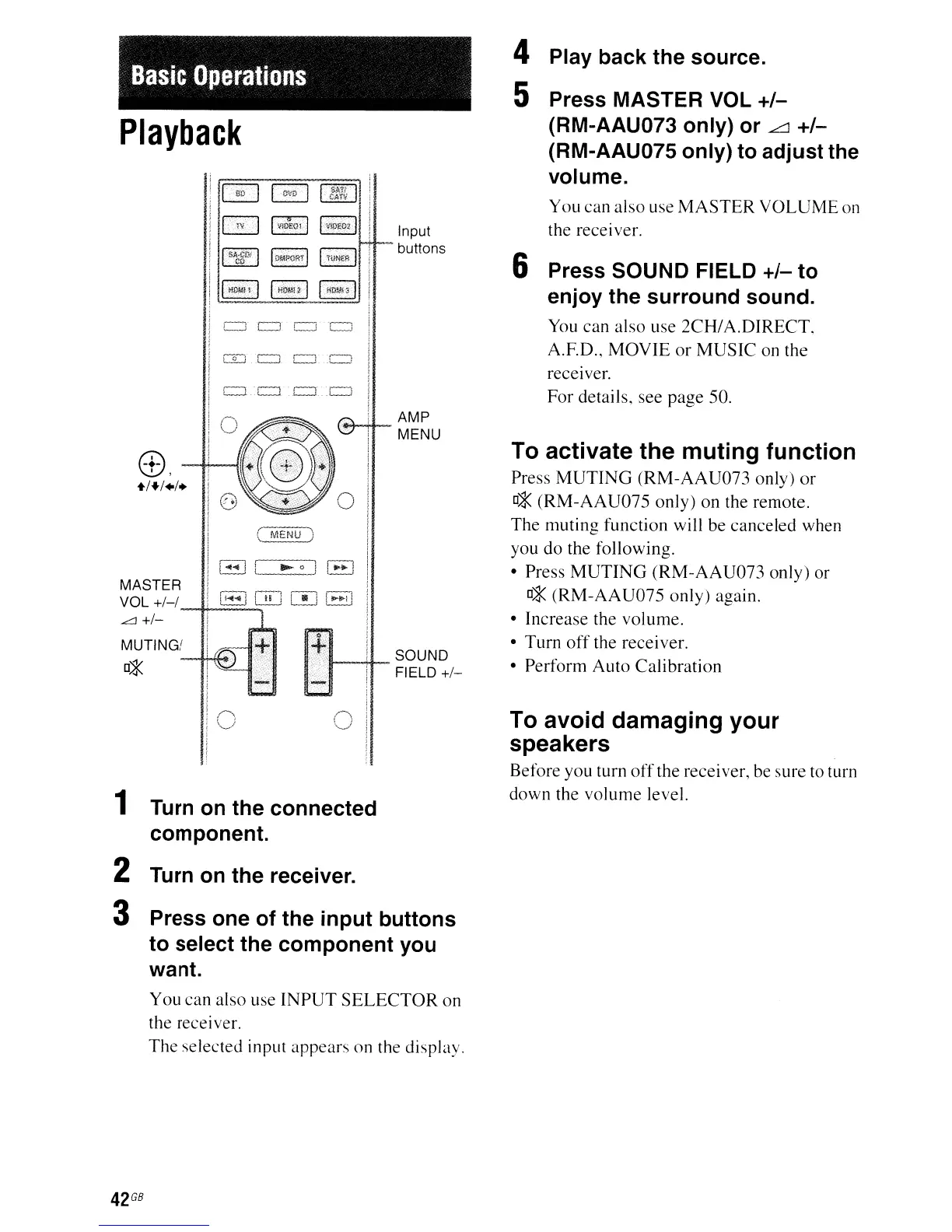
4 Play back the source.
5 Press MASTER VOL
+/-
(RM-AAU073 only) or
.L:::J
+/-
(RM-AAU075 only) to adjust the
volume.
You can also use
MASTER
VOLUME
on
the receiver.
6 Press SOUND FIELD
+/-
to
enjoy the surround sound.
You
can also use
2CHI
A.DIRECT,
A.ED.,
MOVIE
or
MUSIC
on the
receIver.
For
details, see page 50.
To activate the muting function
Press
MUTING
(RM-AAU073
only)
or
0*
(RM-AAU075
only) on the remote.
The muting function will be canceled when
you do the following.
• Press
MUTING
(RM-AAU073
only) or
0*
(RM-AAU075
only) again.
• Increase the volume.
• Turn
off
the receiver.
• Perform Auto Calibration
Input
buttons
1---+1--
souND
FIELD
+1-
(
MENU)
I-!
[
~oJ
1.·1
8
GO
[!]
1··,1
l-J
c:J
CJ
.c=J
c.::J .
e::t.
c::] .c.::J
Basic
Operations
MASTER
VOL
+1-1
L:l
+1-
Playback
!!GO
IE]
II
S~gOi
I
UllOM!
1 I
1
Turn
on
the connected
component.
2 Turn
on
the receiver.
3 Press one of the input buttons
to select the component you
want.
To avoid damaging your
speakers
Before you turn
off
the receiver, be sure to turn
down the volume level.
You can also use
INPUT
SELECTOR
on
the receiver.
The selected input appears on the display.
42
GB



 To Next Page