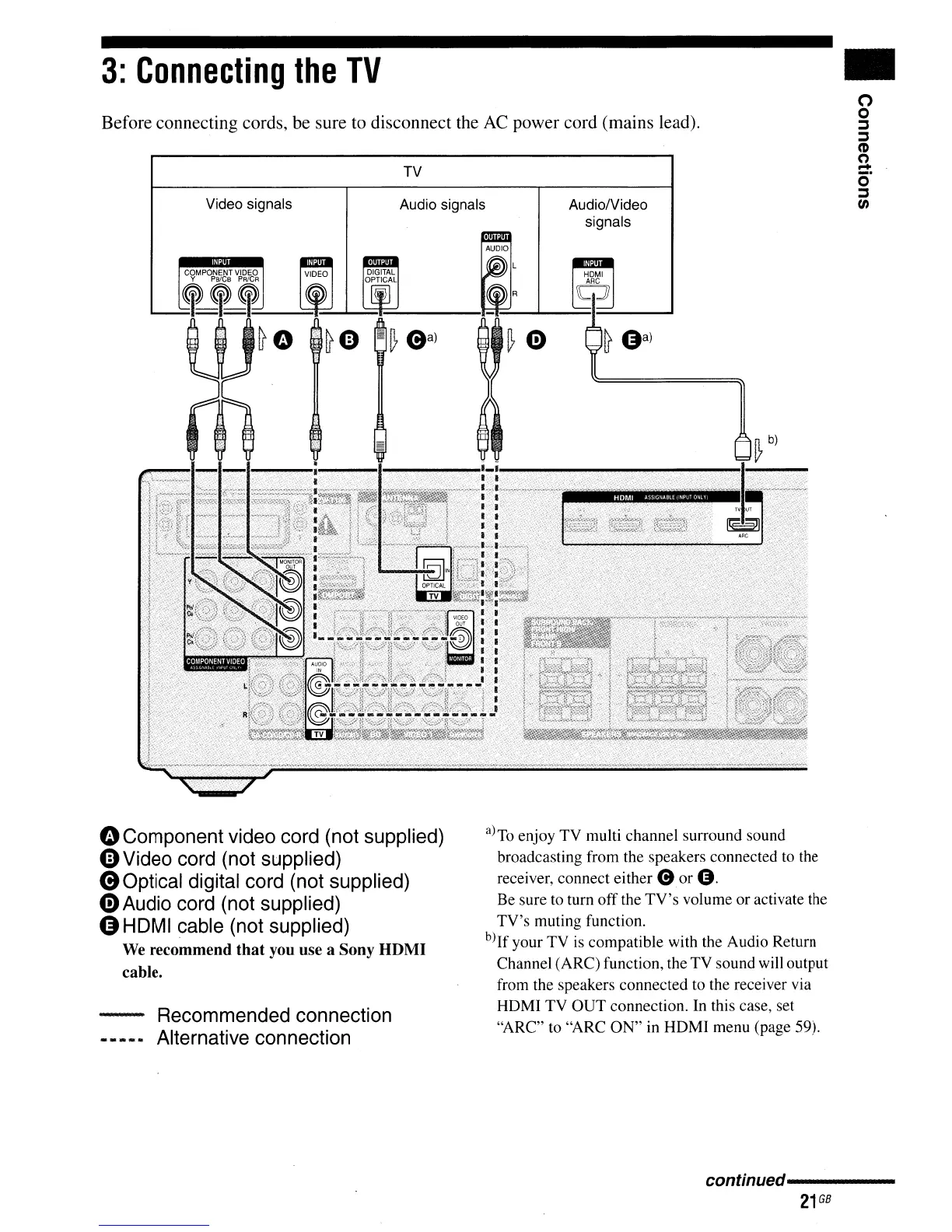
Before connecting cords, be sure to disconnect the
AC
power cord (mains lead).
3:
Connecting
the
TV
Video signals
TV
Audio signals
AudiolVideo
signals
•
o
o
::::s
::::s
(D
o
=:
o
::::s
(/)
oComponent video cord (not supplied)
4)
Video cord (not supplied)
eOptical
digital cord (not supplied)
G)
Audio cord (not supplied)
GHDMI cable (not supplied)
We
recommend that you use a Sony HDMI
cable.
Recommended connection
Alternative connection
a)
To
enjoy
TV
multi channel surround sound
broadcasting from the speakers connected to the
receiver, connect either e
or
O.
Be sure to turn
off
the
TV's
volume
or
activate the
TV's
muting function.
b)If your TV is compatible with the Audio Return
Channel (ARC) function, the TV sound will output
from the speakers connected to the receiver via
HDMI
TV
OUT
connection. In this case, set
"ARC" to "ARC
ON"
in HDMI menu (page 59).
conffnued----------
21
GB



 To Next Page