Bi-aIllPilifiercp·l1l1ection
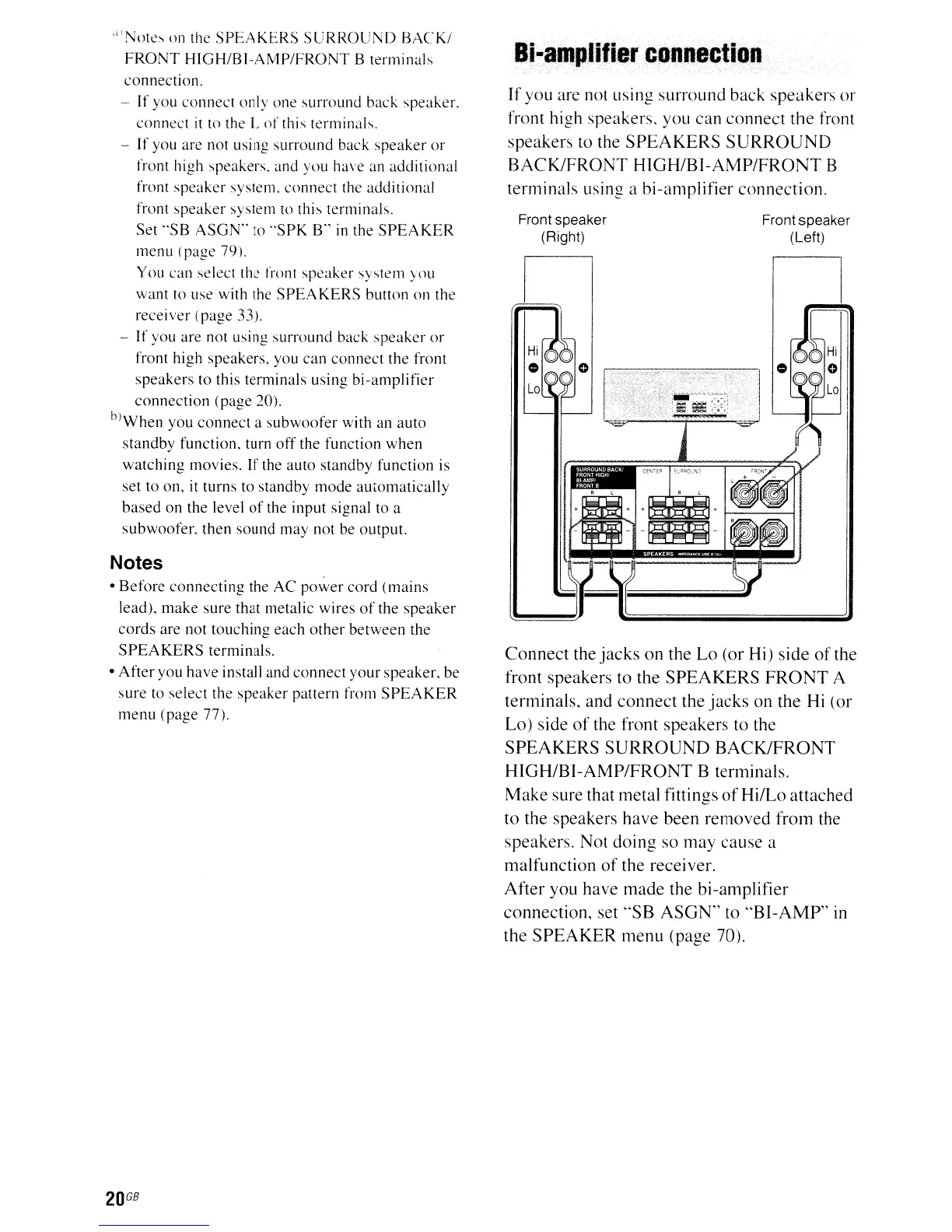
If
you are not using surround back speakers or
front high speakers. you can connect the front
speakers to the
SPEAKERS
SURROUND
BACK/FRONT
HIGH/BI-AMP/FRONT
B
terminals using a bi-amplifier connection.
Connect the
jacks
on the Lo (or Hi) side
of
the
front speakers to the
SPEAKERS
FRONT
A
terminals, and connect the
jacks
on the Hi (or
Lo) side
of
the front speakers to the
SPEAKERS
SURROUND
BACK/FRONT
HIGH/BI-AMP/FRONT
B terminals.
Make
sure that metal fittings
ofHi/Lo
attached
to the speakers have been removed from the
speakers. Not doing so may cause a
malfunction
of
the receiver.
After you have made the bi-amplifier
connection, set
"SB
ASGN"
to
"BI-AMP"
in
the
SPEAKER
menu (page 70).
Front speaker
(Left)
Front speaker
(Right)
;iI
Note~
on the
SPEAKERS
SURROUND
BACKI
FRONT
HIGH/BI-AMP/FRONT
B
terminal~
connection.
- If
you
connect
only
one
surround
back
speaker.
connect
it
to the L
of
this terminals.
-
If
you are not using.
surround
back
speaker
or
front high speakers. and you have an
additional
front
speaker
system.
connect
the additional
front
speaker
system to this terminals.
Set
"SB
ASGN"
to
"SPK
B"
in
the
SPEAKER
menu
(page
79).
You can select the front
speaker
system
you
want
to use with the
SPEA
KERS
button
on the
receiver
(page 33).
-
If
you are not using
surround
back
speaker
or
front high
speakers,
you
can
connect
the front
speakers
to this terminals using
bi-amplifier
connection
(page
20).
bJWhen
you
connect
a
subwoofer
with an
auto
standby
function,
turn
off
the
function
when
watching
movies. If the
auto
standby
function
is
set to on, it
turns
to
standby
mode
automatically
based
on
the
level
of
the input signal to a
subwoofer,
then
sound
may
not
be output.
Notes
•
Before
connecting
the
AC
power
cord
(mains
lead),
make
sure
that metalic wires
of
the
speaker
cords
are
not
touching
each
other
between
the
SPEAKERS
terminals.
•
After
you
have
install and
connect
your
speaker.
be
sure
to
select
the
speaker
pattern from
SPEAKER
menu
(page
77).
20
GB



 To Next Page