EasyManua.ls Logo

Sony STR-DH710 - Connecting Analog Components; Analog Component Connection Diagram

Sony STR-DH710
103 pages
Print Icon
To Next Page IconTo Next Page
To Previous Page IconTo Previous Page
Loading...
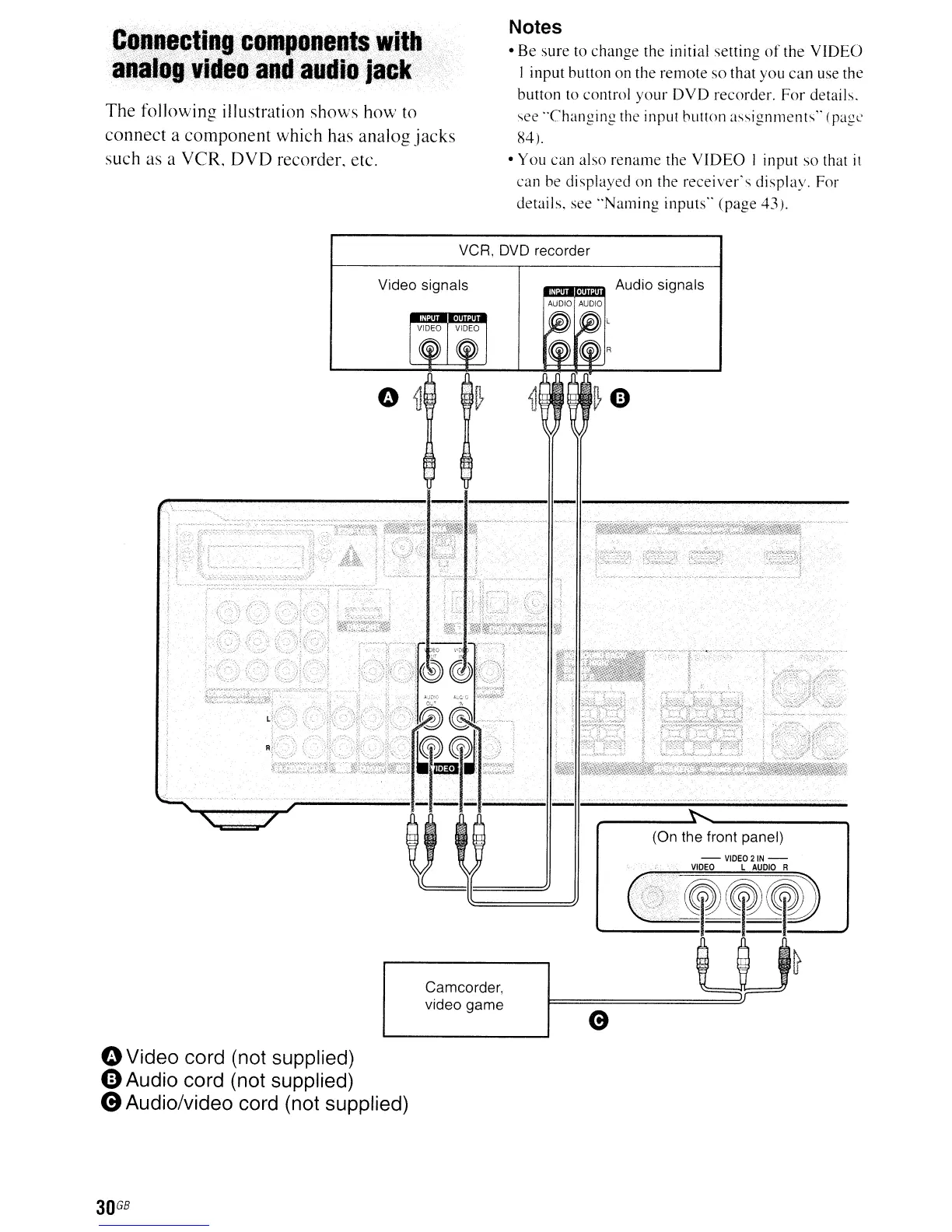
C~~~~o~iI1P<compQneQt.ittli.1:l
aQil1tlg"ideo:.:and.-aUdio-jack
-
The
following
illustration
shows
how
to
connect
a
component
which
has
analog
jacks
such
as a
VCR,
DVD
recorder. etc.
Notes
Be
sure
to
change
the
initial
setting
of
the
V
IDEO
I
input
button
on the
remote
so
that
you
can
use the
button
10 control
your
DVD
recorder.
For
details.
"ee
"Changing
the input
button
assignments"
(page
84).
You
can
also
rename
the
VIDEO
1
input
so
that
it
can
be
displayed
on
the
receiver's
display.
For
details,
see
"Naming
inputs"
(page
43).
VCR.
DVD
recorder
Video signals
Camcorder,
video game
oVideo cord (not supplied)
e Audio cord (not supplied)
e Audio/video cord (not supplied)
30
GB
.u~
Audio signals
AUDIO
AUDIO
(On the front panel)
-VIDE02IN-
VIDEO
L
AUDIO
R
L---=::~~~'_~~
-~
e

Table of Contents

Other manuals for Sony STR-DH710

Related product manuals