Indicalorson
tile
display
Indicator and explanation
rn
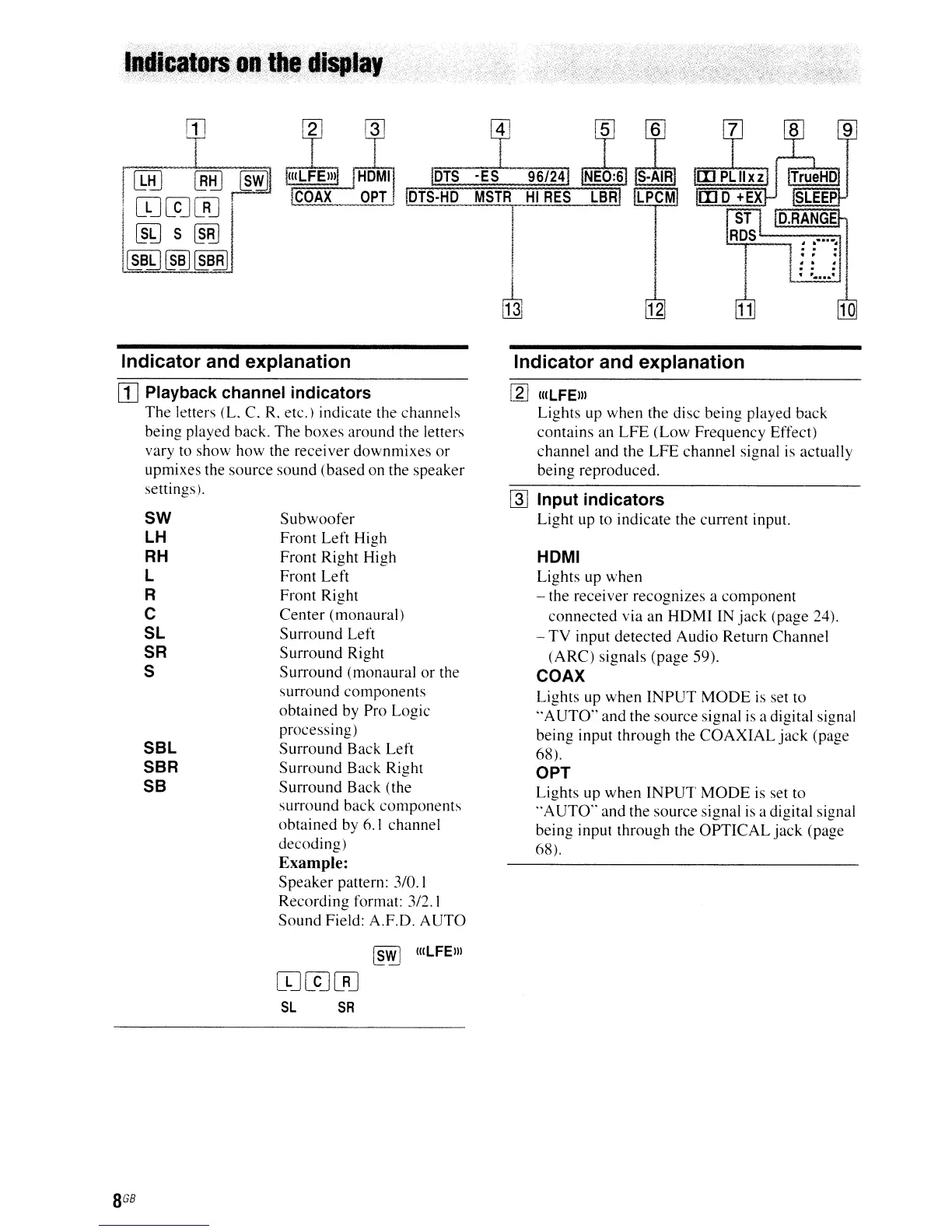
Playback channel indicators
The
letters
(L
C.
R,
etc.) indicate the channels
being played back. The boxes around the letters
vary to show how the receiver downmixes
or
upmixes the source sound (based on the speaker
settings).
SW
lH
RH
l
R
C
Sl
SR
S
SBl
SBR
SB
Subwoofer
Front Left High
Front Right High
Front Left
Front Right
Center (monaural)
Surround Left
Surround Right
Surround (monaural
or
the
surround
components
obtained by Pro Logic
processing)
Surround
Back
Left
Surround Back Right
Surround Back (the
surround back components
obtained by
6.1
channel
decoding)
Example:
Speaker
pattern:
3/0.\
Recording format: 3/2. I
Sound Field: A.F.D.
AUTO
~@
(uLFEm
OJ[CJ[RJ
SL
SA
Indicator and explanation
[gJ
luLFEm
Lights up when the disc being played back
contains an
LFE
(Low Frequency Effect)
channel and the
LFE
channel signal is actually
being reproduced.
[]]
Input indicators
Light up to indicate the current input.
HOMI
Lights up when
- the receiver recognizes a component
connected
via an
HDMI
IN
jack
(page 24).
-
TV
input detected Audio Return Channel
(ARC)
signals (page 59).
COAX
Lights up when
INPUT
MODE
is
set to
"AUTO"
and the source signal is a digital signal
being input through the
COAXIAL
jack
(page
68).
OPT
Lights up when
INPUT
MODE
is
set to
"AUTO"
and the source signal is a digital signal
being input through the
OPTICAL
jack
(page
68).



 To Next Page