Operation
23
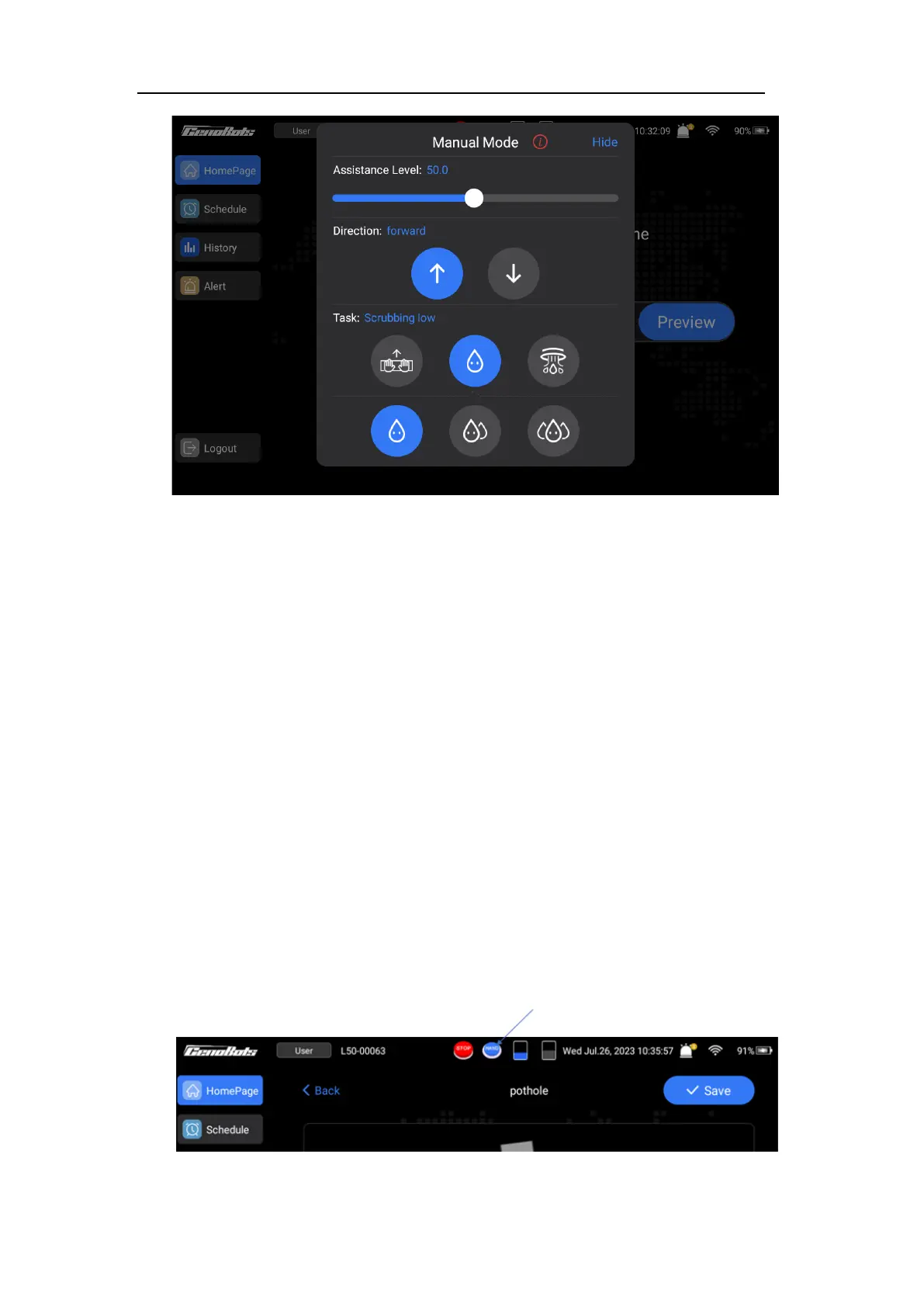
FIG.21
The instructions of the ‘Manual Mode’ page are below:
Assistance level: The assist power can be adjusted by sliding to the right to increase
and sliding to the left to decrease. The power assistance feature is only effective after
pressing the power assist button.
Direction: Tap the left icon, the direction of power assist will be forward and press the
assist button, the machine will move forward. Tap the right icon, the direction of power
assist will be backward and press the assist button, the machine will move backward.
Task:
⚫ Walking: In this mode, the machine will not perform any cleaning. The squeegee
and the brush are in the raised position.
⚫ Scrubbing: The flow of the solution and vacuum power can be selected in this
mode.
⚫ Vacuum: The machine performs the vacuuming task and the brushes are in the
raised position.
Hide:
This page can be hidden by tapping the ‘Hide’ and can be resumed by tapping the
‘HAND’ icon as shown in FIG.22.
FIG.22



 To Next Page