INDEX Page. 83 of 92
Remote ON/OFF using RS-232.
With this new software release, the [ON] and [OFF] keys are fully enabled and work the
same way as they work on the USB version of the application.
However, there is a small technical detail to take into account about the [ON] key's
behaviour.
Since the "PORT" connector on the rear panel of the amplifier is not equipped with any
DSR, the DTR output of the PC's RS-232 port is used to activate the [ON] function, which
generates a timed positive pulse about every second.
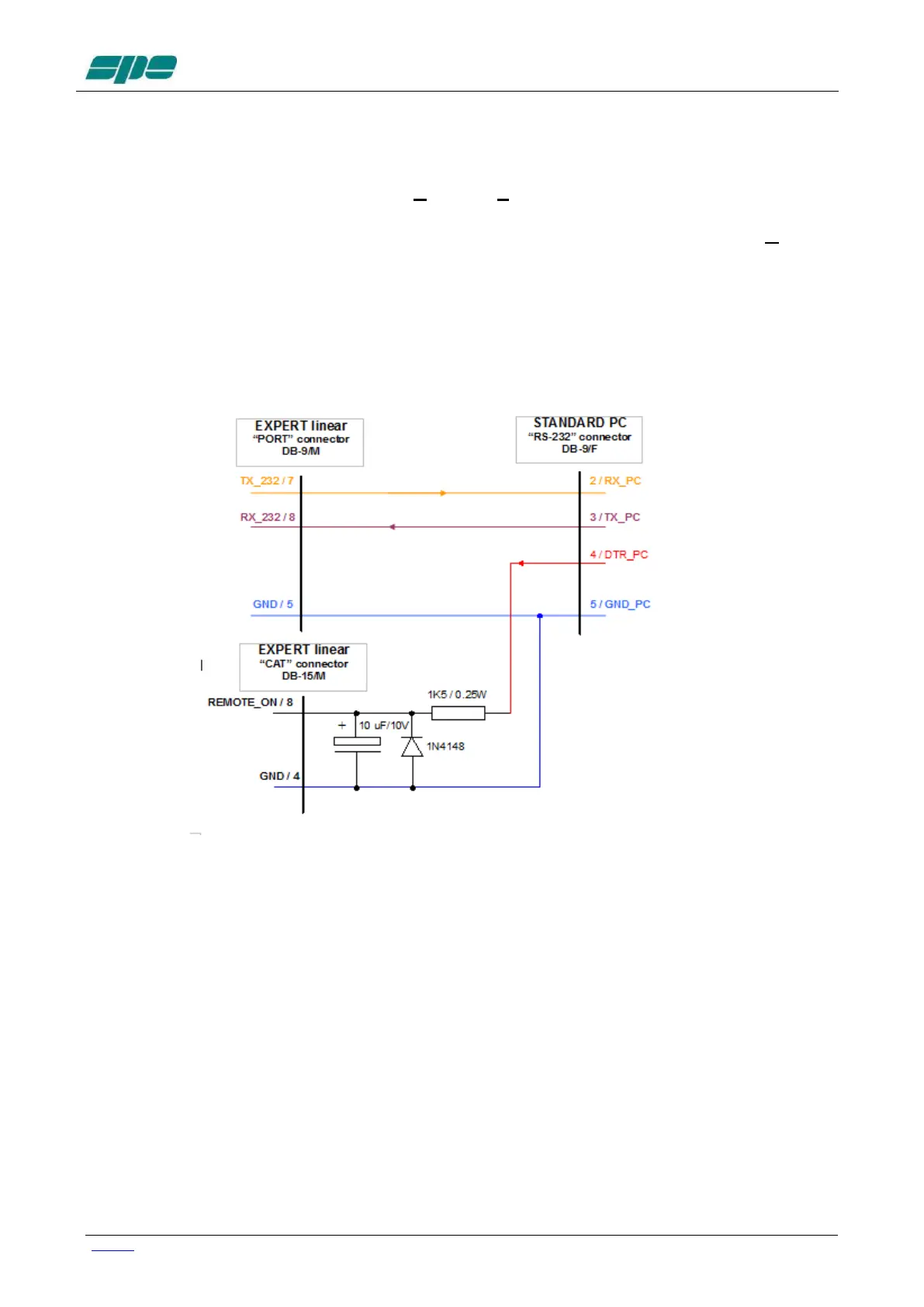
This pulse, duly integrated, is injected into the "Remote ON" pin of one of the two CAT
connectors according to the following diagram
Cable with which you can control, turn on and turn off the amplifier using the RS 232 port
A note about the DTR-link behaviour.
Even though this circuit seems to work correctly when driven by software, it could cause
unexpected switching-on of a connected linear amplifier having its rear panel's mains-
switch enabled, when the linked PC re-boots or when an external serial device (e.g. a USB
to serial adaptor...) is physically connected.
The reason for this odd behaviour is related to some uncontrolled OFF-to-ON transitions of
a DTR output line.
So, please, take this unpleasant side effect into account when using this kind of branch in
external links.



 To Next Page