32
4-1-2. ONVIF SETUP Menu
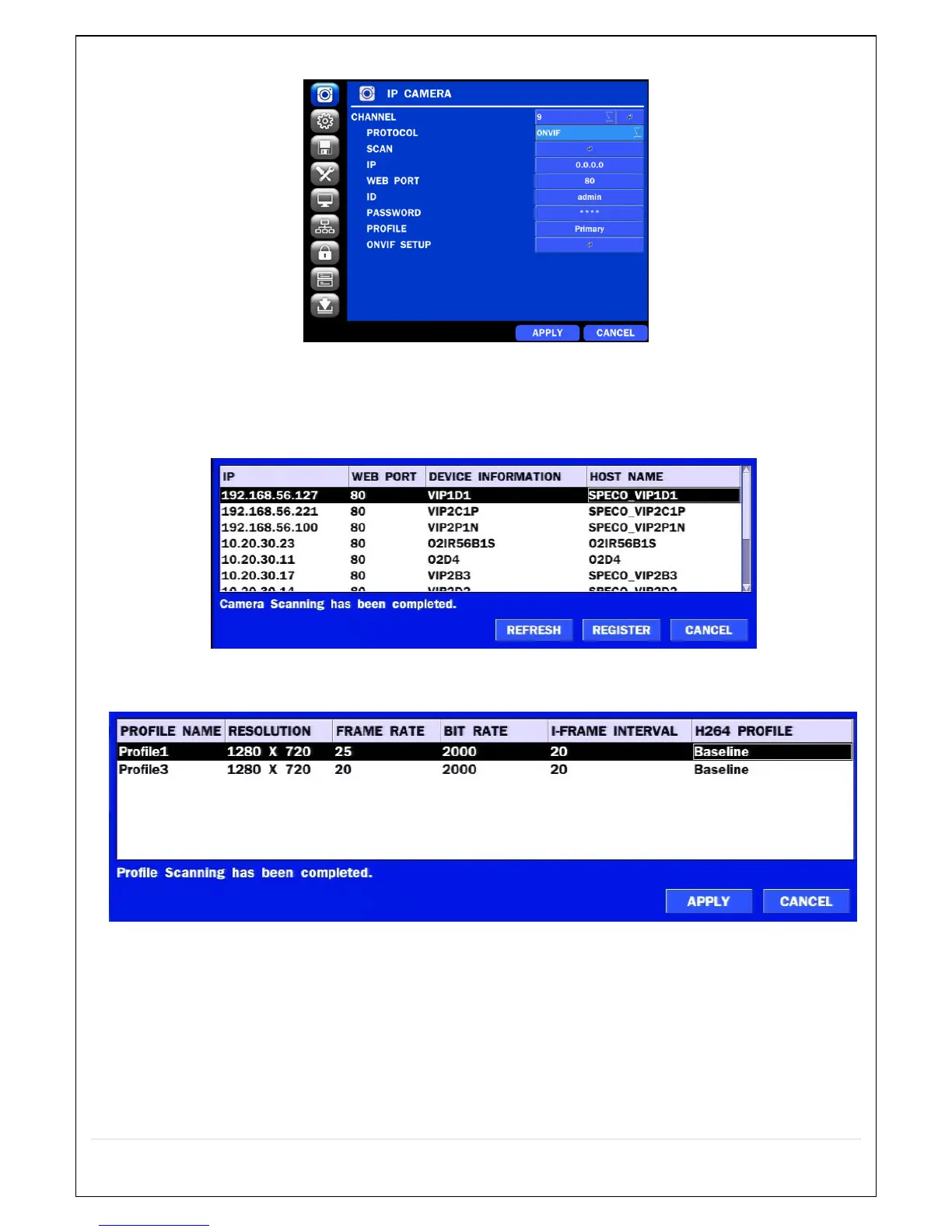
Figure 4.1.2 IP CAMERA Setup Screen (ONVIF)
The NS Series can search for IP Cameras that are conformant to ONVIF (Open Network Video Interface Forum).
In order to search for ONVIF Cameras, the field associated with VENDOR has to be set to ONVIF.
Click on the Box associated with SCAN to scan the networks for ONVIF Conformance cameras.
Figure 4.1.4 ONVIF Camera Scan Window
Figure 4.1.5 ONVIF Profile Scan Window
① Select ONVIF for Vendor and click the SCAN button.
② Select the camera on the list and then click the register button.
③ Then, PROFILE and ONVIF setting button will be displayed on the menu.
Click PROFILE button and then the detail information of ONVIF will be searched and listed.
(If there is not one listed, the ONVIF protocol of IP CAM is not compatible with NVR and
therefore not supported. )



 To Next Page