87
o DHCP: The address setting mode is automatic.
DDNS: Set whether to use DDNS service or not
o HOST NAME: Allows the user to setup a domain name manually
o SUMBIT/UPDATE: Select ON to submit the settings
o ezDDNS: Enable ezDDNS to register the host name automatically
NETWORK PORT: When connecting multiple NSs to the network, set a unique port number.
NETWORK AUDIO PORT: Display the network audio port (NETWORK PORT + 1).
WEB PORT: Set a web server port number.
WIRELESS LAN : Wireless networks can be configured(option)
o IP ADDRESS: Wireless IP Address
o SSID(Service set identifier): Wireless Network ID
o KEY(8~15 Characters): Wireless Network Password
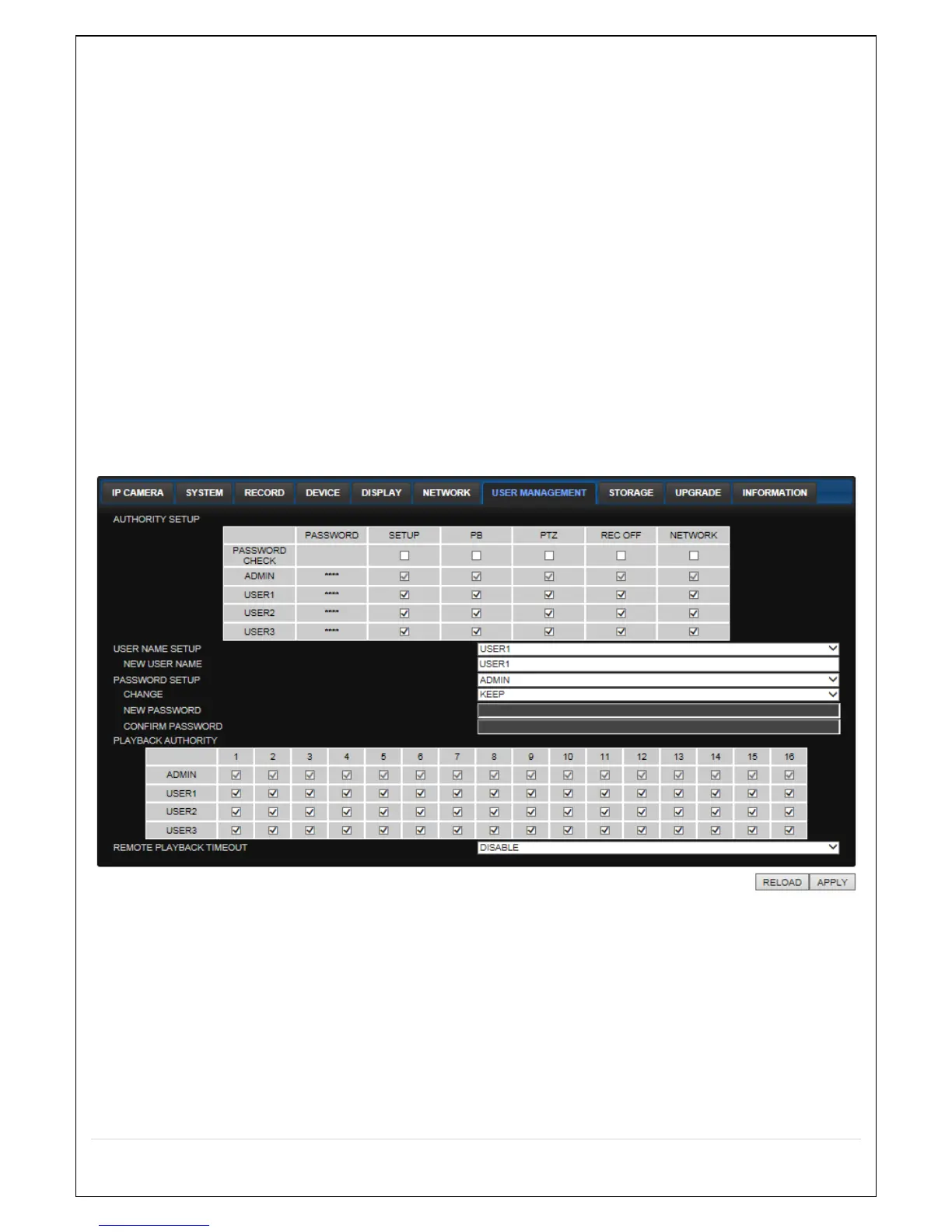
7-7-7. User Management
Select the USER MANAGEMENT tab to set the DISPLAY conditions.
AUTHORITY SETUP: Select which users have access to each function, password check can be
implemented for each function accessed.
USER NAME SETUP: Select which Username to change
o NEW USER NAME: Input the new username
PASSWORD SETUP: Select Username to change Password
o CHANGE: Select whether to KEEP or CHANGE the current password.
o NEW PASSWORD: Input NEW Password if CHANGE was selected.
o CONFIRM PASSWORD: Input NEW Password again to confirm.
PLAYBACK AUTHORITY: User can select which users have access to which channels.



 To Next Page