17
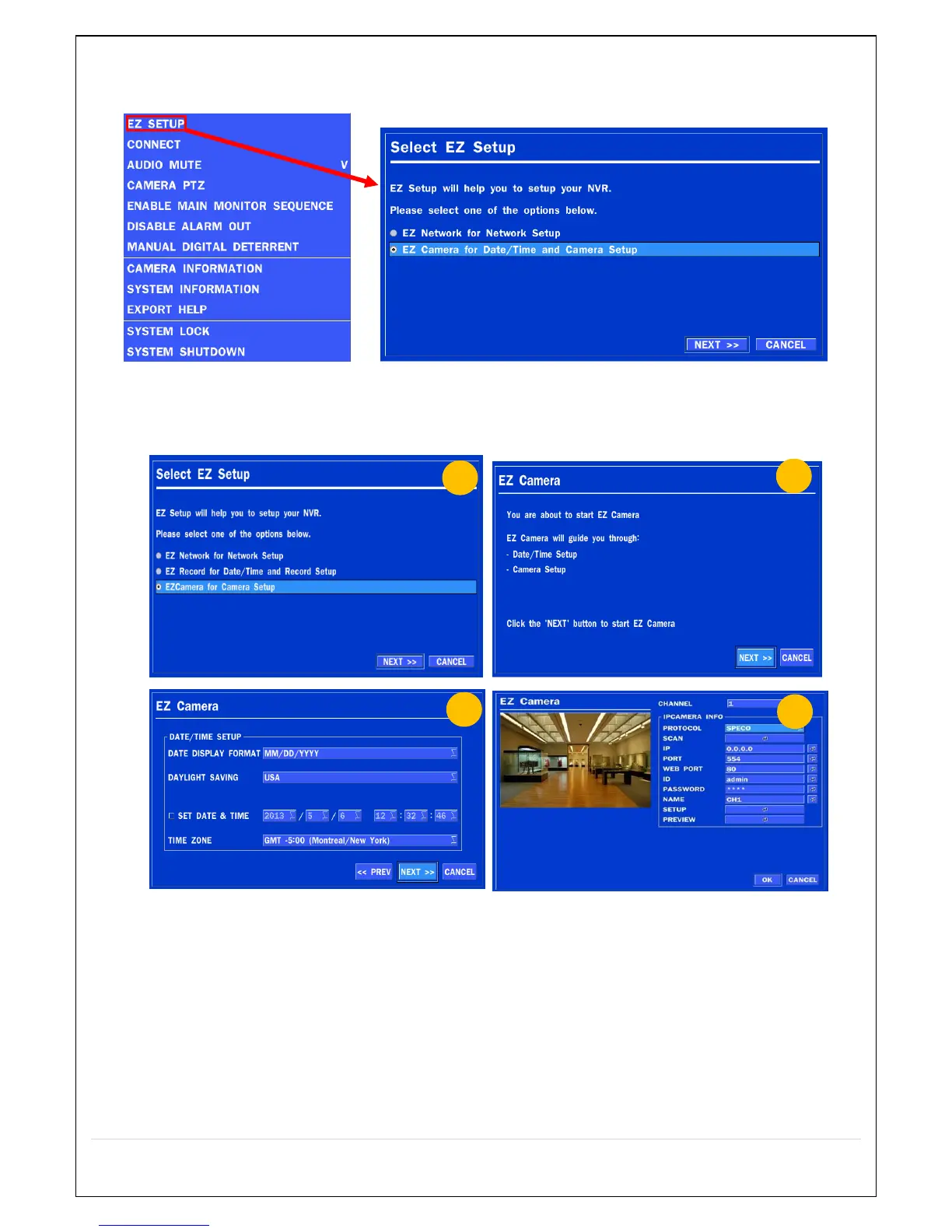
2-4. EZ SETUP
Quick installation Menu for NS and IP Camera Easy installation(Right-Click on the Main Screen)
Figure 2.4. EZ Setup Screen
2.4.1. Setup DATE & TIME, IP CAMERA configurations.
Figure 2.4.1. EZ CAMERA Setup Procedure
① Select EZ Camera for Date/Time and Camera Setup, Click NEXT to proceed.
② Description of EZ Camera Setup is displayed, Click NEXT to proceed.
③ Set up the Date/Time settings and click NEXT to get to the camera setup.
④ Configure individual cameras in the EZ Camera Setup.
Select the Channel to configure.
Select the Camera Protocol and then click on the scan button; this will scan the networks
for any cameras from the particular protocol.
Select on the desired Camera from the list, and then check on register.



 To Next Page