GenA User Guide
Spok, Inc. – Copyright 2022 P a g e | 11 v01/22
MESSAGE OPERATIONS
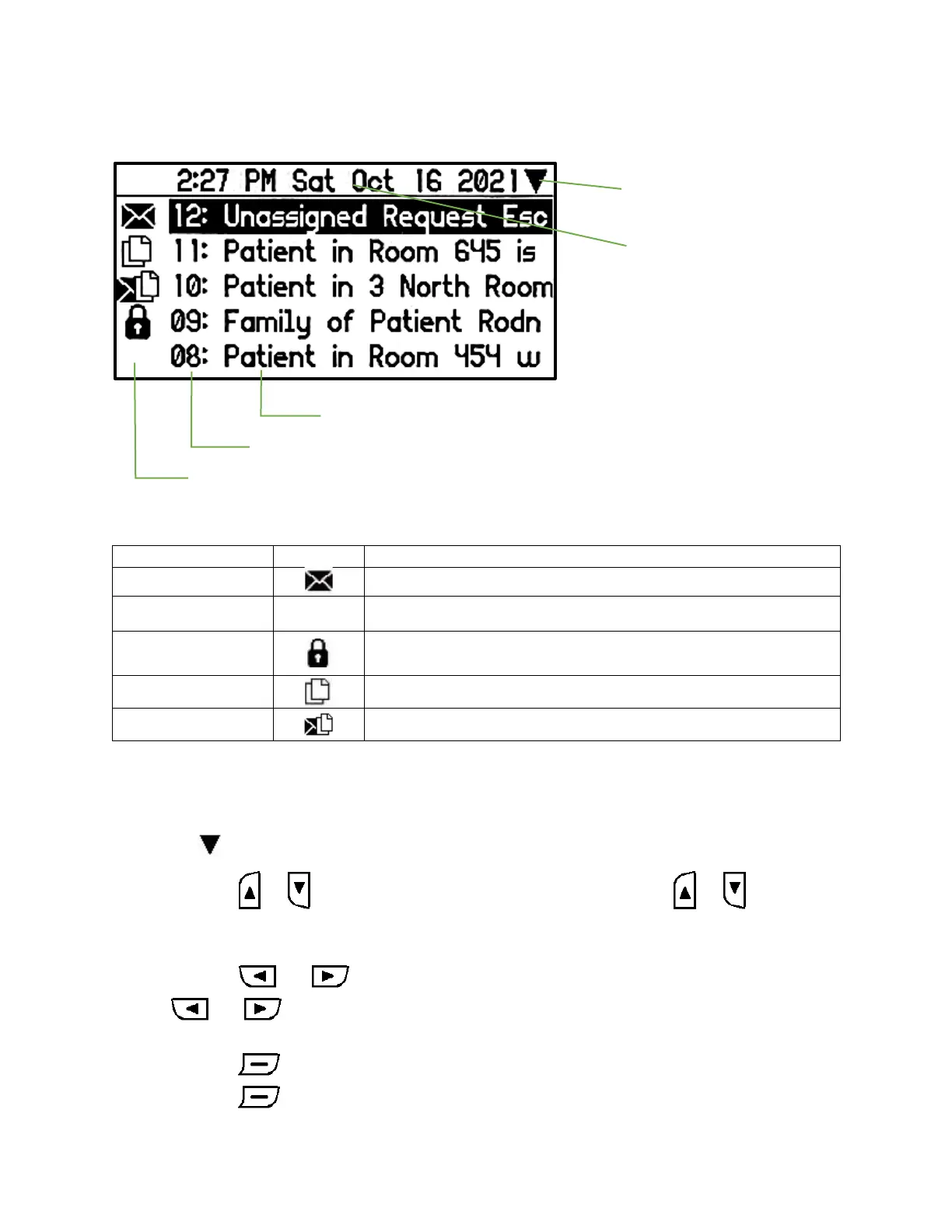
Messages List Screen (Inbox and Groups Folders)
Messages List Screen
<NEED UPDATED SCREEN IMAGE>
Message status icons are described below:
• The message has been locked to prevent accidental deletion
• Up to half of max message number can be locked
• The date/time information at the top of the display shows the date/time that the selected
message was received on the pager based on the pager’s time setting.
• As you navigate up and down through the list, the selected message will be highlighted in
reverse video
• The at the upper right indicates that there are more messages below that displayed
• Press the or button to move the selection up or down. Pressing or when at the
top or bottom of the list will move the selection to the bottom or top of the list respectively
(wrap-around).
• Press the or button to move the message list up or down page by page. Pressing
or when at the top or bottom of the list will move the selection to the bottom or
top respectively (wrap-around).
• Press the button to view the message in the message read screen.
• Press the button for 2 sec, to bring up the message list popup.


 To Next Page