GenA User Guide
Spok, Inc. – Copyright 2022 P a g e | 14 v01/22
Message Read Screen (Inbox, Groups and Saved)
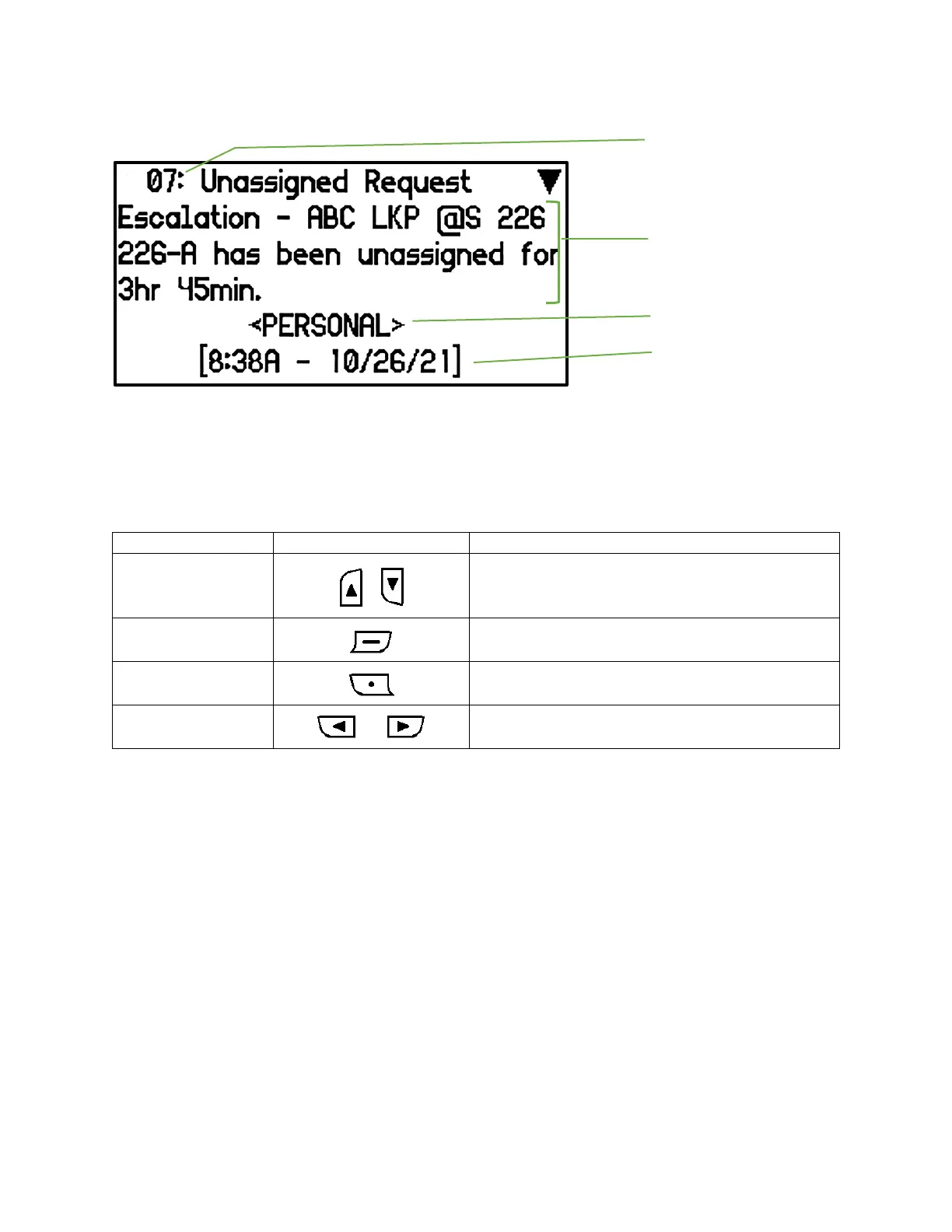
Inbox/Groups/Saved Message Read Screens
The Message Read Screen displays the first page of the selected message.
Read Messages Screen Navigation
• The Up & Down buttons allow the user to
move up or down the message text line-by-
line
• Pressing the Enter button moves the message
text display down page-by-page
• Pressing the Escape button returns the user to
the message list screen
• Pressing the Left or Right buttons allow the
user to move to the previous or next message
When entering the Message Read Screen of an unread message, the message changes status from
unread to read.
When the bottom of the message is reached a ‘Message Options” selection appears at the bottom of
the screen. Pressing Enter again will bring up the message action popup.
NOTES: The Message Source text that appears below the message content is programmed within the
pager. It indicates which pager address the message was received on.


 To Next Page