GenA User Guide
Spok, Inc. – Copyright 2022 P a g e | 22 v01/22
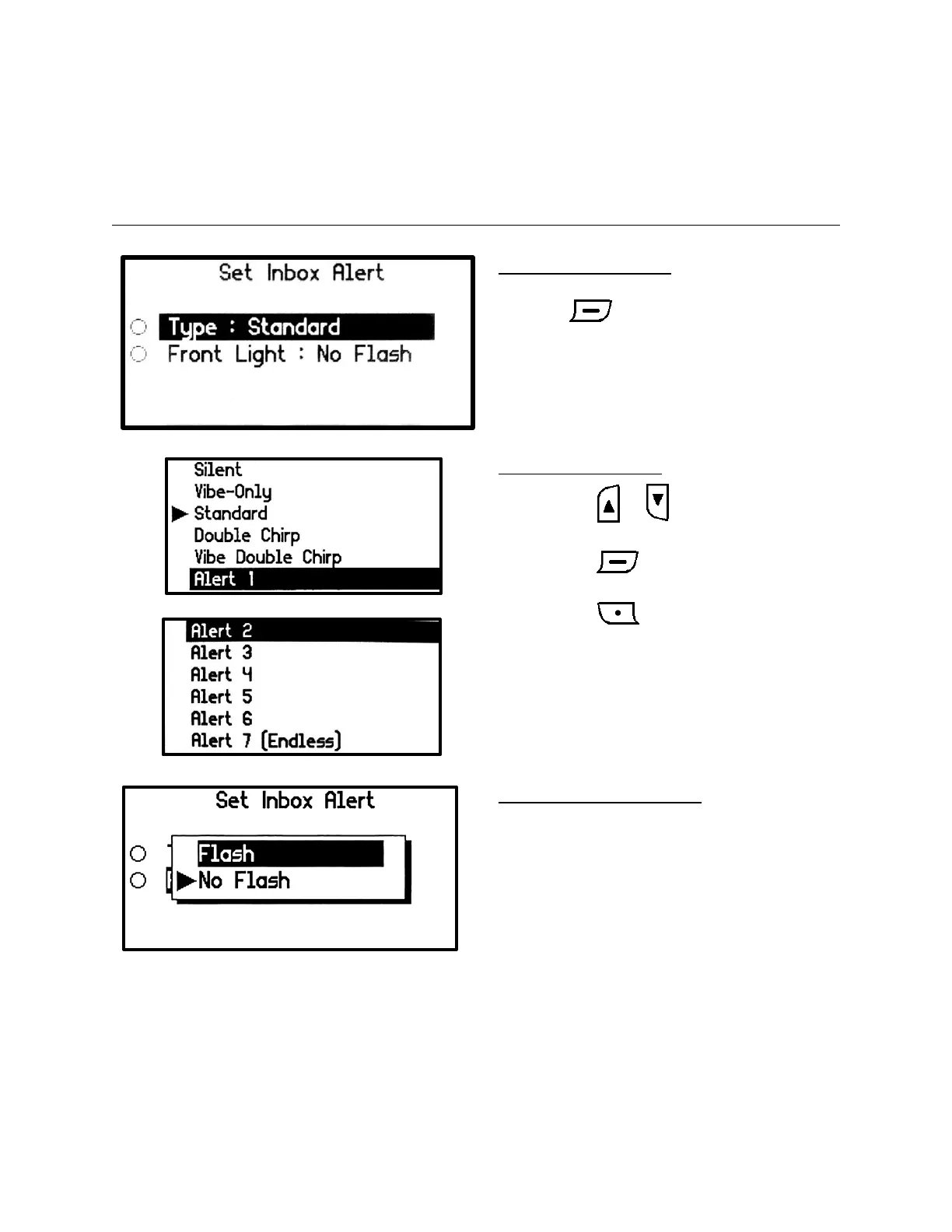
Set Inbox Alert
You can set the paging message alert to an audible alert, a vibrating alert, a chirp alert, a silent alert, or
one of seven other alerts. All alerts sound for 15 seconds except for Alert 7. Alert 7 alerts continuously
when a message is received until a button is pressed. The display front light can also be used to alert
when in dark environments.
Inbox Alert Menu Screen
• Select the Inbox Alert option to update and
press button
Set Type Setting Screen
• Press the or button to change
Alert type.
• Press the button to set the new
Alert type.
• Press the button to cancel the
changed Alert type and exit back to the Set
Inbox Alert menu Screen.
Set Front Light Setting Popup
• When setting the Front Light value to Flash,
the Front Light will flash along with the
alert when a message is received.
• The Flash alert is universal for all messages
received in both the Inbox and any Groups
sub-folder.


 To Next Page