GenA User Guide
Spok, Inc. – Copyright 2022 P a g e | 24 v01/22
Set Lock Code
The Lock Code feature, when enabled by the user, prevents unauthorized persons from reading
messages on the device. The message display will lock after the five-minute default inactivity period. To
view messages, the user must enter the pre-defined four-button lock code sequence. All six device
buttons can be used for the code.
The lock code feature set is determined by device programming. For example, the lock code may be
preset without the option to change it or the lock code may be changed but not disabled.
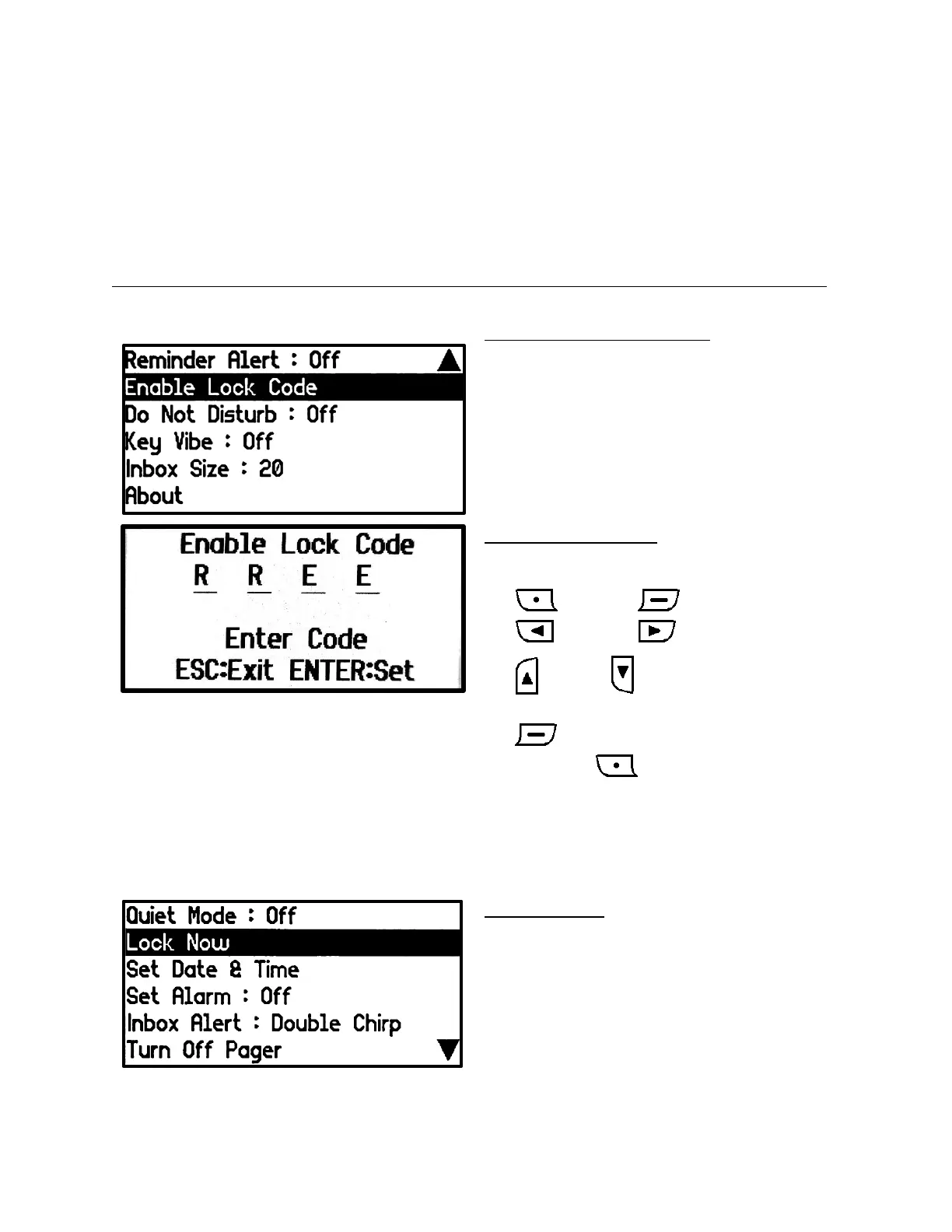
Enable Lock Code Setting Screen
• When the Lock Code is disabled, the
‘Enable Lock Code’ function is available.
Enable Lock Code Screen
Press a sequence of four buttons to enter a
code.
• (ESC) = C , (Enter) = E
• (Left) = L, (Right) = R
• (Up) = U, (Down) = D
• When the four codes are entered, press
button to activate the Lock function.
• If you press , the Lock Code will be
cancelled, and the Lock function will be
disabled.
• In the Set Lock Code input window, you
cannot cancel until four entries have been
made.
Lock Now Option
• Normally, when the Lock function is
enabled, the Lock function operates after 5
minutes of inactivity. The Lock Now
function allows it to be set immediately.


 To Next Page