GenA User Guide
Spok, Inc. – Copyright 2022 P a g e | 15 v01/22
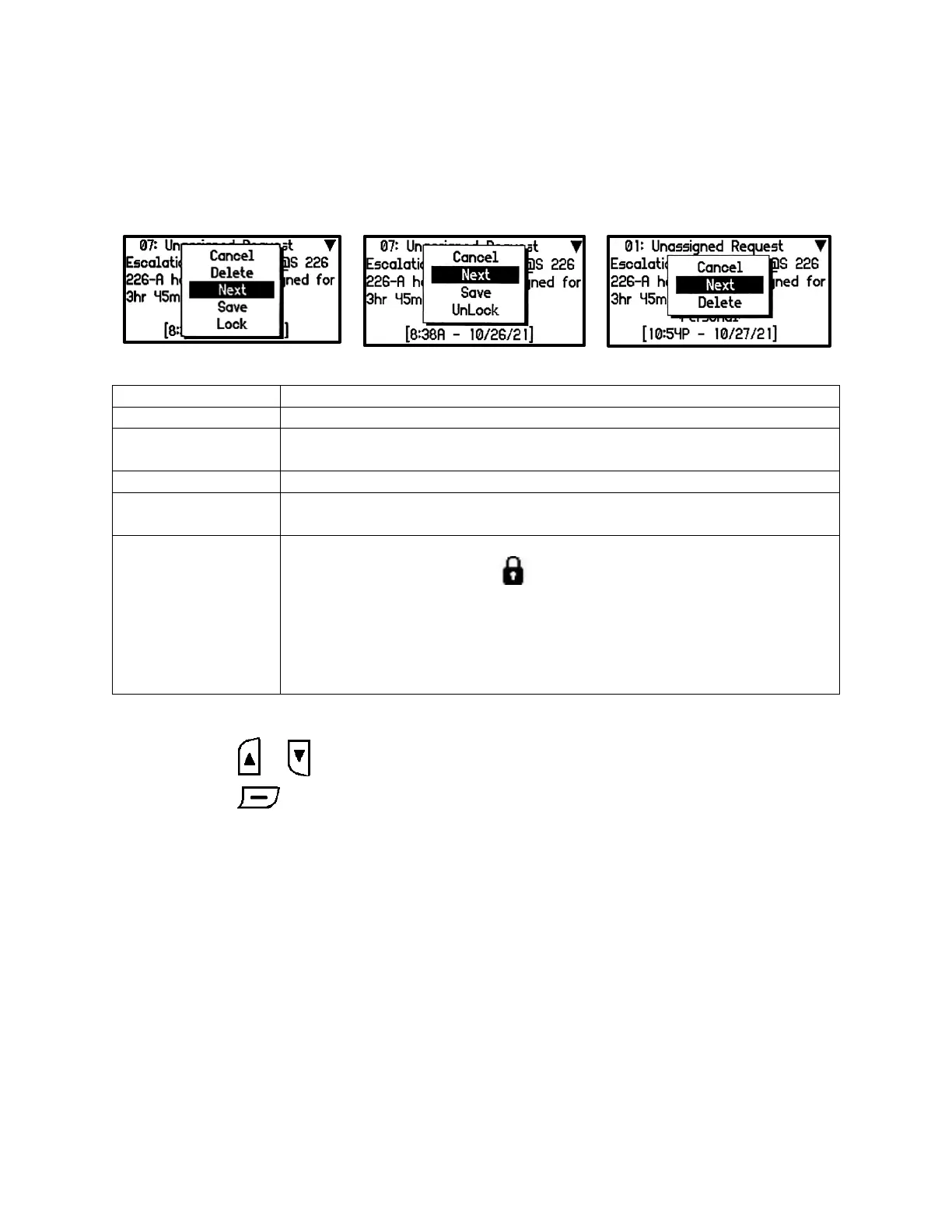
Read Messages Action Popup
When the Enter button is pressed for 2 seconds on a message an action popup appears. The action
popup shows actions that can be performed on the message.
The action popup is cleared. This item is highlighted by default
The highlighted message is deleted. If the popup is brought up when a locked
message is selected, this action will not appear
Displays the next oldest message in the folder
The highlighted message is moved to the Saved folder and removed from the
message list
The highlighted message is locked and its message status icon in the list
screen will change to a Locked icon. If the popup is brought up when a
locked message is selected, the delete action will not appear and an unlock
action will appear and its message status icon will change to blank to indicate
a read message.
Up to half of max message number can be locked.
The saved folder does not have a lock function.
• Press the or button to navigate through the popup menu.
• Press the button to execute the action.
Inbox & Groups Folder
Action Popup
Inbox & Groups Folder
Action Popup with a
Locked Message
Saved Folder
Action Popup


 To Next Page