GenA User Guide
Spok, Inc. – Copyright 2022 P a g e | 27 v01/22
Set Do Not Disturb
When the Do Not Disturb feature is enabled, the pager will not alert if a message is received between
the set times. If a message is received during the set times, the pager can be set to alert at the end of
the set time.
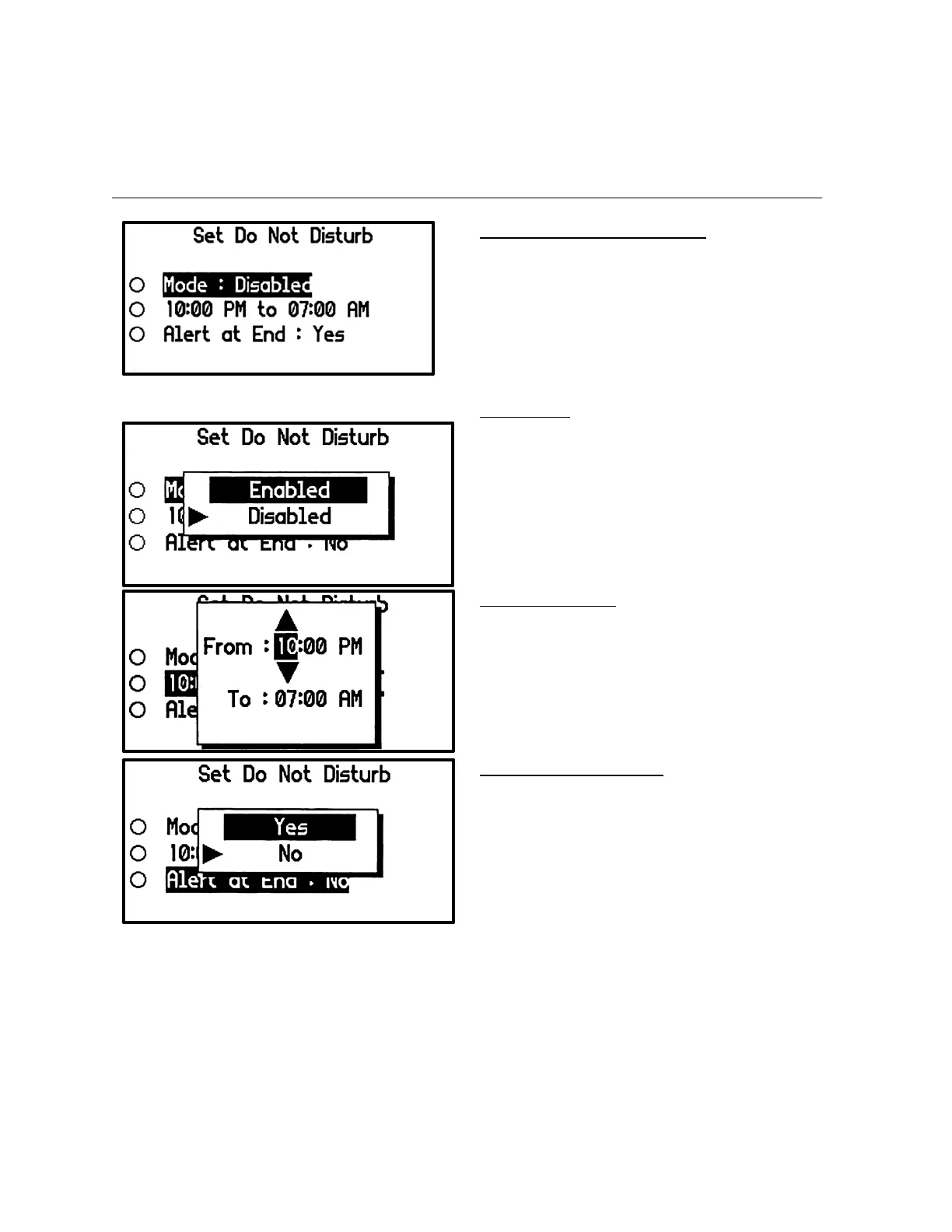
Set Do Not Disturb Menu Screen
• During the set do not disturb period, the
pager will not alert (silent) if it receives a
new message.
• Typically, the time value is set during a
user’s normal sleep time
Mode Popup
• Select Enabled to enable the feature or set
Disabled to disable the feature.
Time Setting Popup
Set the do not disturb start and end times in
the same way that the Time & Date and Alarm
Time settings were made.
Note
• The upper time is the function start time.
• The lower time is the function end time.
Alert at End Setting Popup
• Select Yes if the pager should alert at the
end of the do not disturb period if a
message was received
• Select No if the pager should not alert at
the end of the do not disturb period if a
message was received


 To Next Page