GenA User Guide
Spok, Inc. – Copyright 2022 P a g e | 8 v01/22
TURNING THE PAGER ON AND OFF
Turning the Pager On
• If the pager has a good battery but was switched off, press the Enter button for 2-3 seconds
• If the pager doesn’t have a battery, insert a fresh battery and it will turn on automatically
• If the pager battery depleted, replace with a fresh battery and it will turn on automatically
IMPORTANT: The pager has an internal power reservoir. If the reservoir is depleted when a new battery
is inserted, it may take up to 15 seconds before the pager can turn on.
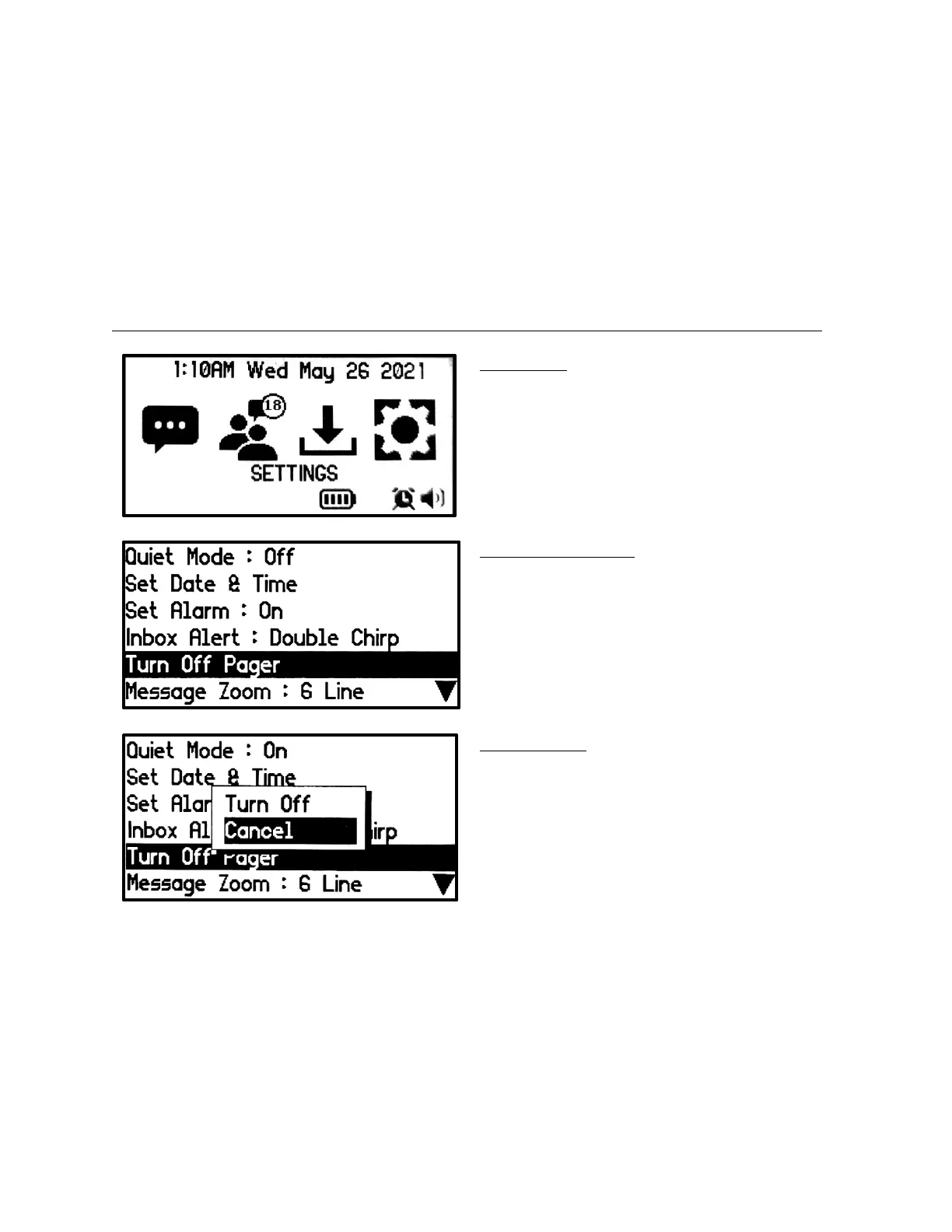
Turning the Pager Off
Main Screen
• Press any button to display the Main
screen.
• Press the Left or Right buttons to move the
highlight to the Settings icon and press the
Enter button to go into the Settings list
screen.
Turn Off Popup
• Press the Up button to select Turn Off and
press the Enter button to turn off the
pager.
• The Pager Off screen will appear


 To Next Page