GenA User Guide
Spok, Inc. – Copyright 2022 P a g e | 16 v01/22
Group Folder Sub-Folder Screen (Groups)
The Groups folder (If enabled within the pager) contains one or more sub-folders. Each sub-folder
contains messages from separate group addresses programmed into the pager. The sub-folder name is
pre-programmed in the pager and each sub-folder can be configured by the user with a unique alert.
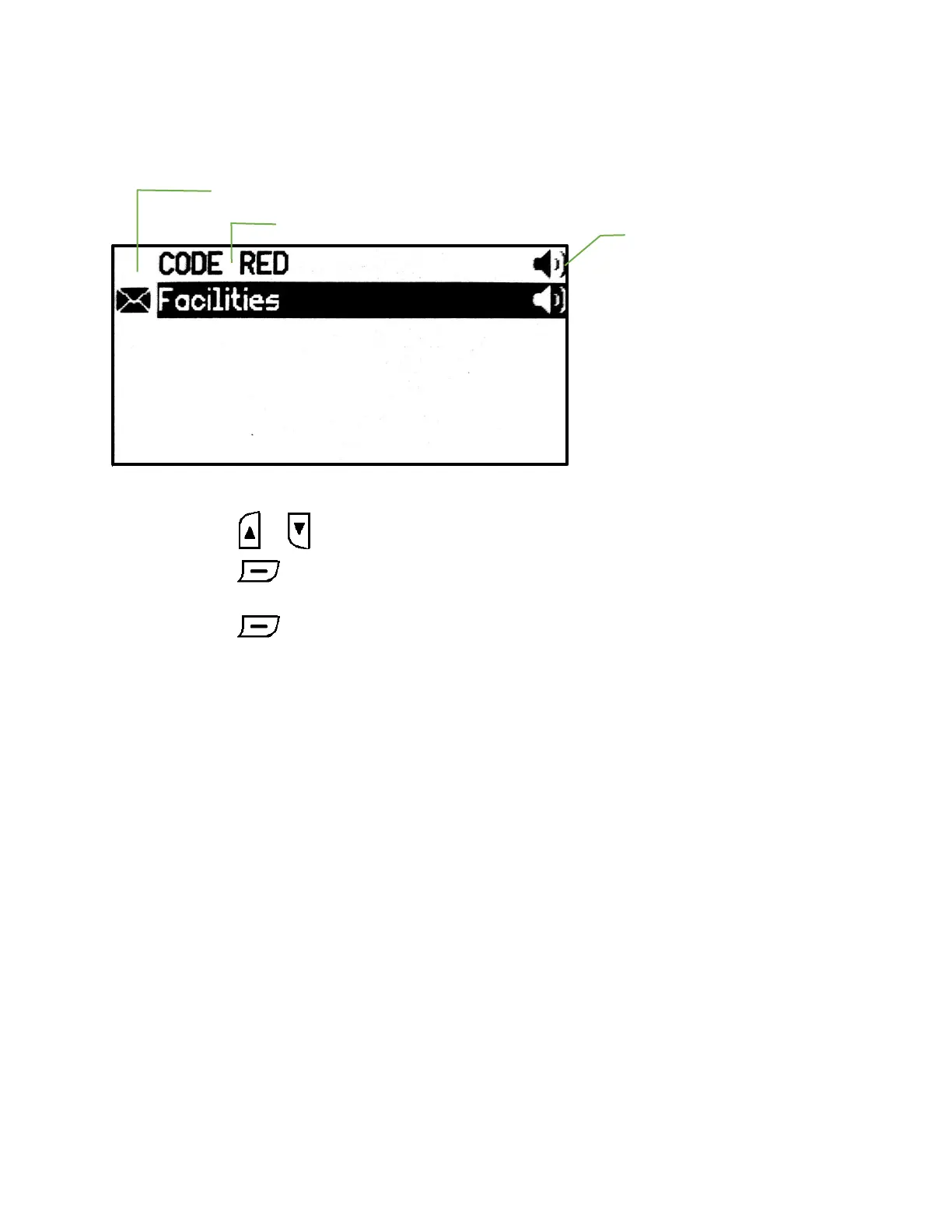
Group Sub-folders Screen
• Press the or button to highlight the desired sub-folder.
• Press the button to view the messages in the selected sub-folder. If the sub-folder
doesn’t contain any messages ‘No messages’ will appear momentarily.
• Press the button for 2 sec, to enter the sub-folder alert selection screen.
Notes
1. The sub-folder name is determined when the group address is programmed in the pager
2. Sub-folders with unread messages display the unread message icon on the left.
3. Different alerts can be set for each sub-folder.
4. The sub-folder alert status is displayed on the right side of the folder according to the set alert.


 To Next Page