GenA User Guide
Spok, Inc. – Copyright 2022 P a g e | 20 v01/22
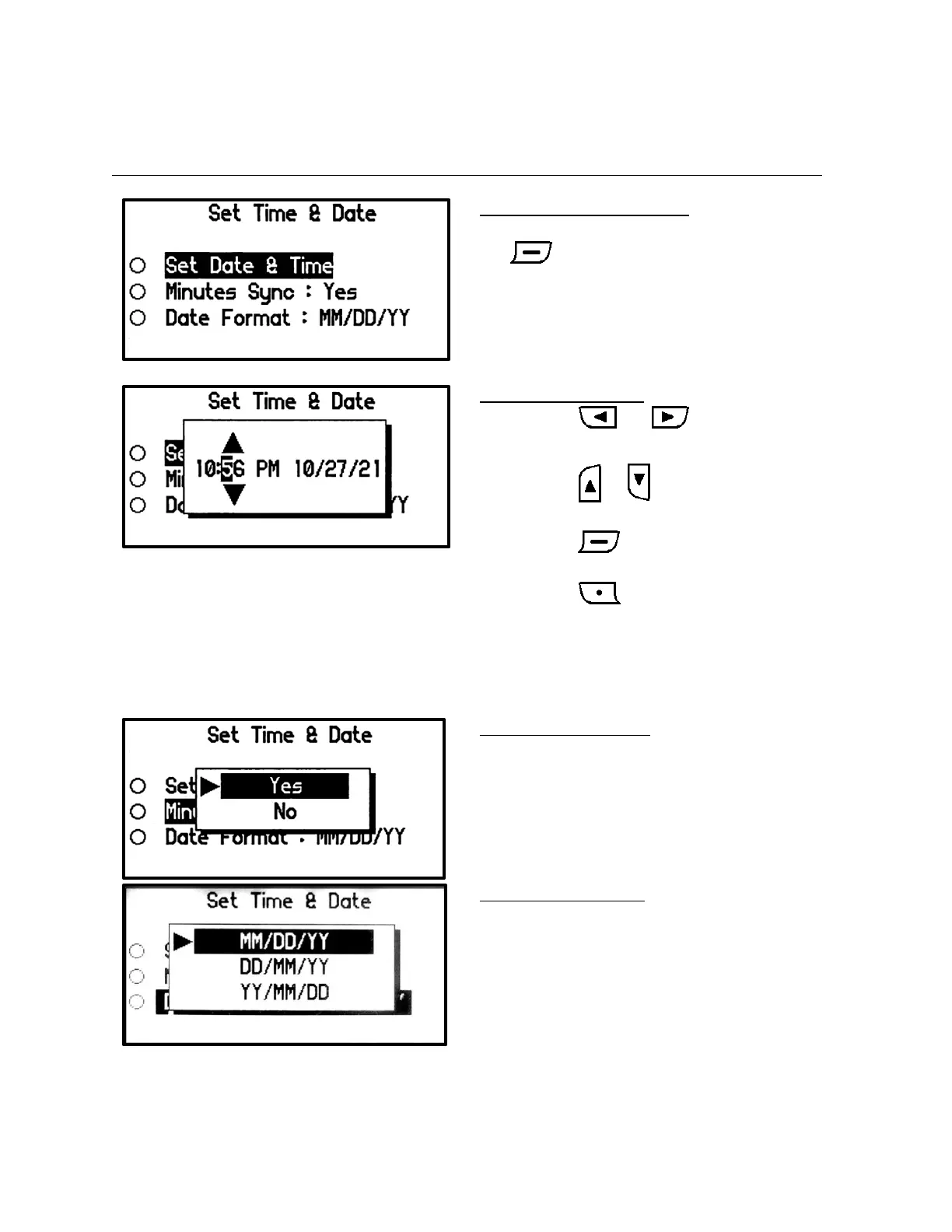
Set Date & Time
The date and time set in the pager appears on the Main and Time screens and determines the date and
time displayed for when a message was received.
Set Time & Date Menu Screen
• Select the option to be updated and press
button
Set Date & Time Screen
• Press the or button to move
through the Time and Date entries.
• Press the or button to change
Time/AM-PM/Date values.
• Press the button to accept the
updated values.
• Press the button to cancel the
changes and exit to the Set Time & Date
menu screen.
• When AM-PM value is set to 24, the time
display changes to 24-hour format.
Set Minutes Sync Screen
• When set to Yes, the pager’s clock minutes
value is automatically set based on network
time.
• The date, hours or AM/PM values of the
pager clock must be set by the user.
Set Date Format Screen
• The format of the date value used
throughout the pager can be selected.


 To Next Page